Known Participant
May 5, 2023
Answered

How to disable Ps button?

  • May 5, 2023
  • 5 replies
  • 517 views

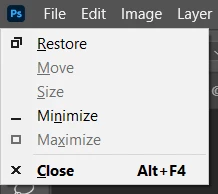
Every time I "pause for a bit" and press the spacebar, this dialog appears. Very annoyed. Is there any way to disable it? It is the button with the Ps icon in the top left corner.

 

This topic has been closed for replies.
Correct answer CShubert

Hi @Shyob inurarea curious if this might fix this?


Go to Preferences/Tools and disable flick panning and overscroll - does the issue still occur?

Are you using only a mouse or do you also have a graphics tablet/pen?


5 replies

Known Participant
May 5, 2023

Your solution worked. Thank you so much!

Btw, i only use the mouse.

CShubert
Community Manager
CShubertCommunity ManagerCorrect answer
Community Manager
May 5, 2023

Hi @Shyob inurarea curious if this might fix this?


Go to Preferences/Tools and disable flick panning and overscroll - does the issue still occur?

Are you using only a mouse or do you also have a graphics tablet/pen?


Known Participant
May 5, 2023

What I mean by "pause for a bit" is that I just pause for about 2 seconds and then press the spacebar. Boom, this dialog box appears.

Known Participant
May 5, 2023

My job is to edit comics. I work with text layers and redraw images. I hold down the spacebar and left mouse button to move the image back and forth.

Kevin Stohlmeyer
Community Expert
Community Expert
May 5, 2023

Hi @Shyob inurarea what do you mean by "pause for a bit" and why do you hit the spacebar? Are you working in the Timeline/Animation window?