artbygermaine
Known Participant
August 9, 2023
Resuelto

How to disable the dialog box when turning a Path into a selection

  • August 9, 2023
  • 3 respuestas
  • 1336 visualizaciones

Hello everyone, I hope I get your help with this issue.
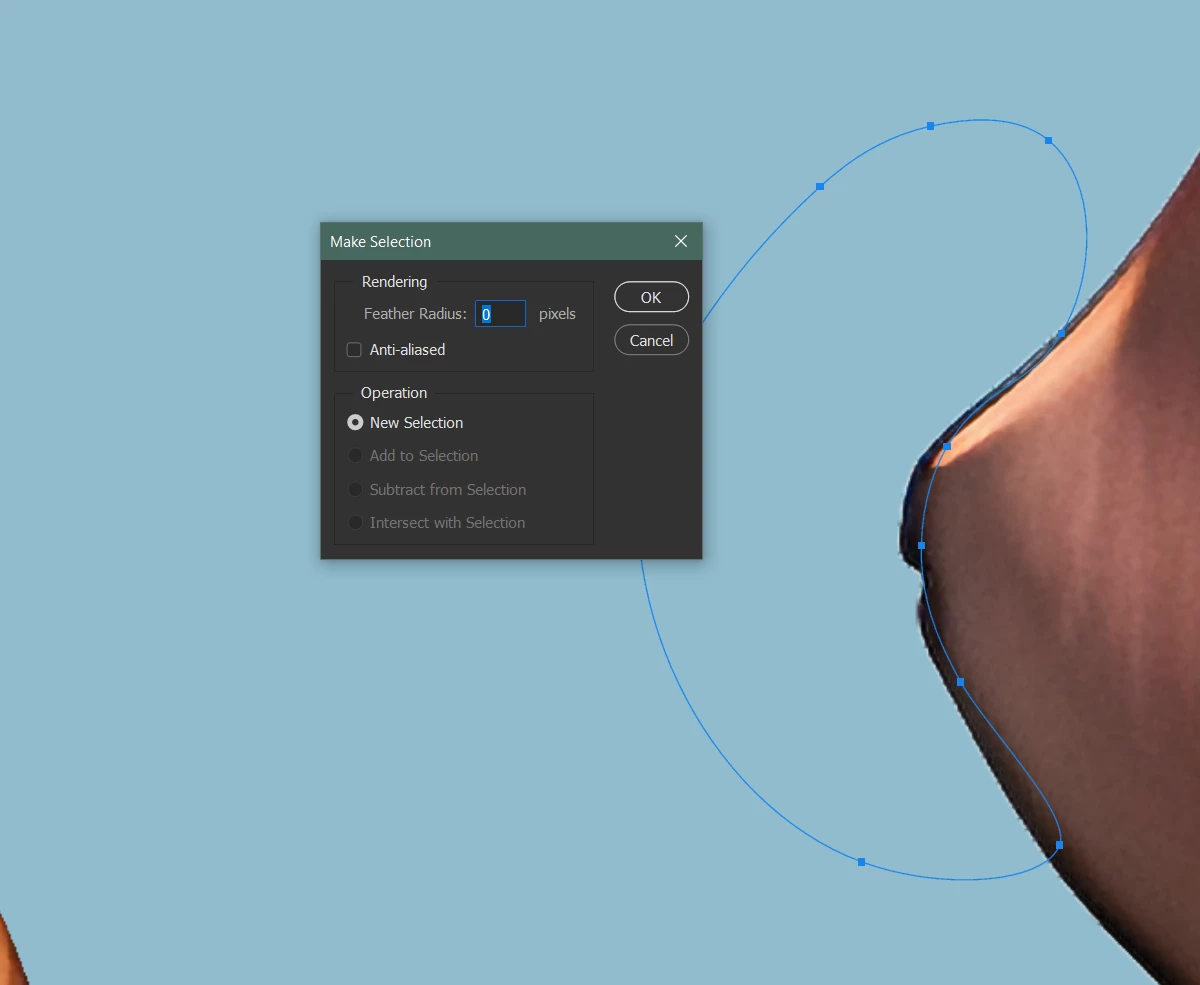
Basically, I use the pen tool to create paths/shapes and then convert said shapes into selections. Once the path is closed, I right-click and then choose "Make Selection" to do this. The issue is this pop-up that appears every single time. I would like it disable it but can't find a way to do so.


I do know that the lasso tool can be used to make selections but my issue with the lasso tool is that the curves are never as smooth as what I get with the pen tool. 


I would appreciate your help. Thanks in advance. ^_^  - Germaine


Este tema ha sido cerrado para respuestas.
Mejor respuesta de Stephen Marsh

Hi Stephen, thanks for your reply. This is the error that comes up when I execute the keyboard shortcut which I assigned to the script. 
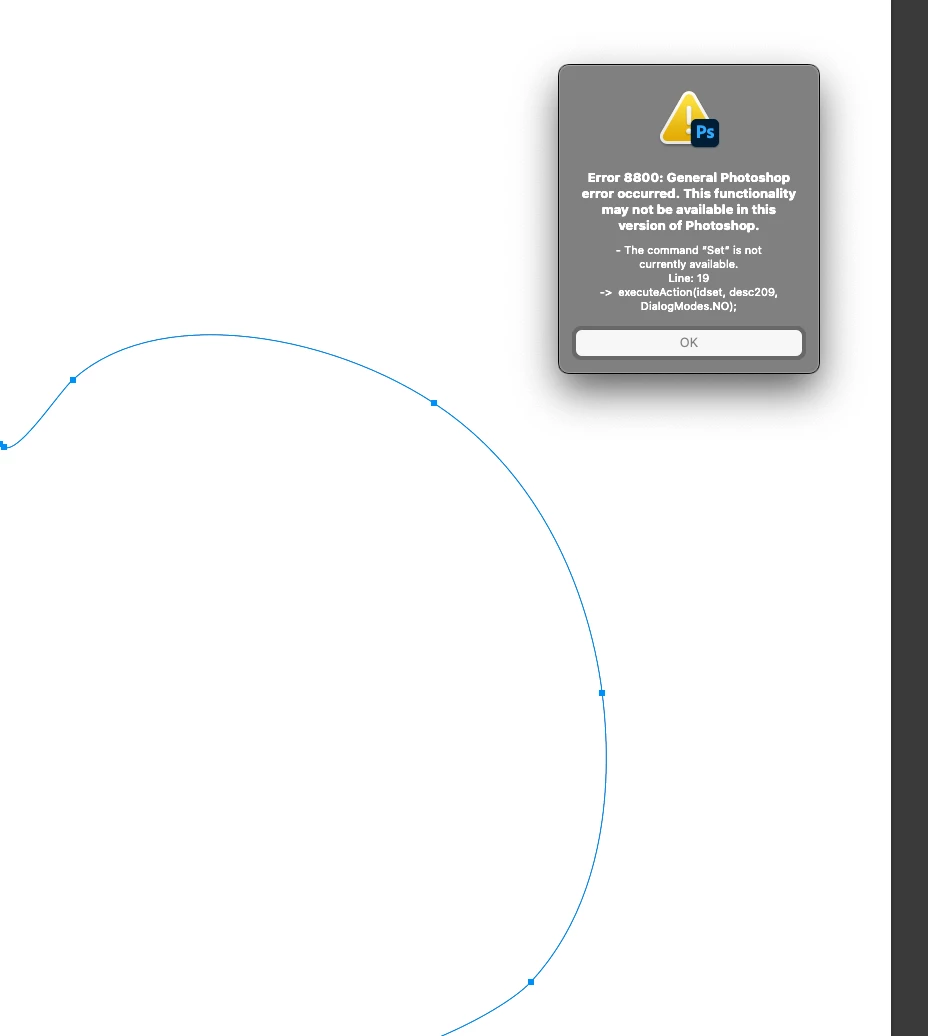

Both blocks of code work for me in Ps2024 (25.9.1) without error and I am also on a Mac. 


For what it's worth, here is the re-recorded code (tested in 25.9.1 and 25.11.0):


// Work Path to Selection
var idset = stringIDToTypeID( "set" );
    var desc286 = new ActionDescriptor();
    var idnull = stringIDToTypeID( "null" );
        var ref25 = new ActionReference();
        var idchannel = stringIDToTypeID( "channel" );
        var idselection = stringIDToTypeID( "selection" );
        ref25.putProperty( idchannel, idselection );
    desc286.putReference( idnull, ref25 );
    var idto = stringIDToTypeID( "to" );
        var ref26 = new ActionReference();
        var idpath = stringIDToTypeID( "path" );
        var idworkPath = stringIDToTypeID( "workPath" );
        ref26.putProperty( idpath, idworkPath );
    desc286.putReference( idto, ref26 );
    var idversion = stringIDToTypeID( "version" );
    desc286.putInteger( idversion, 1 );
    var idvectorMaskParams = stringIDToTypeID( "vectorMaskParams" );
    desc286.putBoolean( idvectorMaskParams, true );
executeAction( idset, desc286, DialogModes.NO );


Or:


// Work Path to Selection
var idset = stringIDToTypeID( "set" );
    var desc301 = new ActionDescriptor();
    var idnull = stringIDToTypeID( "null" );
        var ref29 = new ActionReference();
        var idchannel = stringIDToTypeID( "channel" );
        var idselection = stringIDToTypeID( "selection" );
        ref29.putProperty( idchannel, idselection );
    desc301.putReference( idnull, ref29 );
    var idto = stringIDToTypeID( "to" );
        var ref30 = new ActionReference();
        var idpath = stringIDToTypeID( "path" );
        var idworkPath = stringIDToTypeID( "workPath" );
        ref30.putProperty( idpath, idworkPath );
    desc301.putReference( idto, ref30 );
executeAction( idset, desc301, DialogModes.NO );


Or:


// Active path to selection
var idset = stringIDToTypeID( "set" );
    var desc411 = new ActionDescriptor();
    var idnull = stringIDToTypeID( "null" );
        var ref79 = new ActionReference();
        var idchannel = stringIDToTypeID( "channel" );
        var idselection = stringIDToTypeID( "selection" );
        ref79.putProperty( idchannel, idselection );
    desc411.putReference( idnull, ref79 );
    var idto = stringIDToTypeID( "to" );
        var ref80 = new ActionReference();
        var idpath = stringIDToTypeID( "path" );
        var idordinal = stringIDToTypeID( "ordinal" );
        var idtargetEnum = stringIDToTypeID( "targetEnum" );
        ref80.putEnumerated( idpath, idordinal, idtargetEnum );
    desc411.putReference( idto, ref80 );
executeAction( idset, desc411, DialogModes.NO );




3 respuestas

Stephen Marsh
Community Expert
Community Expert
August 9, 2023

A script can load a selection, without the dialog – with the added bonus of a custom keyboard shortcut being accessible to installed scripts. I don't know if the tablet shortcut introduces further complexities, however, it's worth a try.


Load active path as selection retaining path selection:

// Load active path as selection retaining path selection
var idset = stringIDToTypeID( "set" );
    var desc185 = new ActionDescriptor();
    var idnull = stringIDToTypeID( "null" );
        var ref4 = new ActionReference();
        var idchannel = stringIDToTypeID( "channel" );
        var idselection = stringIDToTypeID( "selection" );
        ref4.putProperty( idchannel, idselection );
    desc185.putReference( idnull, ref4 );
    var idto = stringIDToTypeID( "to" );
        var ref5 = new ActionReference();
        var idpath = stringIDToTypeID( "path" );
        var idordinal = stringIDToTypeID( "ordinal" );
        var idtargetEnum = stringIDToTypeID( "targetEnum" );
        ref5.putEnumerated( idpath, idordinal, idtargetEnum );
    desc185.putReference( idto, ref5 );
executeAction(idset, desc185, DialogModes.NO);


 Load active work path as selection retaining path selection:

// Load active work path as selection retaining path selection
var idset = stringIDToTypeID( "set" );
    var desc209 = new ActionDescriptor();
    var idnull = stringIDToTypeID( "null" );
        var ref24 = new ActionReference();
        var idchannel = stringIDToTypeID( "channel" );
        var idselection = stringIDToTypeID( "selection" );
        ref24.putProperty( idchannel, idselection );
    desc209.putReference( idnull, ref24 );
    var idto = stringIDToTypeID( "to" );
        var ref25 = new ActionReference();
        var idpath = stringIDToTypeID( "path" );
        var idworkPath = stringIDToTypeID( "workPath" );
        ref25.putProperty( idpath, idworkPath );
    desc209.putReference( idto, ref25 );
    var idversion = stringIDToTypeID( "version" );
    desc209.putInteger( idversion, 1 );
    var idvectorMaskParams = stringIDToTypeID( "vectorMaskParams" );
    desc209.putBoolean( idvectorMaskParams, true );
executeAction(idset, desc209, DialogModes.NO);


Info on saving and installing scripts:

https://prepression.blogspot.com/2017/11/downloading-and-installing-adobe-scripts.html

Stephen Marsh
Community Expert
Community Expert
August 9, 2023

One can add the following code to the end of the previous code samples to deselect the path:


// Deselect active path
var iddeselect = stringIDToTypeID( "deselect" );
    var desc270 = new ActionDescriptor();
    var idnull = stringIDToTypeID( "null" );
        var ref71 = new ActionReference();
        var idpath = stringIDToTypeID( "path" );
        var idordinal = stringIDToTypeID( "ordinal" );
        var idtargetEnum = stringIDToTypeID( "targetEnum" );
        ref71.putEnumerated( idpath, idordinal, idtargetEnum );
    desc270.putReference( idnull, ref71 );
executeAction( iddeselect, desc270, DialogModes.NO );


artbygermaine
Known Participant
August 10, 2023

Hi Stephen_A_Marsh, I just installed this script and it worked perfectly. Thank you very much!!! 😄 

pixxxelschubser
Community Expert
Community Expert
August 9, 2023

Do not use the menu item.

[Ctrl] +click on the miniature of the path in the path panel   or   use the third icon at the bottom of the path panel (stylised marching ants).

artbygermaine
Known Participant
August 9, 2023

Hi pixxxelschubser. Thank you, this is my current workaround for now. I've been keeping the "Paths" tab open and within reach. It's not exactly what I wanted but Iguess I have no choice? T_T


I should have noted in my post that I have set a keyboard shortcut for the "make selection" function and those keys are ones close to my left hand while my right hand remains on the drawing tablet. The annoying pop up forces me to move my right each time in order to reach the Enter key which was why it's a bother for me... 

Thanks for your input though. It's greatly appreciated. ^^

pixxxelschubser
Community Expert
Community Expert
August 9, 2023

It might be a bit like "a shot from behind through the chest in the eye" - but how about creating a new action and just clicking on the third icon in the path panel. Then they can either switch to button mode in the actions panel or set a shortcut for the newly created action.

Jeff Arola
Community Expert
Community Expert
August 9, 2023

Press Ctrl+Enter or Return to turn the path to a selection skipping the dialog.

artbygermaine
Known Participant
August 9, 2023

Thanks for your reply, Jeff. I'm afraid this wouldn't work for me because this would mean my hand would have to move away from the drawing tablet to the keyboard. I should have indicated in my post that I have set keyboard shortcuts for the "Make Selection" function and those keys are set to be within reach of my left hand as I use it often. This is why the dialog box bothers me because I have to press it every time the pop up appears but the Enter/Return key is closer to my right hand than my left. Thanks for the input though I appreciate it ^^