Inspiring
June 1, 2019
Answered

How to do a transparent color box without losing opacity of the color

  • June 1, 2019
  • 2 replies
  • 5538 views

Hi there!!!  How's your day so far!!

Recently one ask me to do a color box that people can see through while the color stays the same. 

Changing the opacity of the color does work but the color will be tint and be whiter. 

I Google a lot and still have no idea to figure out!! I heard people use PS to do it instead of AI.

As the picture, how could I do that?

Thus, could I get help from anyone? Thanks a lot!!

This topic has been closed for replies.
Correct answer Norman Sanders

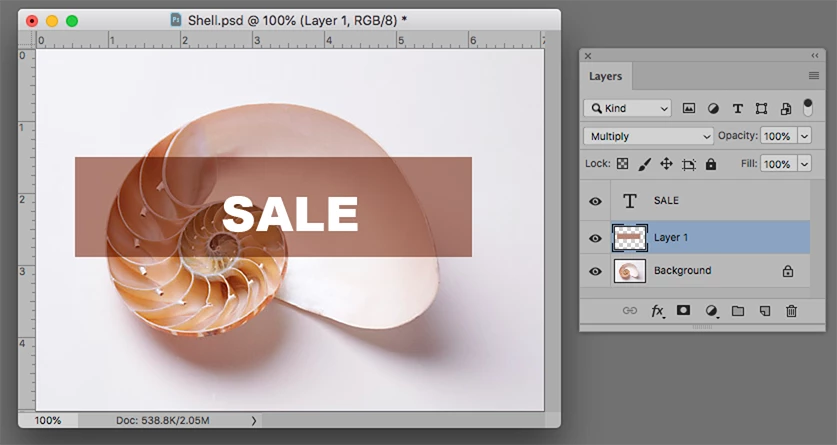
Is this what you had in mind. Note that the middle panel Blending Mode is set to Multiply

2 replies

Norman Sanders
Legend
June 1, 2019

I am not sure I know what you have in mind but if you are asking about seeing the top layer contents and the one beneath it, as well, choose the top layer and set the Bending Mode in the Layers panel to Multiply.

If that is not what you have in mind, a clearer description of what you want would be a big help.

Post the current image and the Layers panel so that there is no misunderstanding of the desired end result.

Inspiring
June 1, 2019

Sure. I will try what you said. 

As one more picture I showed, I have to make a color box which can be seen through and the color can stay in the same.

Norman Sanders
Norman SandersCorrect answer
Legend
June 1, 2019

Is this what you had in mind. Note that the middle panel Blending Mode is set to Multiply

Legend
June 1, 2019

Not sure I understand this correctly. If you lower the opacity of course it gets lighter. If the color would not change how would you be able to see through?

Inspiring
June 1, 2019

I'm not very sure how it works.  My boss says it's gonna works and I have to do that, maybe layers or something.