
Participating Frequently
December 9, 2018
Answered

How to draw a tapered river (dendritic shape) on a map?

  • December 9, 2018
  • 6 replies
  • 3978 views

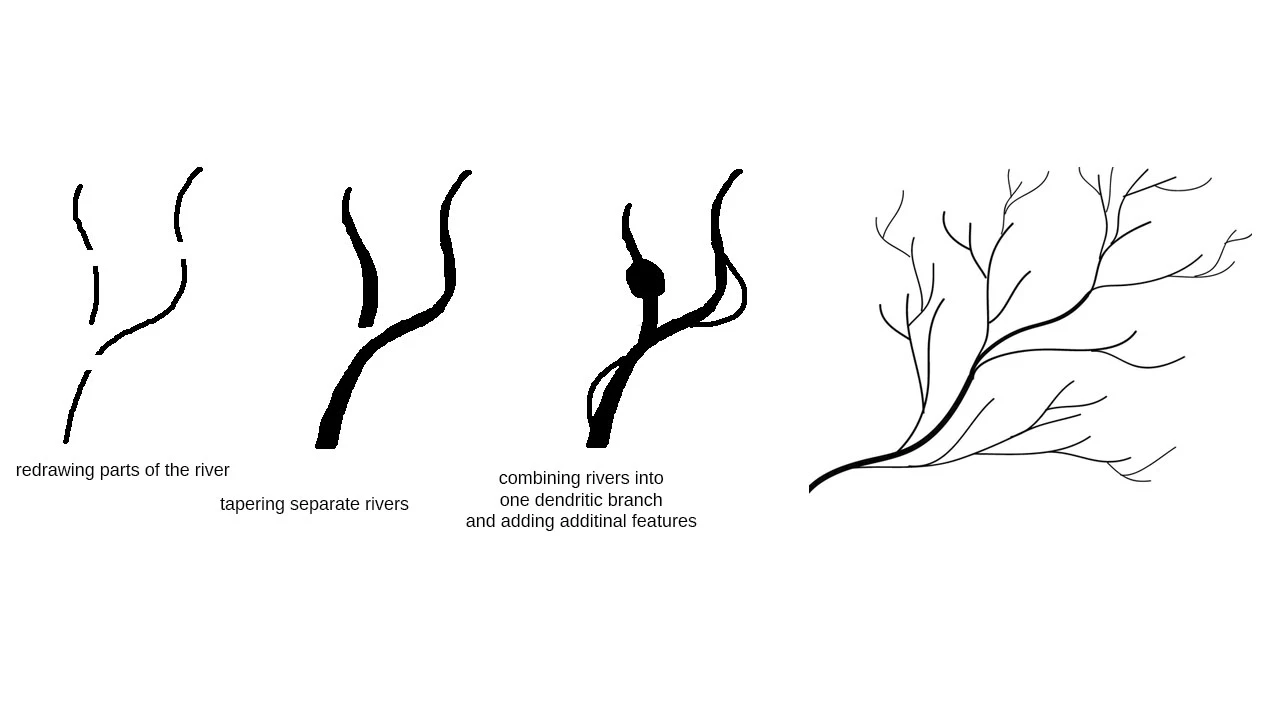
I have to draw A LOT of rivers and I want them to be tapered. Basicaly I want to redraw a map, but I have no idea how to draw rivers. It can't be an one continuous brush stroke, because I have to zoom in and out, draw parts of rivers, combine them, etc, so drawing by pressure is impossible. Paths are also very tedious to work with and very unaccurate, so it would be hell on earth to draw them.

Is there any other way? Please check attached picture. It's really ugly an unaesthetic, but I hope you know what I mean.
This topic has been closed for replies.
Correct answer Francesco Della Peruta

For this type of work i think Illustrator is a better choice.

6 replies

Chuck Uebele
Community Expert
Community Expert
December 10, 2018

Yes, with Illustrator, you can change the width of the path in varying degrees. Much better for this type of work.

KShinabery212
Community Expert
Community Expert
December 10, 2018

This probably where I would prefer to use a Tabelt with Stylus, simply to draw the lines of the river over top an exisiting map.

Also, I would consider doing it Illustrator and not Photoshop.  As I feel  a vector graphic would be better.

Participating Frequently
December 10, 2018

Ok, I think I figured it out with your help. It's close to impossible to do that in Photoshop. Illustrator is more suitable for that kind of work.

For those interested in drawing tapered dendritic shapes (or maps):

1. Get Illustrator

2. To edit stroke properties go Window - Stroke (Ctrl+F10)

3. To make custom stroke profiles you can use Width Tool. The best way to do that is just to draw a straight short line and then edit stroke profile on that line, then save.

Vector graphic is infinitely better (for maps). Well, it should be obvious...

Thank you :-)

Community Expert
December 10, 2018

For this type of work i think Illustrator is a better choice.

S_Gans
Community Expert
Community Expert
December 10, 2018

Try creating a brush setting that uses "Fade" as the controller for the size.

Adobe Community Expert / Adobe Certified Instructor
Participating Frequently
December 9, 2018

But you can't do that with hundreds of rivers and really complicated and elongated shapes with minimal taper. It isn't just one river. I meant hundreds.

An it's a quater of map only:

c.pfaffenbichler
Community Expert
Community Expert
December 10, 2018

May I ask why you want to redraw the map?

As far as I know there are services where one can buy digital maps as vector data and one can then edit those as necessary.

And as Francesco Della Peruta has indicated the task may be a better fit for Illustrator (or other vector drawing applications).

Participating Frequently
December 10, 2018

@ c.pfaffenbichler: I don't want to redraw the whole map, just the most important rivers (maybe not hundreds, but I guess around twenty), cities, lands, provinces, places of importance and so on. All in semi-fantasy (Tolkien) style. It would be historical map. There is simply no good, nor clear and readable map of the Eastern Europe on the internet. Besides I LOVE cartography, geography and history.

@ S_Gans: I've tried it, but first: you have to control lenght manually (you can't just fill the whole shape) and second you can't control taper profile (width).

Inspiring
December 9, 2018

Have you considered drawing a path with the pen tool?

Then filling it with a color?