Participant
September 8, 2012
Answered

How to draw an arrow in Photoshop CS6?

  • September 8, 2012
  • 2 replies
  • 368792 views

The Line Tool in Photoshop CS6 is radically different from that in PSCS5.  I have used Photoshop almost daily for years, yet I haven't been able to figure this out.  Any help out there?

This topic has been closed for replies.
Correct answer Noel Carboni

It just looks different. but the functionality is still there.  Look here:
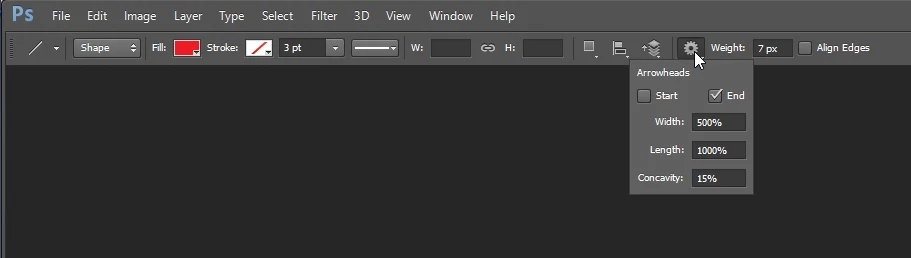
-Noel

2 replies

taylorp31465204
Participant
March 16, 2017

Is there any way to angle it so that the arrow doesn't only go side to side?

Trevor.Dennis
Community Expert
Community Expert
March 16, 2017

Hi Taylor

I am not sure what you mean by 'angle it'?

You know that you can choose either, both, or none in the line Options?

And the size and shape with the other paramters?

Noel Carboni
Noel CarboniCorrect answer
Legend
September 8, 2012

It just looks different. but the functionality is still there.  Look here:

-Noel

Participant
May 21, 2013

Looks good, but when I click on the thing on the right, all I get is a box that says "rubber band". I ended up using Graphic
Converter to get the arrow. Still would like to know how to do it in Photoshop CS6 though.

Legend
May 21, 2013

Bob,

The rubber band is for the Pen tool. You should use the Line tool.

Ronald