Seb_Mainguet
Participant
January 14, 2016
Answered

How to draw an arrow on an image with Photoshop CC 2014 for Mac OS ?

  • January 14, 2016
  • 5 replies
  • 43750 views

Hello

Il would just like to add a small red arrow on an image with Photoshop CC 2014 for Mac OS. Which might be quite easy, but I don't remember how I did last time. I think I have to use the line tool, but then…

Thank you for your help in advance…
This topic has been closed for replies.
Correct answer Bojan Živković11378569

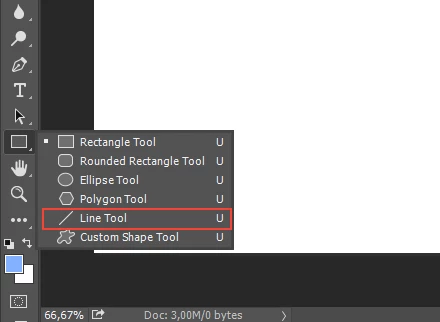
Choose Line Tool from the Toolbox (it is grouped with shapes like Rectangle Tool)

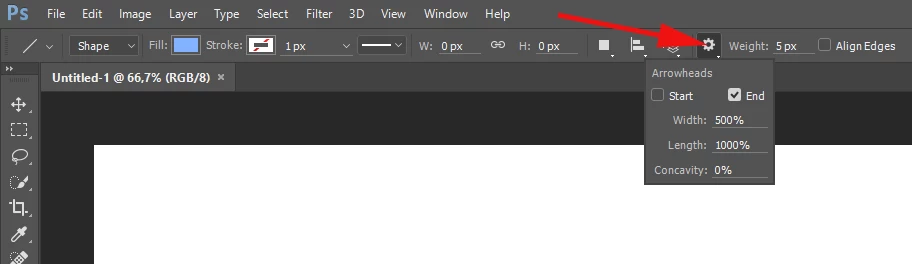
With Line Tool active click on the gear icon in the Options bar and check Start or End below Arrowheads.

5 replies

July 10, 2019

I see many sites that share the method for how to draw an arrow, but don't share how to change the color from black to red or some other color which will highlight it.   Can anyone share that?

Bojan Živković11378569
Community Expert
Community Expert
July 10, 2019

There are a couple of ways to change color:

  • Select shape layer then change color from the Options bar. You must have shape tool active to see options.
  • Select shape layer in the Layers panel then open Properties panel and change color. See screenshot below.
  • Double click on shape layer thumbnail then set color in Color Picker dialog which will open.
  • Use Color Overlay layer effect: With shape layer selected go to Layer > Layer Style > Color Overlay. Set blending to Normal and pick color of your choice.

Seb_Mainguet
Participant
February 19, 2016

Thank you all !

Terri Stevens
Legend
January 14, 2016

You could also use one of the pre-existing arrows from the custom shape tool.

Bojan Živković11378569
Community Expert
Community Expert
January 14, 2016

Choose Line Tool from the Toolbox (it is grouped with shapes like Rectangle Tool)

With Line Tool active click on the gear icon in the Options bar and check Start or End below Arrowheads.

c.pfaffenbichler
Community Expert
Community Expert
January 14, 2016

Click on the gear icon in the Options Bar and check "Arrowheads" "Start" or "End".