Participating Frequently
October 8, 2021
Answered

How to duplicate this logo?

  • October 8, 2021
  • 3 replies
  • 801 views

Hello everybody,

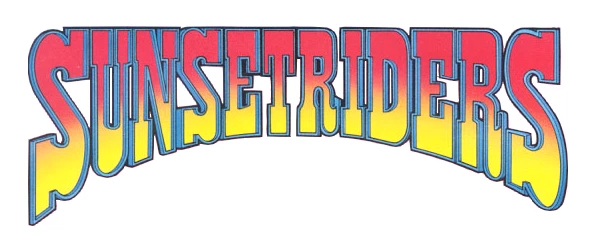
I am trying to reproduce the logo below but have not been successful.

Used the WRAP TEXT tool but it just doesn't suit me.

There's a tool for make it or a way to do?

Thanks.


Claudio Raphael

This topic has been closed for replies.
Correct answer Semaphoric

If you Type > Convert to Shape, you can ust the regular Warp, which allows more control, at the expense of losing the editabilty of the text.



3 replies

barbara_a7746676
Community Expert
Community Expert
October 9, 2021

I bet that logo was created in Illustrator. 

Creating it in Illustrator has the advantage of being vector and easily scalable.

Semaphoric
Community Expert
SemaphoricCommunity ExpertCorrect answer
Community Expert
October 9, 2021

If you Type > Convert to Shape, you can ust the regular Warp, which allows more control, at the expense of losing the editabilty of the text.


Participating Frequently
October 9, 2021

YES!! Perfect for me.

Many thanks Semaphoric for show me the magic.

Make a single test, dont be perfect but this way.

Again, thaaanks


Claudio Raphael

Participating Frequently
October 9, 2021

Norori Media
Participant
October 8, 2021

There is a number of ways you could reproduce this logo on PS, all of them will require lots of editing and time.
I would greatly recommend using Illustrator for this, it has better text/vector tools for this kind of logo


If I were you, i would completly do it on Ai and use Wrap text, create gradiante, create outlines and then and some 3d text illustrator.


These guides will give you somewhat of an idea:

https://www.youtube.com/watch?v=_DB5w38FR_U

https://www.youtube.com/watch?v=ZsqqBj3Dk0I


Best of luck,

Cheers

Participating Frequently
October 9, 2021

Thanks Norori Media  for tips and links. Watched both. Now I will download AI for tests.


Claudio