
TJT1985
Participant
December 20, 2022
Answered

How to ENABLE saving to the cloud in Photoshop

  • December 20, 2022
  • 2 replies
  • 1118 views

I'm trying to save a photoshop file to the cloud, but when I go File > Save As, it goes straight to my computer's files. I need the Pop-up window to return so I can select whether to save it to my hard drive or the cloud. 
    This topic has been closed for replies.
    Correct answer TheDigitalDog

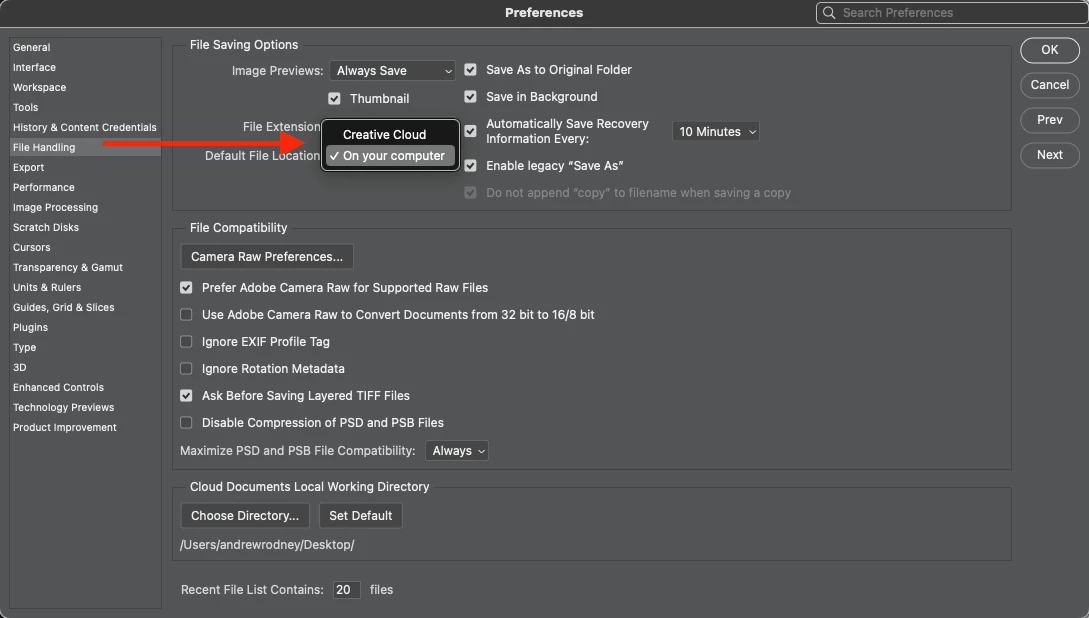
    Check your preferences; what do you have setup here:

    2 replies

    TheDigitalDog
    TheDigitalDogCorrect answer
    Inspiring
    December 20, 2022

    Check your preferences; what do you have setup here:

    Author “Color Management for Photographers" & "Photoshop CC Color Management/pluralsight"
    kglad
    Community Expert
    Community Expert
    December 20, 2022

    <moved from using the community >

    Participating Frequently
    March 17, 2024

    This would appear to solve the problem I'm having...

    I WANT to save to the CLOUD, but it's greyed out.

    On the preferences, it DOESN'T EVEN SHOW the option: DEFAULT FILE LOCATION ????

    I've spent hours updating, and searching for a solution, but have found NOTHING that works! :^(
    Photoshop Version: 25.5.1

    Any help from anyone???