
Cobretti81352025
Participant
April 9, 2019
Question

How to export different sizes but deactivate suffix

  • April 9, 2019
  • 1 reply
  • 740 views

Hi,

i'm using the "Export as" function pretty often and in my case i need to export in two different sizes:
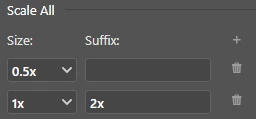
1 and 0,5

1 should add 2x at the end of the filename
0,5 should leave filename as is

for example:

original file: xxx.jpg

size 1:      xxx2x.jpg
size 0,5:   xxx.jpg

My Co-worker does the same an just leaves the suffix naming space empty and it works.
But on my PS CC the files look like this:

size 1:      xxx2x.jpg

size 0,5:   xxx@0,5x.jpg

do i miss something?
help would be really appreciated

Thanks


Alan

This topic has been closed for replies.

1 reply

Mike_Gondek10189183
Community Expert
Community Expert
April 9, 2019

Are you saying you did:

and ended up with

size 0,5:   xxx@0,5x.jpg

size 1:      xxx2x.jpg

The @0,5x should not have been added. Try putting anything into the blank field (eg: test) export, then try again and erase. That may flush this out. If that don't help reset your Photoshop prefs.

Cobretti81352025
Participant
April 9, 2019

Hi Mike,

sorry for the confusion.
It's a busy day.

Let me explain again.

That's how my export options are set:

exported files look like this:

but what i want is them to look like this:

i don't want "@0,5x" suffix.

I've tried your suggestions above but it didn't help.

i hope you get me now

Thank you for you help

Mike_Gondek10189183
Community Expert
Community Expert
April 9, 2019

What OS & Illustrator version are you on?

My install does  this correctly, and I am on Mv OS High Sierra & CC 2019 latest update.