dragantomas
Inspiring
January 29, 2017
Answered

How to export my workspace preset

  • January 29, 2017
  • 2 replies
  • 1113 views

Hi all,

A question. I created my workspace in Psp, and would like to save it as preset, if possible, for you never know, I may want to use the photoshop on another mac.

Can someone advise is this possible and if yes, how to do it?

Thanks
    This topic has been closed for replies.
    Correct answer Barb Binder

    Are you asking specifically about where a custom workspace is saved?

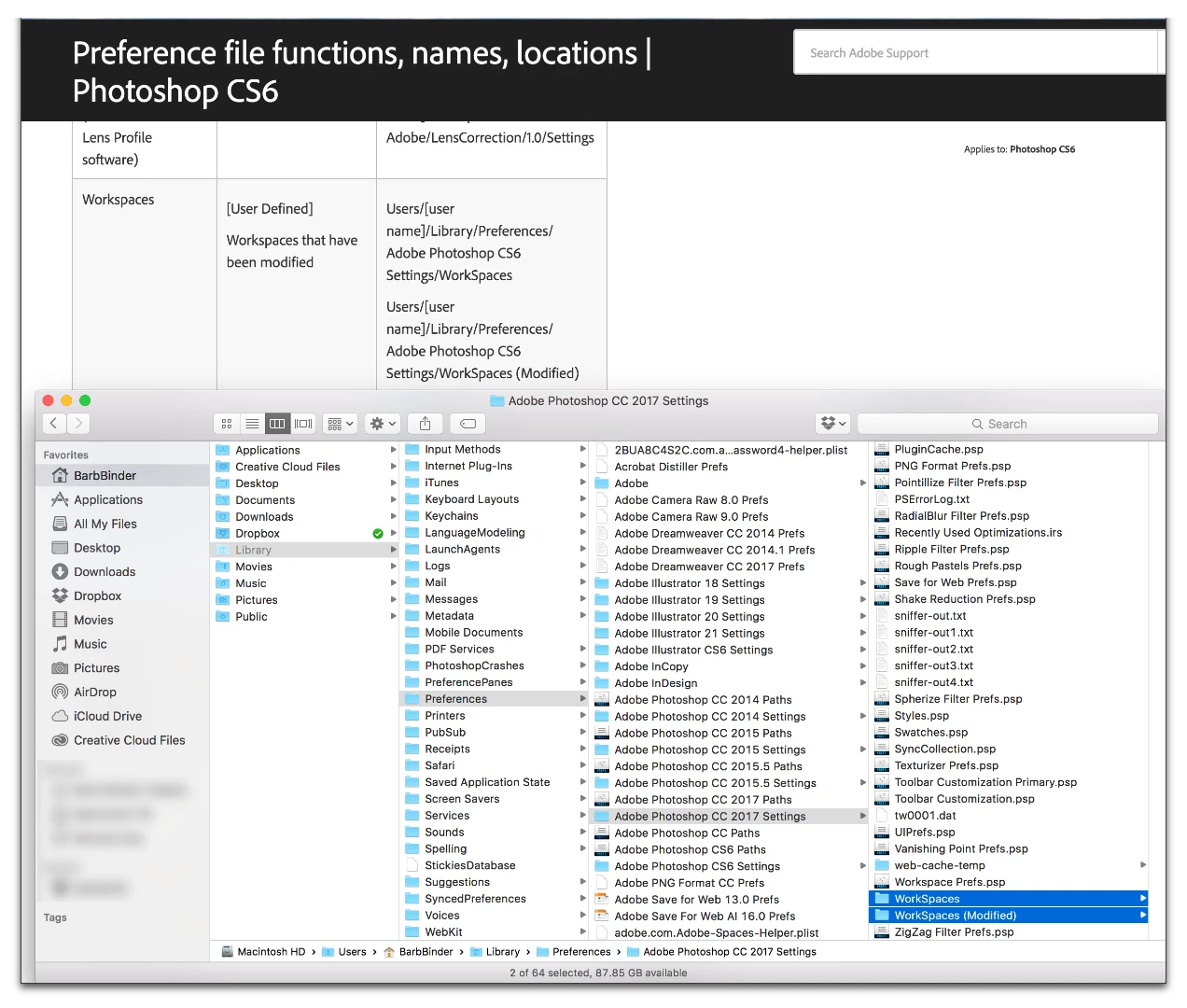
    This document shows the path for all presets, including workspaces: Photoshop CS6 preference file functions, names, locations.

    Note that this is specifically for CS6. I was unable to locate the CC version of the document, but I tested the location on my Mac, and by swapping out CC 2017 for CS6 in the path, the location is still valid.

    I did not check the Windows path, but I'd imagine it is also the same. Just swap CC for CS6.

    2 replies

    Barb Binder
    Community Expert
    Barb BinderCommunity ExpertCorrect answer
    Community Expert
    January 29, 2017

    Are you asking specifically about where a custom workspace is saved?

    This document shows the path for all presets, including workspaces: Photoshop CS6 preference file functions, names, locations.

    Note that this is specifically for CS6. I was unable to locate the CC version of the document, but I tested the location on my Mac, and by swapping out CC 2017 for CS6 in the path, the location is still valid.

    I did not check the Windows path, but I'd imagine it is also the same. Just swap CC for CS6.

    ~Barb at Rocky Mountain Training
    dragantomas
    Inspiring
    January 30, 2017

    Thanks @BarbBinder, thats exactly what i was looking for. I can find the saved presets now and collect / drop them where i want them. Cheers.

    Barb Binder
    Community Expert
    Community Expert
    January 30, 2017

    Terrific!

    ~Barb at Rocky Mountain Training
    c.pfaffenbichler
    Community Expert
    Community Expert
    January 29, 2017

    Edit > Presets > Export/Import Presets

    or simply copy the file/s manually from the library.