
How to find texture name in tool preset?
Hi 
Go to the tool presets panel, and select a preset which has a texture associated with it. To do so:
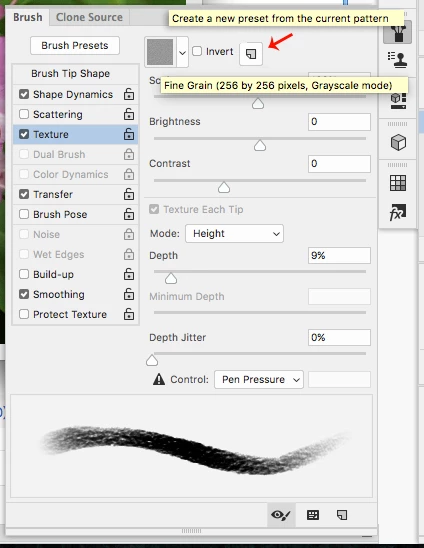
-open the Brush panel.
-next, open the Tool Presets panel.
-next, select a tool preset from the panel and keep an eye on the "Texture" check box in the Brush panel-- when you see a checkmark on the "Texture" checkbox in the brush panel after selecting a tool preset, you know that there is a texture associated with the preset
-next, click on the small texture thumbnail in the brush panel, which is located just to the left of the "Invert" checkbox. It should open up a list of texture thumbnails which you can scroll through
question:
how do you find the exact texture thumbnail inside that list that is associated with the current tool preset? in other words, one of those thumbnails should be highlighted in blue, which indicates the current texture that is being used for the current tool preset that you have selected. But whjen I scroll thrpough the list, none of the lines are highlighted, so I have no idea which of those textures are the active one being used in my current brush (tool preset).
does this make sense - or should I explain this better?
 AdChoices