Known Participant
March 14, 2025
Answered

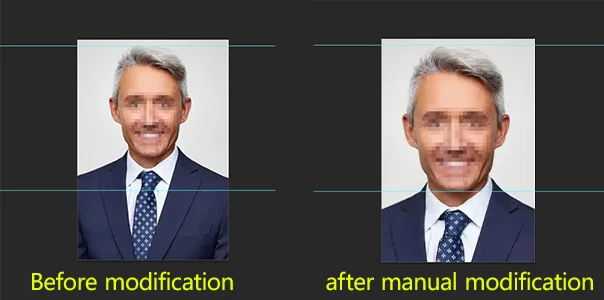
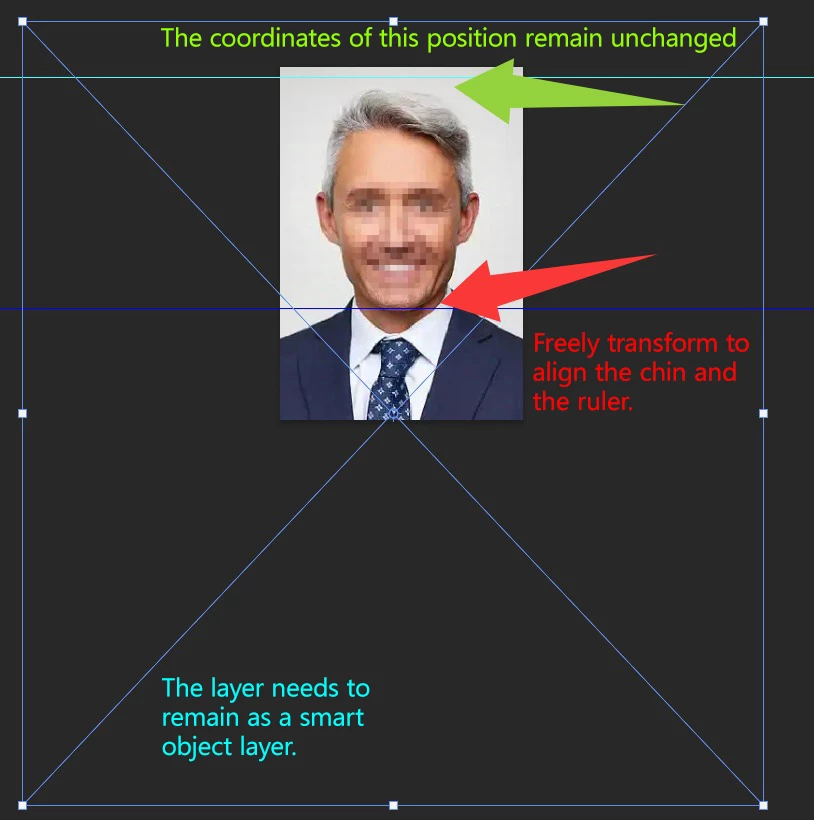
How to freely transform while keeping the top distance unchanged?

  • March 14, 2025
  • 2 replies
  • 2168 views

I want to use a JSX script to freely transform the image. My image has two horizontal reference lines: one at the top of the head and one at the chin. When I perform a free transform to the chin position, the distance between the top of the head and the top reference line creates a gap. How can I keep the top of the head aligned with the top reference line while also ensuring that the chin stays aligned with the bottom reference line?

Correct answer c.pfaffenbichler

Yes, semi-automation is achievable. However, obtaining an accurate chin position might be difficult. I have tried recording the Camera Raw filter as an action, but unfortunately, the recording still applies to the previous image.


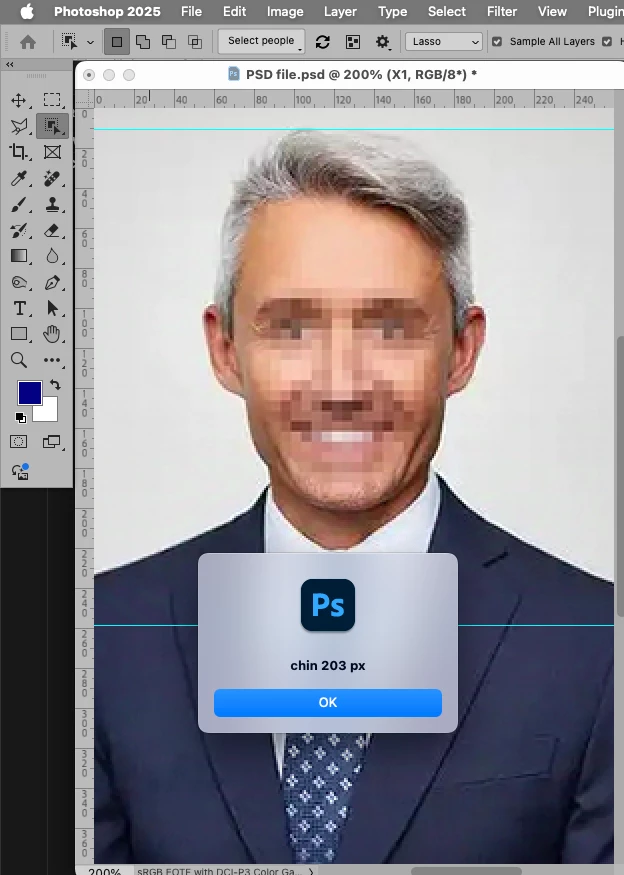
One can assess the »Select People«-selections via Script now. 
// 2025, use it at your own risk;
if (app.documents.length > 0) {
var desc232 = new ActionDescriptor();
desc232.putBoolean( stringIDToTypeID( "selectAllPeople" ), false );
var list4 = new ActionList();
list4.putInteger( 1 );
desc232.putList( stringIDToTypeID( "people" ), list4 );
var list5 = new ActionList();
list5.putString( "Facial skin" );
desc232.putList( stringIDToTypeID( "tagsV2" ), list5 );
var list6 = new ActionList();
list6.putInteger( 10 );
desc232.putList( stringIDToTypeID( "tagsIndices" ), list6 );
executeAction( stringIDToTypeID( "selectPeopleV2" ), desc232, DialogModes.NO );
// check for selection;
if (hasSelection() == true) {
var originalRulerUnits = app.preferences.rulerUnits;
app.preferences.rulerUnits = Units.PIXELS;
alert ("chin "+activeDocument.selection.bounds[3]);
activeDocument.selection.deselect();
app.preferences.rulerUnits = originalRulerUnits;
}
};


 

2 replies

c.pfaffenbichler
Community Expert
Community Expert
March 14, 2025

This would raise the transform with a custom Reference Point, so alt-dragging the handles would center there. 

// 2025, use it at your own risk;
if (app.documents.length > 0) {
var originalRulerUnits = app.preferences.rulerUnits;
app.preferences.rulerUnits = Units.PIXELS;
freeTransformWithRefernce ([750,750]);
app.preferences.rulerUnits = originalRulerUnits;
};
////// free transform //////
function freeTransformWithRefernce (thePoint) {
try {
    var idtransform = stringIDToTypeID( "transform" );
    var desc6 = new ActionDescriptor();
    var idfreeTransformCenterState = stringIDToTypeID( "freeTransformCenterState" );
    var idquadCenterState = stringIDToTypeID( "quadCenterState" );
    var idQCSIndependent = stringIDToTypeID( "QCSIndependent" );
    desc6.putEnumerated( idfreeTransformCenterState, idquadCenterState, idQCSIndependent );
    var idposition = stringIDToTypeID( "position" );
        var desc7 = new ActionDescriptor();
        var idhorizontal = stringIDToTypeID( "horizontal" );
        var idpixelsUnit = stringIDToTypeID( "pixelsUnit" );
        desc7.putUnitDouble( idhorizontal, idpixelsUnit, thePoint[0] );
        var idvertical = stringIDToTypeID( "vertical" );
        var idpixelsUnit = stringIDToTypeID( "pixelsUnit" );
        desc7.putUnitDouble( idvertical, idpixelsUnit, thePoint[1] );
    var idpaint = stringIDToTypeID( "paint" );
    desc6.putObject( idposition, idpaint, desc7 );
    var idoffset = stringIDToTypeID( "offset" );
        var desc8 = new ActionDescriptor();
        var idhorizontal = stringIDToTypeID( "horizontal" );
        var idpixelsUnit = stringIDToTypeID( "pixelsUnit" );
        desc8.putUnitDouble( idhorizontal, idpixelsUnit, -0.000000 );
        var idvertical = stringIDToTypeID( "vertical" );
        var idpixelsUnit = stringIDToTypeID( "pixelsUnit" );
        desc8.putUnitDouble( idvertical, idpixelsUnit, -0.000000 );
    var idoffset = stringIDToTypeID( "offset" );
    desc6.putObject( idoffset, idoffset, desc8 );
    var idwidth = stringIDToTypeID( "width" );
    var idpercentUnit = stringIDToTypeID( "percentUnit" );
    desc6.putUnitDouble( idwidth, idpercentUnit, 100 );
    var idheight = stringIDToTypeID( "height" );
    var idpercentUnit = stringIDToTypeID( "percentUnit" );
    desc6.putUnitDouble( idheight, idpercentUnit, 100 );
    var idreplaceLayer = stringIDToTypeID( "replaceLayer" );
        var desc9 = new ActionDescriptor();
        var idfrom = stringIDToTypeID( "from" );
            var ref2 = new ActionReference();
            var idlayer = stringIDToTypeID( "layer" );
            ref2.putIdentifier( idlayer, 3 );
        desc9.putReference( idfrom, ref2 );
        var idto = stringIDToTypeID( "to" );
            var ref3 = new ActionReference();
            var idlayer = stringIDToTypeID( "layer" );
            ref3.putIdentifier( idlayer, 3 );
        desc9.putReference( idto, ref3 );
    var idtransform = stringIDToTypeID( "transform" );
    desc6.putObject( idreplaceLayer, idtransform, desc9 );
executeAction( idtransform, desc6, DialogModes.ALL );
} catch (e) {}
};
Known Participant
March 14, 2025

First of all, thank you for your answer. Before this, I did try my own code, but there was a gap at the top position.


#target photoshop

// Get the active document and its guides
var doc = app.activeDocument;
var guides = doc.guides;

// Initialize arrays for vertical and horizontal guides
var verticalGuides = [];
var horizontalGuides = [];

// Loop through guides and separate them into vertical and horizontal
for (var i = 0; i < guides.length; i++) {
    var guide = guides[i];
    if (guide.direction == Direction.VERTICAL) {
        verticalGuides.push(guide.coordinate);
    } else {
        horizontalGuides.push(guide.coordinate);
    }
}

// Determine the left and right boundaries
var left = Math.min.apply(null, verticalGuides);
var right = Math.max.apply(null, verticalGuides);
var bottom = Math.max.apply(null, horizontalGuides);

// Calculate the selection height dynamically
var selectionHeight = doc.height - bottom; // Adaptive height
var selectionRegion = [
    [left, bottom],
    [right, bottom],
    [right, bottom + selectionHeight],
    [left, bottom + selectionHeight]
];

// Select the region
doc.selection.select(selectionRegion);

// Calculate JS_gaodu (height difference)
var X_gaodu = selectionHeight.toString().replace(' px', ''); // Get the selection height and remove 'px'
var JS_gaodu = 259 - parseFloat(X_gaodu); // Calculate the difference

doc.selection.deselect(); // Deselect the selection

// Get the layer's boundary information
var layer = doc.activeLayer;
var layerBounds = layer.bounds;
var layerWidth = layerBounds[2].value - layerBounds[0].value;
var layerHeight = layerBounds[3].value - layerBounds[1].value;

// Calculate the target height and the scale percentage
var targetHeight = layerHeight + JS_gaodu; // Calculate the target height
var scale = targetHeight / layerHeight * 100; // Calculate the scale percentage

// Resize the layer, maintaining the aspect ratio
layer.resize(scale, scale, AnchorPosition.TOPCENTER);


c.pfaffenbichler
Community Expert
Community Expert
March 14, 2025

Do sou want the Script to pause and manually transform the Layer or …? 

Known Participant
March 14, 2025

I hope to automatically adjust the layer through the script, not pause for manual transformation. Thank you

c.pfaffenbichler
Community Expert
Community Expert
March 14, 2025

How would you imagine that to work? 

Are you willing to mark the top of the head and the chin manually?