Inspiring
September 16, 2013
Answered

How to get current brush name

  • September 16, 2013
  • 16 replies
  • 38153 views

Hi, I use tool presets to select my tools (I never use the brush panel)

After I select a particular brush, and then use it for a few minutes, sometimes I forget the name of the brush preset I'm using, so I got back into the tool presets window to see if it's still highlighted, but it isn't. 

I've looked everywhere else to see where I can get the name of the current brush (which was seleted via tool presets panel, not brush presets panel), but I can't find it anywhere. Surely there has to be a way to do this? If anyone knows that would be great (I'm hoping this is a simple solution that I've overlooked )

    Correct answer BC_KPRC

    For anyone still looking for a solution/workaround in 2025, here's mine. Im using release 26.11.0.

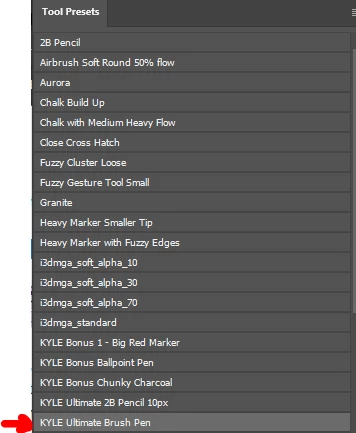
    • Select the brush tool > go to the Tool Presets panel > select the brush you want to use(in this example Ill be using "KYLE 

    Ultimate Brush Pen") . See Image 01

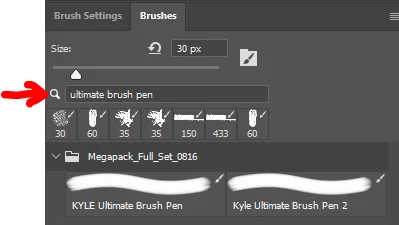
    • Next, In the Brushes Panel > go to the search field > type the name of the brush. (e.g. "Ultimate Brush Pen"). See Image 02
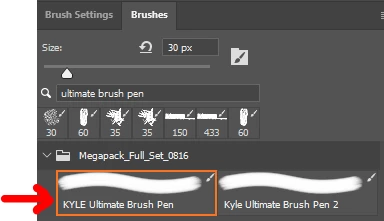
    • Then click on the brush in the list generated from the search. See Image 03

    THAT'S IT!! Use the brush tool as you normally would. Even if you use another tool, or perform another task, when you go back to your brush tool it will still be selected in the brush panel with the Name of the Brush shown. 

    This worked for me and hopefully will save a life 😃

    16 replies

    Participant
    July 3, 2015

    Go to the Create New Brush icon at the bottom of the Preset Panel.  When you click it, it gives you the name of the current brush even after changes made.

    Participant
    March 10, 2018

    Go to the Create New Brush icon at the bottom of the Preset Panel.  When you click it, it gives you the name of the current brush even after changes made.

    I was tickled when I found this suggestion.  However, if you renamed the brush - the name listed there is the original created brush name.

    Inspiring
    January 30, 2015

    1. Select a brush from the tool presets window

    2. the brush you selected remains highlighted

    3. paint anywhere in your document, and re-size the brush

    4. the brush in the tool presets panel is no longer highlighted

    meaning that we have no way of knowing what tool preset we're working with unless we remember which one we chose previously. Which is not useful especially if we're working with multiple tool presets at a time, there's no way to keep track. This problem may be worse for digital painters who often switch back and forth between brushes frequently. Too bad trhere wasn't a panel to dock the current tool preset into. Kind of like a panel extension, where if you click on it, it "drops" your current tool preset into it and keeps it there as an icon or a button showing that tool preset name, and can be selected from there at any time instead of selecting from the standard tool presets panel, which can grow in size over time. This would be more like a condensed panel, allowing you to drop in 5, 6 or 7 presets as you work away, allowing you to quickly jump between them. Using the standard tool presets panel is *very* difficult if you've got 100's of presets. and causes you to have to scroll through them searching for a brush when all you want to do is switch as quickly as possible and keep paitning without interruption

    Participant
    May 14, 2015

    I'll add to 'boo radley' with: remembering the tool used may be fine for some people. But the additional issue is the speed at which the name of the brush or swatch displays. Every time an artist switches tools cannot account for more than a split second. So not only must the tool/color/swatch show visually and display its current tool name, but it must do so quickly. It must be shown clearly without having to open a dialogue window, or waiting 2-seconds for an info box to open.

    All of the tools in Photoshop are useful; my brain can only remember so many names and numbers. I don't want to remember a specific set of the prettiest brushes and colors, I want to have the entire Photoshop tool set at my disposal as an artist.

    ARTmuffin
    Participant
    January 27, 2015

    With the brush tool selected, hit the f5 key.

    davidc1815
    Legend
    January 27, 2015

    I don't think that works.  When you do as you suggest, the brush presets panel toggles on and off.  It's true that the pre-customised brush is identified in that panel but it's not in the drop down list from tools presets panel. When you adjust a brush preset parameter, the original brush is no longer highlighted in the drop down list and pressing f5 makes no difference. It does not reappear.

    davidc1815
    Legend
    September 16, 2013

    I seem to remember that CS5 does not always highlight the active brush in the Brush Panel but CS6 and CC do.  I have CC and it is highlighted in blue around the border of the selected brush in the brush panel.  It's still pretty irritating that the highlighting doesn't stay in the drop down list of brush presets - I hope Adobe will fix this.  On a related point when using brush tools (of the various sorts) its a pity you cannot easily assemble a palette of favourites by drag and drop from the drop down lists; the preset manager is pretty clunky.  To see selected brushes in the brushes panel I fear you may just have to upgrade. 

    Inspiring
    September 17, 2013

    yeah, CS5 doesn't let you view 'text only' in the brush panel, it only allows you to view them as thumbnails.

    So when the highlighting of your current brush name in the Tool Presets panel eventually disappears (often when you switch back and forth between brush and another tool such as eraser), then there's really no way to tell what brush preset you're on, unless you remember it. Which is no good if you're constantly switching between tool presets all the time. I can't believe there's no simple edit box or a small display bar of the current brush name you're using..

    I'll go take a look in the scripting forum, there's usually lots of goodies there, maybe something similar can be found there.. thanks guys

    Chris Cox
    Legend
    September 17, 2013

    There is no easy way to figure that out, because any change you make to the settings means you are no longer using one of the existing brush or tool presets.

    Jeff Arola
    Community Expert
    Community Expert
    September 16, 2013

    You might be able to see the name in the Brush panel under Brush Tip Shape.

    One of the brush tips should be highlighted.

    Inspiring
    September 16, 2013

    It's Photoshop CS5

    It doesn'show the name in the brush panel either.

    My currently loaded brush set (.abr file) isn't where I'm selecting my brush from - I select it from the tool presets panel (.tpl file) - go to Window/Tool Presets

    The brushes in my tool presets file aren't the same brushes which are in the currently-loaded .abr file (I hope this makes sense). In other words, the image you provided above only shows brush thumbnails which are in the current .abr set, not the .tpl (tool presets) set.

    So when I choose a brush from the tool presets, there seems to be no way for me to find out what tool preset is currently in use if I decide to double-check it a few minutes later.

    What happens is that I select the tool preset, and it stays highlighted for a small period of time. A few minutes later when I re-open the tool presets panel, it's no longer highlighted and I have no way of knowing what preset I'm currently using if I've forgotten the name of it when I selected it. I've looked everywhere for a simple simple "current brush" name or something, but it seems that it's nowhere be found...

    I would be flabbergasted if there's no way to determine this?

    Thanks for the quick reply by the way!

    Trevor.Dennis
    Community Expert
    Community Expert
    September 16, 2013

    If you have several favourite brushes, how about renaming them with names meaningful to you?   Names you won't forget.

    Jeff Arola
    Community Expert
    Community Expert
    September 16, 2013

    What version of photoshop are you using?