Inspiring
October 14, 2020
Answered

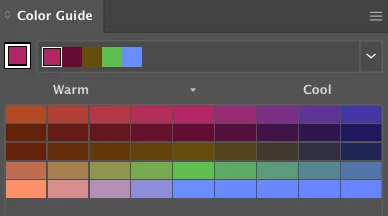
How to get in Photoshop, a Color Guide panel like in Illustrator

  • October 14, 2020
  • 3 replies
  • 3193 views

How can I get a Color Guide like in Illustrator that helps find colors using a color scheme in Photoshop ?


This topic has been closed for replies.
Correct answer user620

Guess I have to use Adobe Kuler or Coolorus 2

3 replies

user620AuthorCorrect answer
Inspiring
October 22, 2020

Guess I have to use Adobe Kuler or Coolorus 2

user620Author
Inspiring
October 22, 2020

Still No answers,

but still getting regular questions "Did you get an answer" via email ? 🙄

KarthikPollachi
Participating Frequently
October 14, 2020

Press F5 or go to Window > color.you will get swatches,color,color wheel and gradient option panels

user620Author
Inspiring
October 14, 2020

@KarthikPollachi Thanks for the quick reply.
Unfortunately can't give any credit for your answer, since the question is not about how to show the Color panel or Swatches panel in photoshop.


The Question is about the 'color guide' panel in Illustrator which automatically selects related colors for the color you choose with the color picker using various Color schemes.