scotwllm
Inspiring
July 15, 2023
Beantwortet

How to Get Rid of this New Watchamacallit

  • July 15, 2023
  • 5 Antworten
  • 843 Ansichten

According to my great Uncle Jack (born in New York to Irish immigrant parents), a whatchamacallit is what you call something when you don't know what it's called.


I'm using Photoshop 24.5.0, and I'm wondering how to get rid of this new whatchamacallit that keeps popping up and getting in the way. It's like a context sensitive menu. In theory, it's a great idea. In practice, it covers up what you're trying to see, so you're constantly pushing it out of the way. 


I know. I know. "First world problem." But it's so close to being brilliant. All Adobe would need to do is have it pop up below the image and I'd love it. But it doesn't, and I hate it. How do I get rid of it?


Scott 
Dieses Thema wurde für Antworten geschlossen.
Beste Antwort von Ged_Traynor

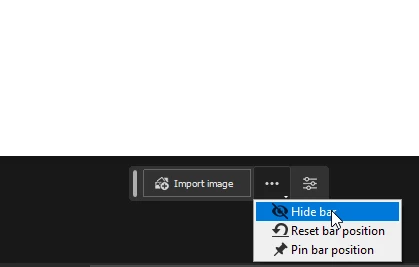
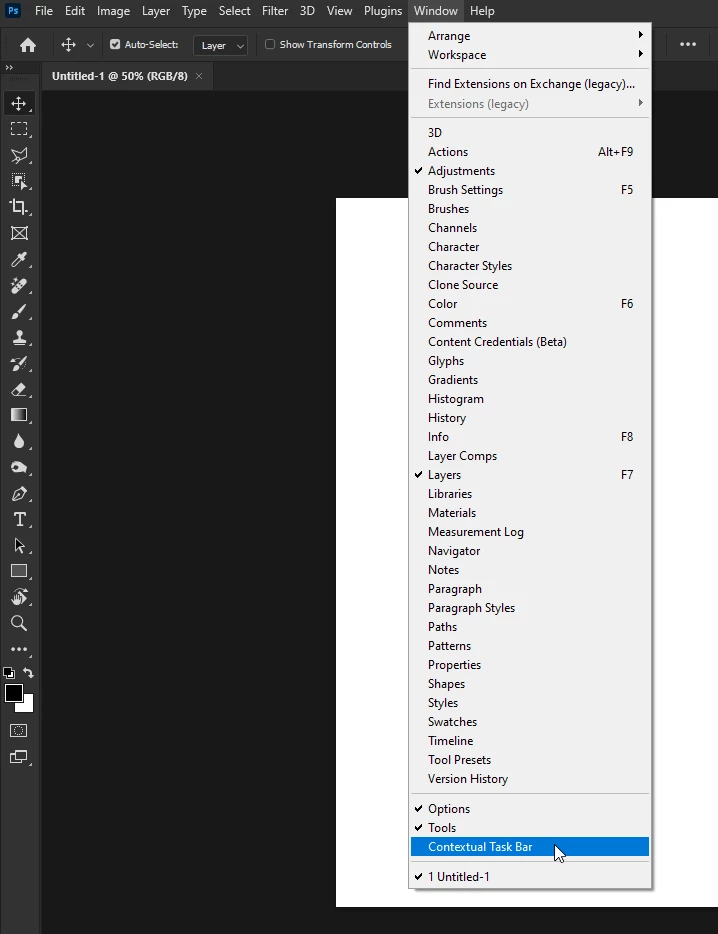
@scotwllm if you referring to the "Contextual Task Bar" to hide it just go to the Window menu and disable it from there

or here

5 Antworten

Trevor.Dennis
Community Expert
Community Expert
July 16, 2023

For those people who are annoyed with the CTB, I urge them to give it some time, as it can be a huge time saver.  As others have said, set it to be Pinned which still lets you move it, but it will no longer bounce back like its on an infuriating elastic band.  It would be nice to have its default setting as pinned, or at least have that as an option.


There are contextual settings that would be nice to add, like if you run the ruler along and edge, wouldn't it be nice to have the option to Straighten right there in the CTB?  I especially like the drop downs as that is so much quicker than having to go through menus.  So please give it a serious try.  It might turn out to be your favourite PS tool ever.

Known Participant
July 15, 2023

Besides disabling the contextual taskbar (having moved to CA from NJ decades ago, I prefer your term for it...) in the Window menu, you can also click on the mini menu on the right side of that bar & get the option to pin it elsewhere in your workspace - so it's accessible but not in an obstrusive place.


I'm also trying to enlist the entire Ps user base to rise up collectively to request (demand?) Adobe devs add the ability to make the pin "sticky;" so it stays in the pinned location from session to session and doesn't have to be re-pinned each time! And, only moved to a new location if desired...

scotwllm
Inspiring
July 15, 2023

If they pin it just below the image, that would be awesome. That way you've got the tools at the bottom AND top of the screen.

Scott

NB, colourmanagement
Community Expert
Community Expert
July 15, 2023

@scotwllm whatchamacallit / thingamajig? whatever - if it’s the 'contextual menu' popup then that can be disabled as @Ged_Traynor has explained - please mark his answer as correct if it works for you


I hope this helps
neil barstow, colourmanagement net - adobe forum volunteer - co-author: 'getting colour right'
google me "neil barstow colourmanagement" for lots of free articles on colour management

jane-e
Community Expert
Community Expert
July 15, 2023

@scotwllm 


In addition to Ged's correct answer, whatchamacallit is a real word.


The Contextual Task Bar can be pinned for the current session (see Ged's screen shot), and there is a thread asking for the ablility to Dock it with the other panels.

https://community.adobe.com/t5/photoshop-beta-discussions/contextual-task-bars-now-in-photoshop-beta/td-p/13658736


Jane

Ged_Traynor
Community Expert
Community Expert
July 15, 2023

@jane-e turns out it's also a candy bar.

jane-e
Community Expert
Community Expert
July 15, 2023


I had no idea, @Ged_Traynor! Hershey says they introduced these things in 1978.


Jane

Ged_Traynor
Community Expert
Community Expert
July 15, 2023

@scotwllm if you referring to the "Contextual Task Bar" to hide it just go to the Window menu and disable it from there

or here

scotwllm
Inspiring
July 15, 2023

Thanks, Ged. With the ability of the user to control when the task bar pops up and where it's placed, maybe we should change the name to the "Consensual Task Bar."

Scott