Known Participant
July 20, 2024
Question

How to get the path point data From JPEG or JPG files

  • July 20, 2024
  • 3 replies
  • 861 views

Hi all,
I have .jpg file which contains path point or vector path.
So where that pathpoint details are stored, and how to get that path point data from the path panel
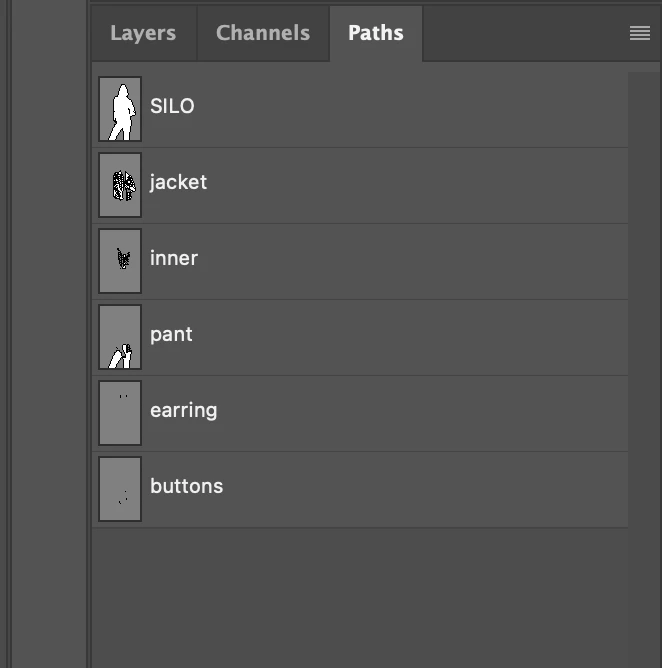
in the above image jpg file contains 6 paths in it so how to get that.
Thank You

This topic has been closed for replies.

3 replies

Chuck Uebele
Community Expert
Community Expert
July 20, 2024

As the others mentioned, scripting can get the info. You can store the info in an array. It will record the points in the orthat they were drawn. 

I'm curious as to how a jpg file has path info stored? I thought that wasn't possible. 

c.pfaffenbichler
Community Expert
Community Expert
July 20, 2024

The information is available in ESTK Scripting both via DOM and AM. (Edit: … for open files that is.) 

So as @Stephen Marsh already indicated it would be important to know what you are actually trying to achieve. 

Mahesh12Author
Known Participant
July 22, 2024

@c.pfaffenbichler can you help me with scripting

c.pfaffenbichler
Community Expert
Community Expert
July 22, 2024


I omitted the Bezier Handles as you only seemed to speak of pathpoints. 

// 2024, use it at your own risk;
if (app.documents.length > 0) {
var myDocument = app.activeDocument;
var thePaths = [];
for (var m = 0; m < myDocument.pathItems.length; m++) {
thePaths.push(collectPathInfoFromDesc2023(myDocument, m+1))
};
var theText = "";
for (var n = 0; n < thePaths.length; n++) {
theText = theText + myDocument.pathItems[n].name + "\n";
var thePointsString = "";
for (var o = 0; o < thePaths[n].length; o++) {
    for (var p = 0; p < thePaths[n][o].length - 2; p++) {
        thePointsString = thePointsString + String (thePaths[n][o][p][0]) + "\n"
    }
};
theText = theText + thePointsString
};
alert (theText);
writePref (theText, "~/Desktop/thePathPoints.txt")
};
////// read prefs file //////
function readPref (thePath) {
if (File(thePath).exists == true) {
var file = File(thePath);
file.open("r");
file.encoding= 'BINARY';
var theText = new String;
for (var m = 0; m < file.length; m ++) {
theText = theText.concat(file.readch());
};
file.close();
return String(theText)
}
};
////// function to write a preference-file storing a text //////
function writePref (theText, thePath) {
try {
var thePrefFile = new File(thePath);
thePrefFile.open("w");
for (var m = 0; m < theText.length; m ++) {
thePrefFile.write(theText[m])
};
thePrefFile.close()
}
catch (e) {};
};
////// collect path info from actiondescriptor, indices start at 1, not 0 //////
function collectPathInfoFromDesc2023 (myDocument, thePath) {
var originalRulerUnits = app.preferences.rulerUnits;
app.preferences.rulerUnits = Units.POINTS;
// based of functions from xbytor’s stdlib;
var idPath = charIDToTypeID( "Path" );
var ref = new ActionReference();
// check if thePath is an index or a dom-path;
if (thePath.constructor == Number) {
ref.putIndex(idPath, thePath)
}
else {
thePath.select();
var ref = new ActionReference();
ref.putEnumerated( charIDToTypeID( "Path" ), charIDToTypeID("Ordn"), charIDToTypeID("Trgt") );
};
// get stuff;
var desc = app.executeActionGet(ref);
var pname = desc.getString(cTID('PthN'));
// create new array;
var theArray = new Array;
var pathComponents = desc.getObjectValue(cTID("PthC")).getList(sTID('pathComponents'));
// for subpathitems;
for (var m = 0; m < pathComponents.count; m++) {
var listKey = pathComponents.getObjectValue(m).getList(sTID("subpathListKey"));
var operation1 = pathComponents.getObjectValue(m).getEnumerationValue(sTID("shapeOperation"));
switch (operation1) {
case 1097098272:
var operation = 1097098272 //cTID('Add ');
break;
case 1398961266:
var operation = 1398961266 //cTID('Sbtr');
break;
case 1231975538:
var operation = 1231975538 //cTID('Intr');
break;
default:
//		case 1102:
var operation = sTID('xor') //ShapeOperation.SHAPEXOR;
break;
};
// for subpathitem’s count;
for (var n = 0; n < listKey.count; n++) {
theArray.push(new Array);
var points = listKey.getObjectValue(n).getList(sTID('points'));
try {var closed = listKey.getObjectValue(n).getBoolean(sTID("closedSubpath"))}
catch (e) {var closed = false};
// for subpathitem’s segment’s number of points;
for (var o = 0; o < points.count; o++) {
var anchorObj = points.getObjectValue(o).getObjectValue(sTID("anchor"));
var anchor = [anchorObj.getUnitDoubleValue(sTID('horizontal')), anchorObj.getUnitDoubleValue(sTID('vertical'))];
var thisPoint = [anchor];
try {
var left = points.getObjectValue(o).getObjectValue(cTID("Fwd "));
var leftDirection = [left.getUnitDoubleValue(sTID('horizontal')), left.getUnitDoubleValue(sTID('vertical'))];
thisPoint.push(leftDirection)
}
catch (e) {
thisPoint.push(anchor)
};
try {
var right = points.getObjectValue(o).getObjectValue(cTID("Bwd "));
var rightDirection = [right.getUnitDoubleValue(sTID('horizontal')), right.getUnitDoubleValue(sTID('vertical'))];
thisPoint.push(rightDirection)
}
catch (e) {
thisPoint.push(anchor)
};
try {
var smoothOr = points.getObjectValue(o).getBoolean(cTID("Smoo"));
thisPoint.push(smoothOr)
}
catch (e) {thisPoint.push(false)};
theArray[theArray.length - 1].push(thisPoint);
};
theArray[theArray.length - 1].push(closed);
theArray[theArray.length - 1].push(operation);
};
};
// by xbytor, thanks to him;
function cTID (s) { return cTID[s] || cTID[s] = app.charIDToTypeID(s); };
function sTID (s) { return sTID[s] || sTID[s] = app.stringIDToTypeID(s); };
// reset;
app.preferences.rulerUnits = originalRulerUnits;
return theArray;
};


Stephen Marsh
Community Expert
Community Expert
July 20, 2024

Do you just wish to copy all paths from one file to another? Such as all paths from a JPG to a PSD? Or something else?


What exactly do you wish to do with each pathItem in the pathItems collection?


Or are you specifically after lower level details such as pathPoint, pathPoints or pathPointInfo?


You labelled the post as both actions/scripting and SDK. Can you clarify, as programming in the SDK is very different.

Mahesh12Author
Known Participant
July 22, 2024

@Stephen Marsh  i want to store that path point details in a file

Stephen Marsh
Community Expert
Community Expert
July 22, 2024
quote

@Stephen Marsh  i want to store that path point details in a file


By @Mahesh12


Ah, I have never done that!  :]