Known Participant
October 3, 2025
Answered

How to get the real size of the current layer

  • October 3, 2025
  • 2 replies
  • 539 views
var layer = app.activeDocument.activeLayer;
var Width = layer.bounds[2] - layer.bounds[0];
var Height = layer.bounds[3] - layer.bounds[1];
alert(Width + "\n" + Height)

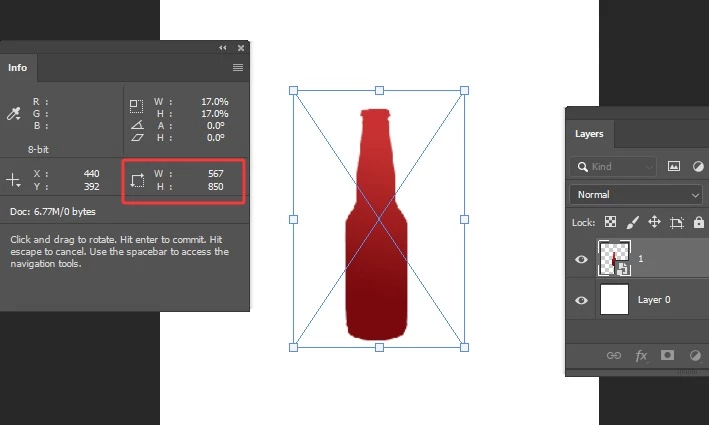
The dimensions obtained by the above code are 207 and 765, but the actual dimensions are 567 and 850, because the image contains transparent areas. How can I get the actual dimensions? Thank you, everyone


Correct answer Stephen Marsh

Because I clicked on File, Place Embedded, and selected a PNG file, but this PNG file may contain transparent pixels on the top, bottom, left, and right. Then I need to freely transform it proportionally to match the current document size, so I must first get the current smart object layer's size in the current document.


quote

Because I clicked on File, Place Embedded, and selected a PNG file, but this PNG file may contain transparent pixels on the top, bottom, left, and right. Then I need to freely transform it proportionally to match the current document size, so I must first get the current smart object layer's size in the current document.


By @w30290083o9nn


Having an embedded PNG complicates the layer or channel based hacks that I would employ when using a PSD/PSB.


AFAIK, there are only hacks, as this isn't covered by the DOM and I am unaware of AM alternatives.


Good luck!

2 replies

Stephen Marsh
Community Expert
Community Expert
October 3, 2025

@w30290083o9nn 


The edited canvas size of the original smart object, including transparency padding (500x500px):


Using transform, the scaled placed size, now 259px rather than the original 500px total size:


The script correctly reports the same scaled 259 total pixel size, not 500px:


I think this is code better than my previous suggestions, you were right to look at layer bounds, but not by opening the SO, just checking the bounds of the active layer. This includes transparency and includes the scaled size. So much simpler than my previous suggestions.


#target photoshop

// Get the currently selected layer
var layer = app.activeDocument.activeLayer;

// Check if the layer is a Smart Object
if (layer.kind == LayerKind.SMARTOBJECT) {
    // Get the bounds of the Smart Object layer (left, top, right, bottom)
    var layerBounds = layer.bounds;

    // Calculate the width and height of the Smart Object layer
    var layerWidth = layerBounds[2].as("px") - layerBounds[0].as("px"); // right - left
    var layerHeight = layerBounds[3].as("px") - layerBounds[1].as("px"); // bottom - top

    // Display the dimensions
    alert("Smart Object Dimensions (including transparency):\nWidth: " + layerWidth + " px" + " \nHeight: " + layerHeight + " px");
} else {
    alert("The selected layer is not a Smart Object.");
}


Known Participant
October 3, 2025

Thank you for providing the code. Why is the size not accurate when I use this code? Under free transform, the width of this layer is 567 and the height is 850, but the script retrieves the width as 207 and the height as 765

Stephen Marsh
Community Expert
Community Expert
October 3, 2025

Is the smart object raster? If so, when you edit it - what is the canvas size?


P.S. You should also explicitly work in pixels, either directly or temporarily setting ruler units before getting the bounds, just in case the current ruler units change.

Known Participant
October 3, 2025

The current layer is a smart object layer, not rasterized.

The ruler is in pixel units

Stephen Marsh
Community Expert
Community Expert
October 3, 2025
quote

The current layer is a smart object layer, not rasterized.


I can see that, but is it a raster object that Photoshop can edit/open, or is it a vector object that would be opened in an external editor such as Illustrator?


quote

The ruler is in pixel units


By @w30290083o9nn


My point was that this shouldn't be assumed. I don't know if you only posted a snippet of code, are you accounting for this or not?