
UltraUber
Known Participant
May 30, 2017
Answered

How to gradually increase transparency of objects?

  • May 30, 2017
  • 2 replies
  • 759 views

Hello.

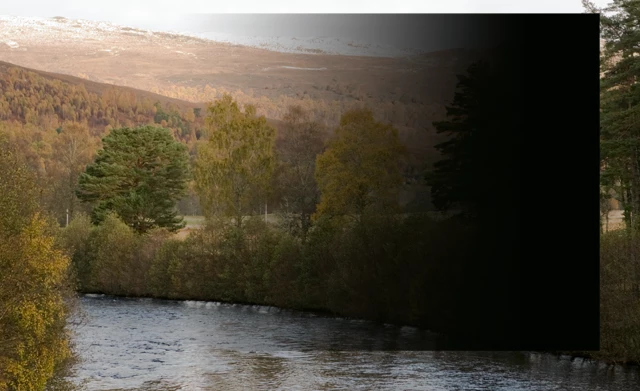
What are the methods to gradually increase transparency of an object (by "object" I mean any area of interest of an artwork). Say I have a black rectangle. I want the upper half of the rectangle to be solid black, and then from the middle I want it to become more and more transparent, right to the bottom edge. If there is some way to make Gradient Tool to affect transparency, that would be great. Any ideas?
This topic has been closed for replies.
Correct answer davescm

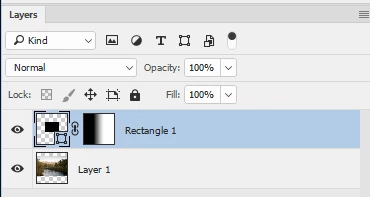
Add a mask.

Where the mask is white the pixels on that layer show.

Where the mask is black the pixels are transparent

Grey is semi-transparent

So if you add a mask and use the gradient tool to make it go from black to white you will get the effect you want

Dave

2 replies

Trevor.Dennis
Community Expert
Community Expert
May 31, 2017

You can apply gradients to Layer Masks.  In fact you can do most things in layer masks, but you are restricted to grey scale.

Does that help?

davescm
Community Expert
davescmCommunity ExpertCorrect answer
Community Expert
May 30, 2017

Add a mask.

Where the mask is white the pixels on that layer show.

Where the mask is black the pixels are transparent

Grey is semi-transparent

So if you add a mask and use the gradient tool to make it go from black to white you will get the effect you want

Dave

Trevor.Dennis
Community Expert
Community Expert
May 31, 2017

Blimey Dave.  It must be 1.15am over there.  You don't want to be skimping on your beauty sleep matey