
Participating Frequently
November 29, 2024
Answered

How to hide a filter in the filter menu.

  • November 29, 2024
  • 1 reply
  • 291 views

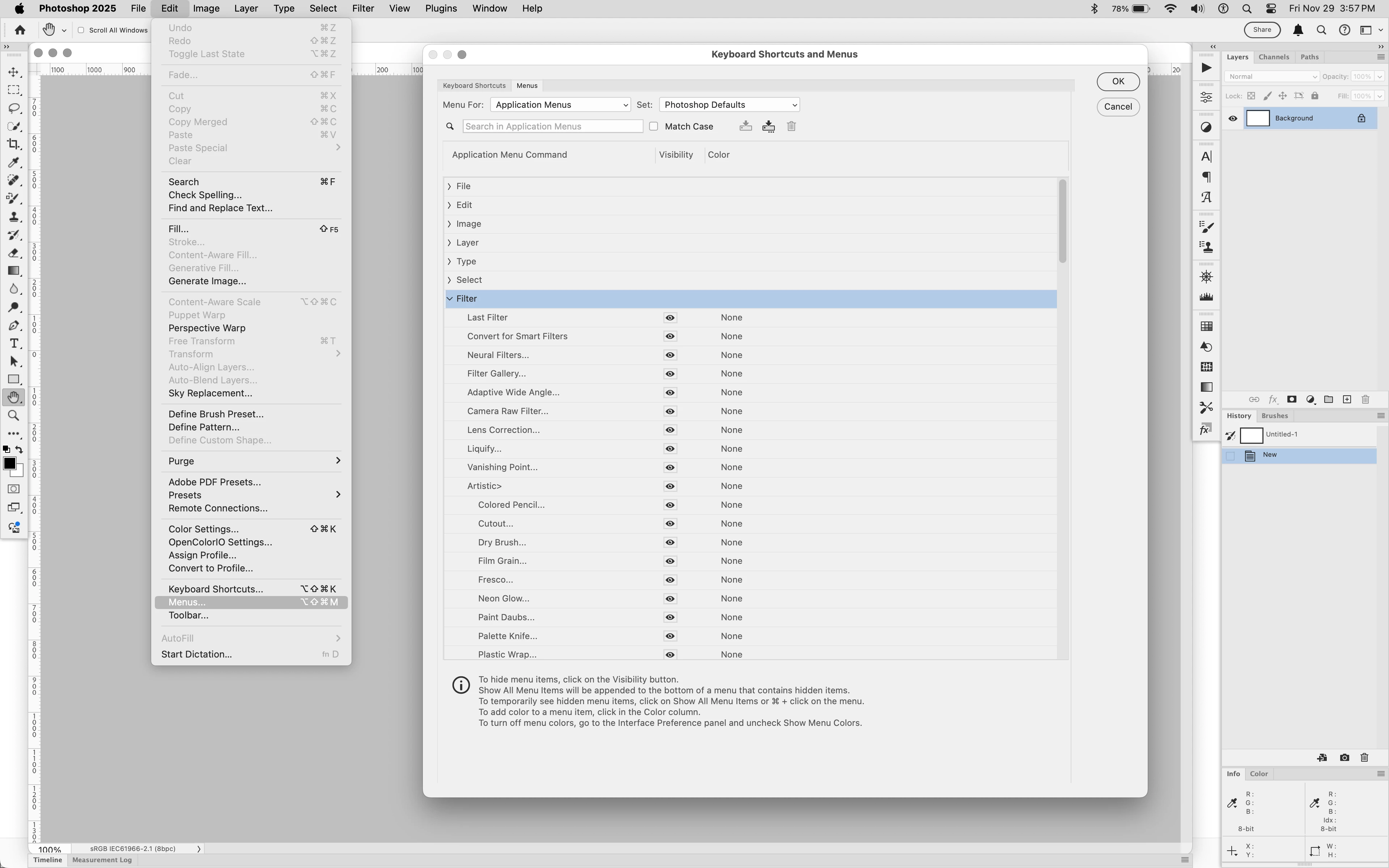
Some time ago I saw a list of the filters in my filter menu. Next to the list was an eyeball that let me determine which filters would show and which would be hidden. Unfortunately, I can't recall how to get to this filter list. Help please!
This topic has been closed for replies.
Correct answer Jeff Arola

In Photoshop go to Edit>Menus


1 reply

Jeff Arola
Community Expert
Jeff ArolaCommunity ExpertCorrect answer
Community Expert
November 29, 2024

In Photoshop go to Edit>Menus


Participating Frequently
November 29, 2024

That's exactly what I was looking for. Thank you so much!

Trevor.Dennis
Community Expert
Community Expert
November 29, 2024

Just so you know, you can save custom shortcuts, toolbars and menus with custom workspace.  This is useful because you can streamline your menus to speed up everyday use, and quickly turn them back on by swiotching to the default workspace (Essentials)