
Participant
January 9, 2021
Answered

How to I change the scale in Photoshop?

  • January 9, 2021
  • 3 replies
  • 731 views

I imported a photo into photoshop, and I know for this photo that 33 pixels is 12 inches. How can I change the scale so the ruler on top shows the correct length and when I draw a rectangle, it is accurate?


Thanks
This topic has been closed for replies.
Correct answer Michael Bullo

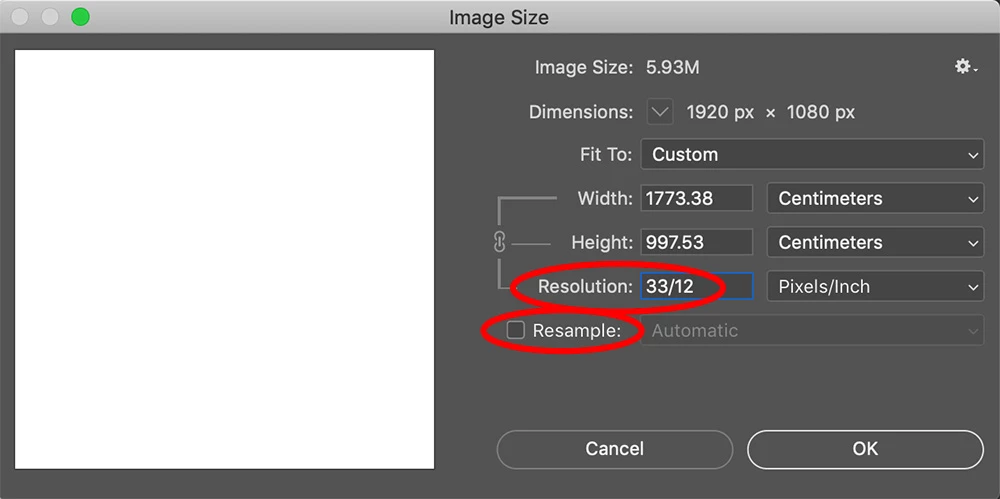
Changing the Resolution of your file might do the trick.

  1. Open the Image Size dialog box from the Image menu.
  2. Turn off the Resample checkbox to avoid changing the number of pixels in the image.
  3. Within the Resolution field type in a value for pixels, followed by the division symbol and followed by the equivalent number of inches. In your case, type in "33/12". Photoshop will calculate this equation for you.
  4. Press the tab key to calculate the equation without closing the dialog box. Press OK to update the Resolution.
  5. Show/Hide your Rulers via the toggle Command/Control + R.
  6. Right mouse click on a Ruler to change the units to inches.


3 replies

acohen906Author
Participant
January 10, 2021

Thank you! This worked perfectly. 

Michael Bullo
Community Expert
Community Expert
January 10, 2021

Excellent. Thank you.

Michael Bullo
Community Expert
Michael BulloCommunity ExpertCorrect answer
Community Expert
January 10, 2021

Changing the Resolution of your file might do the trick.

  1. Open the Image Size dialog box from the Image menu.
  2. Turn off the Resample checkbox to avoid changing the number of pixels in the image.
  3. Within the Resolution field type in a value for pixels, followed by the division symbol and followed by the equivalent number of inches. In your case, type in "33/12". Photoshop will calculate this equation for you.
  4. Press the tab key to calculate the equation without closing the dialog box. Press OK to update the Resolution.
  5. Show/Hide your Rulers via the toggle Command/Control + R.
  6. Right mouse click on a Ruler to change the units to inches.


Stephen Marsh
Community Expert
Community Expert
January 9, 2021

Image > Analysis > Set Measurement Scale > Custom

acohen906Author
Participant
January 10, 2021

Unfortunately, that doesn't seem to work. While it does change it when using the Ruler Tool, it doesn't edit the Ruler on image and when I try to draw a rectangle, it doesn't work either.

acohen906Author
Participant
January 10, 2021

For example, if I draw that same area with a rectangle, I get only 0.227 inches for length when it should really be 36 inches.