
Known Participant
July 19, 2019
Answered

How to implement the background in a picture?

  • July 19, 2019
  • 5 replies
  • 1150 views

Hi,

I hire a webdesign company to design a website. The designer implement the homepage. I cut the header part of the page, as below:

In the upper section, the background is using a very light blue. And I can notice the color in the border is deeper than those in the center. I ask the designer how to implement such a feature, but it seems that the designer cannot understand me very well. After several communications back and forth, I give up and decide to ask on the PS forum.

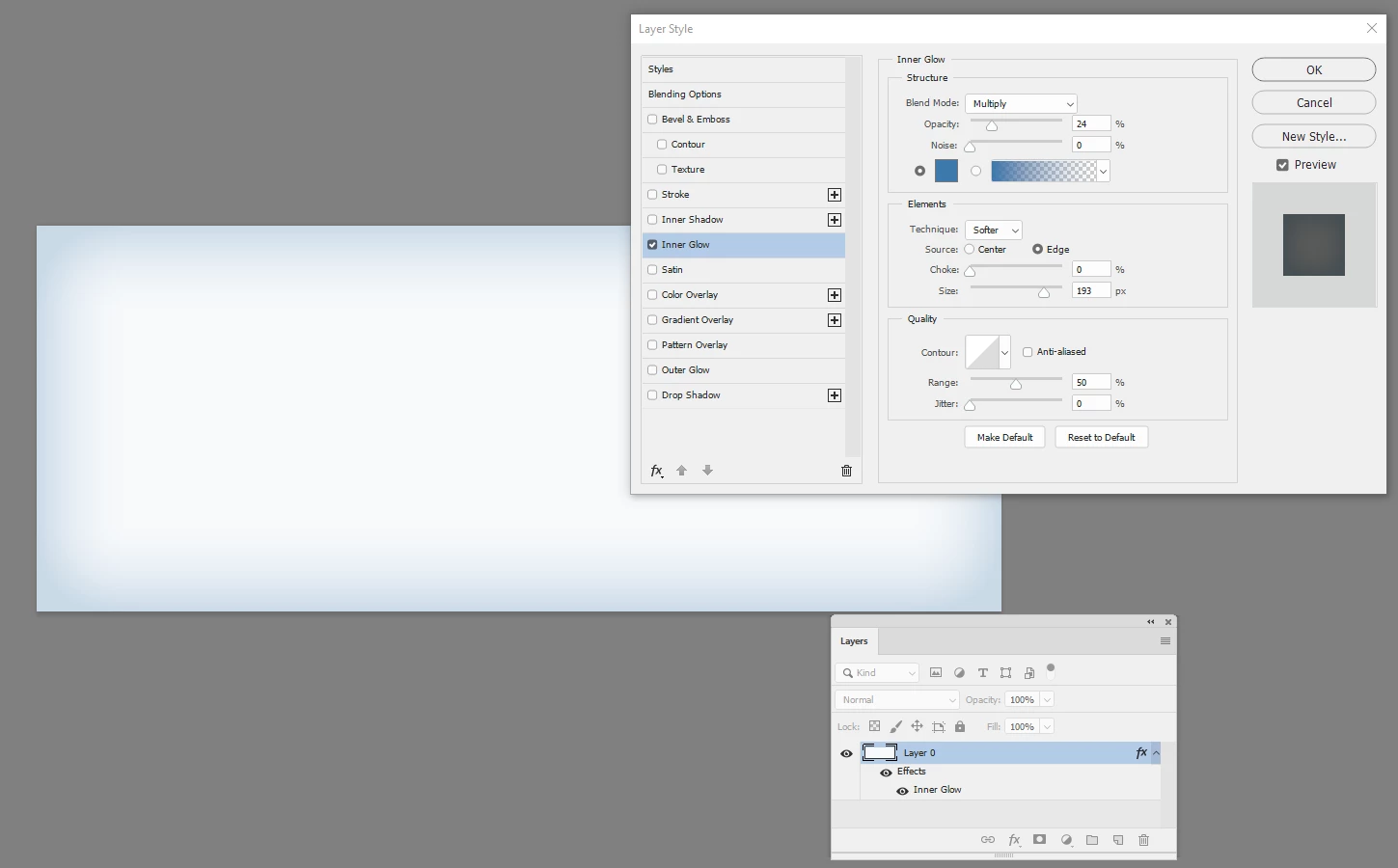
Can anyone tell me how to implement such a background? Is it using "Inner Shadow" effect or "Gradient Overlay" or other effects?

Thank you very much. !
This topic has been closed for replies.
Correct answer davescm

Use an inner glow set to multiply blend mode

Dave

5 replies

ccw123Author
Known Participant
July 20, 2019

Hi,

Thanks to all of you.

Dave's solution is the best one. And I solve the problem by asking the designer to resend the source PSD file and find the background layer, then adjust the borders like Dave's suggestion. As for how to increase the width of the shadow, it is a bit complex to me. And the background layer in the source PSD has enough width for me, so I just adopt it.

Thanks again for all your helps.

Legend
July 19, 2019

This is just a colored vignette, which can be applied in numerous ways. I typically use a solid color layer then a rounded rectangle pixel mask and blur the mask to taste. Then you can adjust the opacity to determine how strong it is. This has the advantage of being easily editable in the PSD at any time.

Bob_Hallam
Legend
July 19, 2019

You can do this effect (and many others in the Cascading Style Sheet of that page or globaly using CSS gradients.   Much better than using an image and will keep your web page fast instead of requiring the user to download the full frame image. 

Using CSS gradients - CSS: Cascading Style Sheets | MDN

ICC programmer and developer, Photographer, artist and color management expert, Print standards and process expert.
Community Expert
July 19, 2019

The OP already said this is in the design stage and not asking for a CSS? That aside I'd use CSS box-shadow, not gradient

Bob_Hallam
Legend
July 19, 2019

Unessary critisem.... the goal is to Help the OP. 

In this case help is to disuade the use of an image and use CSS instead. 

Better design.  

box-shadow - CSS: Cascading Style Sheets | MDN  

ICC programmer and developer, Photographer, artist and color management expert, Print standards and process expert.
Legend
July 19, 2019

Do you know that this is a graphic, rather than an HTML-based effect? I see no reason to use graphics for a simple gradient when you can do it with CSS: CSS Gradients

ccw123Author
Known Participant
July 19, 2019

The designer first design with PS, then they will implement the graphic with HTML & CSS. Currently we are still in the design stage so this is still a graphic.

davescm
Community Expert
davescmCommunity ExpertCorrect answer
Community Expert
July 19, 2019

Use an inner glow set to multiply blend mode

Dave

ccw123Author
Known Participant
July 19, 2019

davescm

Thank you very much for your help.

Is there a way to increase the width of the shadow in bottom? I check the original background, it seems that the shadow in bottom is much more wider than that in the top. I try to increase the size of inner glow to 250 px but seems still now wider enough.

Thank you.

Community Expert
July 19, 2019

You can't apply Inner Glow unevenly, but you can apply a Vector Mask over the layer to achieve what you after - you'd need it to create the spout at the bottom anyway