
Participant
January 27, 2021
Answered

how to limit value levels

  • January 27, 2021
  • 1 reply
  • 925 views

I wish to achieve an effect like this:
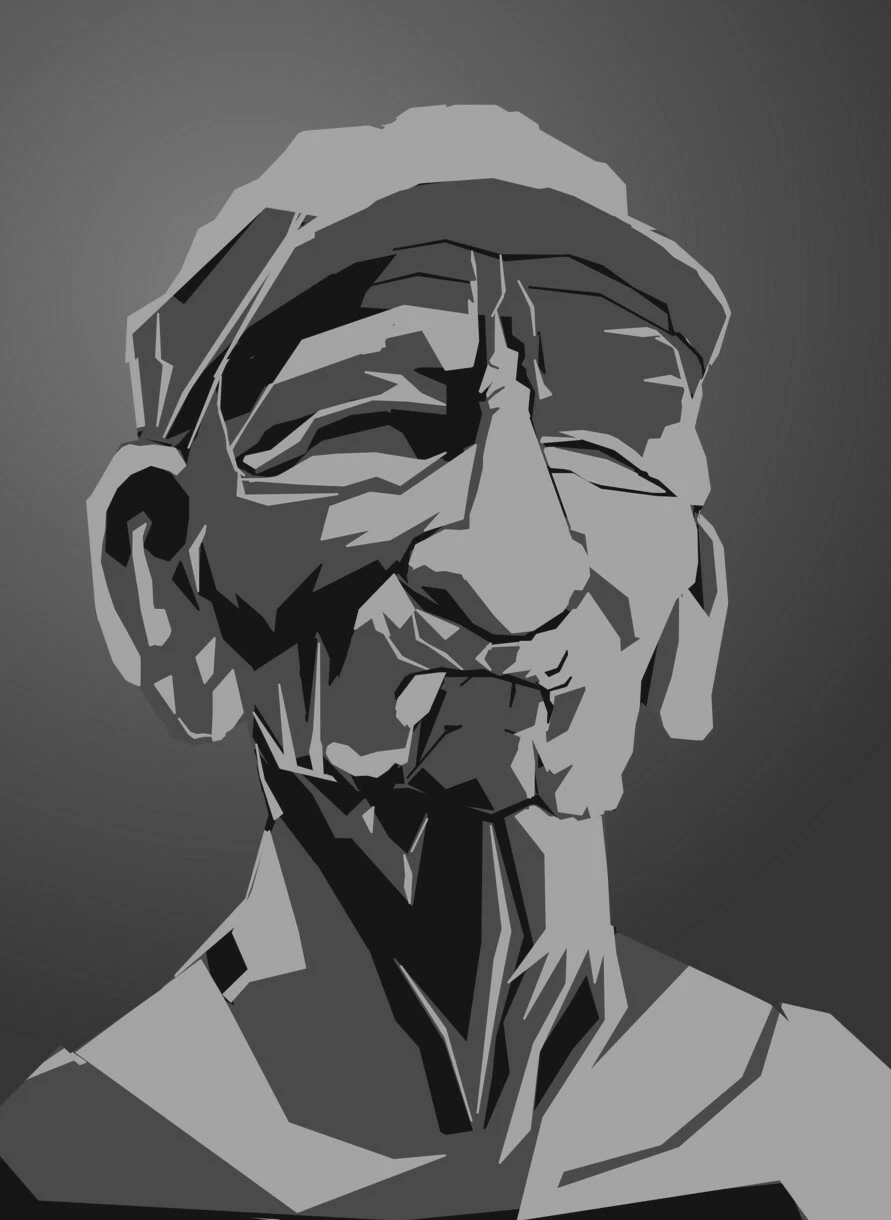
Where Photoshop groups pixels by value into several levels. In the example above there's 3 levels: Black, Dark Gray and Light Gray - and nothing in-between. That's what I'm going for but I don't know how to do that

This topic has been closed for replies.
Correct answer S_Gans

Depending on the original image, it looks like this was done in Illustrator, as an Image Trace, using 4 color grayscale. 
In Photoshop, you can try Creating a Posterize Adjustment Layer and playing with the color options, to bring it down to 4 colors.

1 reply

S_Gans
Community Expert
S_GansCommunity ExpertCorrect answer
Community Expert
January 27, 2021

Depending on the original image, it looks like this was done in Illustrator, as an Image Trace, using 4 color grayscale. 
In Photoshop, you can try Creating a Posterize Adjustment Layer and playing with the color options, to bring it down to 4 colors.

Adobe Community Expert / Adobe Certified Instructor