


Known Participant
May 23, 2025
Answered

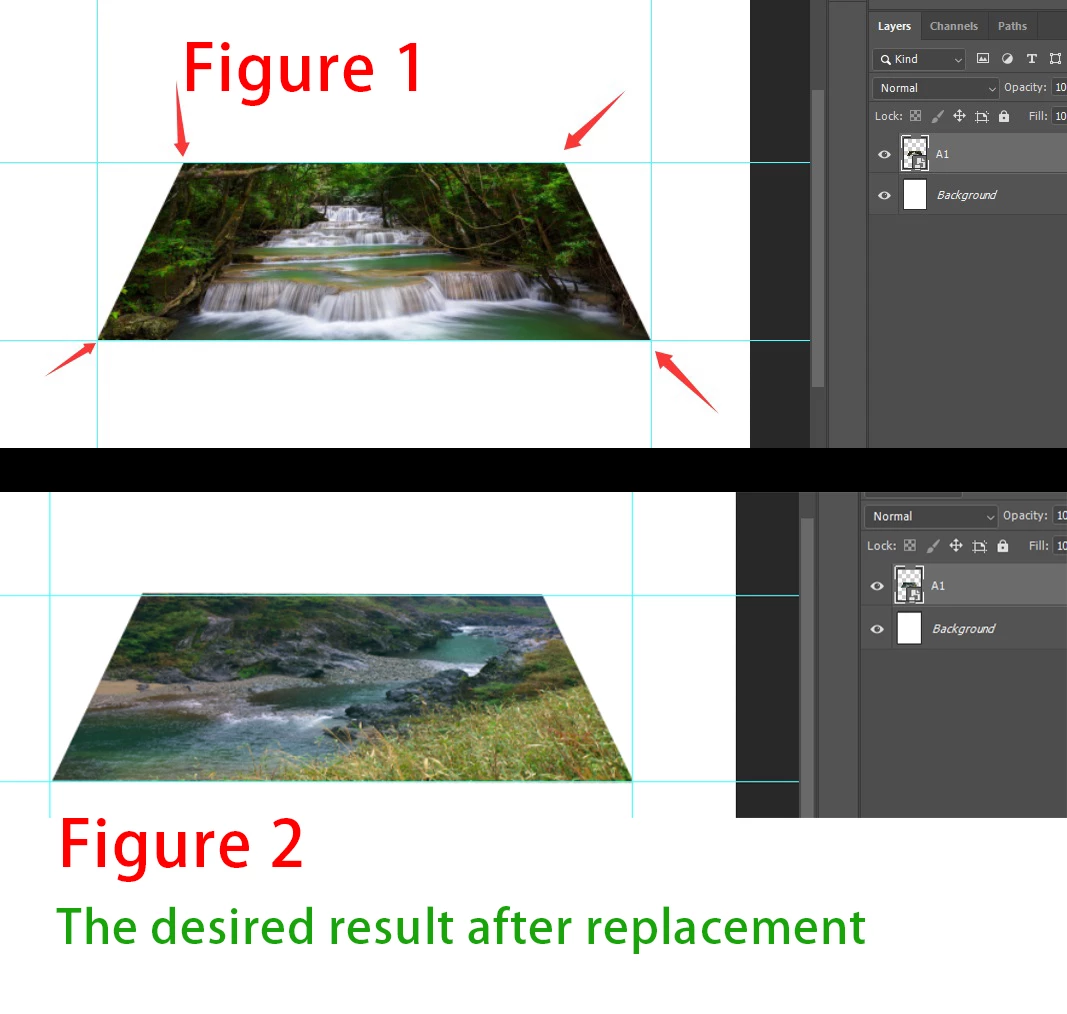
How to maintain consistent free transformation after replacing the content?

  • May 23, 2025
  • 3 replies
  • 1452 views

Due to the varying resolution and size of each image, after using the code below, some images may appear very large or very small, and even the coordinates and free transformation may differ.How can I maintain the consistent width, height, and free transformation of the image after replacing its content? Thank you again.

#target photoshop

var theFiles = File.openDialog("Please select a file", "*.psd;*.tif;*.jpg", false);

// Replace Smart Object contents
var idplacedLayerReplaceContents = stringIDToTypeID("placedLayerReplaceContents");
var desc3 = new ActionDescriptor();
var idnull = charIDToTypeID("null");
desc3.putPath(idnull, new File(theFiles)); // Pass the new file path to the action
var idPgNm = charIDToTypeID("PgNm");
desc3.putInteger(idPgNm, 1);
executeAction(idplacedLayerReplaceContents, desc3, DialogModes.NO);

Correct answer Stephen Marsh

@c.pfaffenbichler - great job as always, I was hoping that you would join the discussion as I was pretty sure that you'd be all over this!


@c.pfaffenbichler wrote:

A check to verify the active layer is a Smart Object might be a useful addition. 


My meagre contribition, DOM code:

// Terminate the script if the active layer isn't a smart object
if (app.activeDocument.activeLayer.kind !== LayerKind.SMARTOBJECT) {
    //alert("The active layer isn't a smart object!");
    exit();
}


AM code:


// Terminate the script if the active layer isn't a smart object
s2t = stringIDToTypeID;
(r = new ActionReference()).putProperty(s2t('property'), p = s2t('layerKind'));
r.putEnumerated(s2t('layer'), s2t('ordinal'), s2t('targetEnum'));
var layerKind = executeActionGet(r).getInteger(p);
if (layerKind !== 5) {
    //alert("The active layer isn't a smart object!");
    exit();
}

3 replies

c.pfaffenbichler
Community Expert
Community Expert
May 25, 2025

But please keep in mind that this only addresses a »plain« transformation, an applied Warp would be a different matter. 

Known Participant
May 27, 2025

ok,Thank you

c.pfaffenbichler
Community Expert
Community Expert
May 24, 2025

A check to verify the active layer is a Smart Object might be a useful addition. 

// replace contens of smart object and recreate previous perspectival transformation;
// based on code by michael l hale and r-bin;
// 2025, use it at your own risk;
if (app.documents.length > 0) {
var originalRulerUnits = app.preferences.rulerUnits;
app.preferences.rulerUnits = Units.PIXELS;
////////////////////////////////////
var myDocument = app.activeDocument;
var theFiles = File.openDialog("Please select a file", "*.psd;*.tif;*.jpg", true);
for (var m = 0; m < theFiles.length; m++) {
// get info;
var ref = new ActionReference();
ref.putEnumerated( charIDToTypeID("Lyr "), charIDToTypeID("Ordn"), charIDToTypeID("Trgt") ); 
var layerDesc = executeActionGet(ref);
var soDesc = layerDesc.getObjectValue(stringIDToTypeID('smartObject'));
var soMoreDesc = layerDesc.getObjectValue(stringIDToTypeID('smartObjectMore'));
var size = soMoreDesc.getObjectValue(stringIDToTypeID('size'));
var oldWidth = size.getUnitDoubleValue(stringIDToTypeID('width'));
var oldHeight = size.getUnitDoubleValue(stringIDToTypeID('height'));
var transform = soMoreDesc.getList(stringIDToTypeID("transform"));
var nonAffineTransform = soMoreDesc.getList(stringIDToTypeID("nonAffineTransform"));
var yy = new Array;
for (var n = 0; n < nonAffineTransform.count; n++) {
yy.push(nonAffineTransform.getDouble(n))
};
////////////////////////////////////
var newFile = theFiles[m];
replaceContents (newFile);
var ref = new ActionReference();
ref.putEnumerated( charIDToTypeID("Lyr "), charIDToTypeID("Ordn"), charIDToTypeID("Trgt") ); 
var layerDesc = executeActionGet(ref);
var soDesc = layerDesc.getObjectValue(stringIDToTypeID('smartObject'));
var soMoreDesc = layerDesc.getObjectValue(stringIDToTypeID('smartObjectMore'));
var size = soMoreDesc.getObjectValue(stringIDToTypeID('size'));
var newWidth = size.getUnitDoubleValue(stringIDToTypeID('width'));
var newHeight = size.getUnitDoubleValue(stringIDToTypeID('height'));
var transform = soMoreDesc.getList(stringIDToTypeID("transform"));
var nonAffineTransform = soMoreDesc.getList(stringIDToTypeID("nonAffineTransform"));
var yyNew = new Array;
for (var n = 0; n < nonAffineTransform.count; n++) {
yyNew.push(nonAffineTransform.getDouble(n))
};
// reset transformation;
executeAction( stringIDToTypeID( "placedLayerResetTransforms" ), undefined, DialogModes.NO );
// transform;
var p0 = myDocument.activeLayer.bounds;
var p1 = [[Number (yy[0]), Number (yy[1])], [Number (yy[2]), Number (yy[3])], [Number (yy[4]), Number (yy[5])], [Number (yy[6]), Number (yy[7])]];
non_affine_transform(p0, p1);
////////////////////////////////////
app.preferences.rulerUnits = originalRulerUnits;
}
};
////////////////////////////////////
////// replace SmartObject contents //////
function replaceContents (newFile) {
var desc3 = new ActionDescriptor();
desc3.putPath(charIDToTypeID("null"), new File(newFile));
desc3.putInteger(charIDToTypeID("PgNm"), 1);
executeAction(stringIDToTypeID("placedLayerReplaceContents"), desc3, DialogModes.NO);
};
////// free transform by r-bin //////
function non_affine_transform(p0, p1) 
{  
try {
var d = new ActionDescriptor();
var r = new ActionReference();
r.putEnumerated(stringIDToTypeID("layer"), stringIDToTypeID("ordinal"), stringIDToTypeID("targetEnum"));
d.putReference(stringIDToTypeID("null"), r);

var l = new ActionList();
l.putUnitDouble(stringIDToTypeID("pixelsUnit"), p0[0]);
l.putUnitDouble(stringIDToTypeID("pixelsUnit"), p0[1]);
l.putUnitDouble(stringIDToTypeID("pixelsUnit"), p0[2]);
l.putUnitDouble(stringIDToTypeID("pixelsUnit"), p0[3]);
d.putList(stringIDToTypeID("rectangle"), l );

var l = new ActionList();
l.putUnitDouble(stringIDToTypeID("pixelsUnit"), p1[0][0]);
l.putUnitDouble(stringIDToTypeID("pixelsUnit"), p1[0][1]);
l.putUnitDouble(stringIDToTypeID("pixelsUnit"), p1[1][0]);
l.putUnitDouble(stringIDToTypeID("pixelsUnit"), p1[1][1]);
l.putUnitDouble(stringIDToTypeID("pixelsUnit"), p1[2][0]);
l.putUnitDouble(stringIDToTypeID("pixelsUnit"), p1[2][1]);
l.putUnitDouble(stringIDToTypeID("pixelsUnit"), p1[3][0]);
l.putUnitDouble(stringIDToTypeID("pixelsUnit"), p1[3][1]);
d.putList(stringIDToTypeID("quadrilateral"), l);

d.putEnumerated(stringIDToTypeID("interpolation"), stringIDToTypeID("interpolationType"), stringIDToTypeID("bicubic"));

executeAction(stringIDToTypeID("transform"), d, DialogModes.NO); 

return true;
}
catch (e) { alert(e); return false; }
};


Known Participant
May 25, 2025

This result is amazing, thank you so much for your help!

Stephen Marsh
Community Expert
Community Expert
May 23, 2025

One destructive method that comes to mind for an embedded SO:


Set variables for the known target resolution and width and height... Or edit the smart object to retrieve the resolution and image size info and set as variables. After replacing the SO image, edit the smart object and set the resolution and image size from the variables.


A non-destructive method may match the transformation on the SO without editing the SO, this would be more complicated, search the forum, search the web or vibe code it.

Known Participant
May 24, 2025

Thank you for your suggestion. The method of editing the smart object works, but it's very slow. I will continue exploring the approach of replacing the content to change the image. Thanks again!

Stephen Marsh
Community Expert
Community Expert
May 24, 2025

Ideally, all of the smart object replacement files are batch normalised to the correct size and resolution.