
Participant
October 9, 2019
Question

How to make a fix color template for words / font

  • October 9, 2019
  • 4 replies
  • 1084 views

Hi,

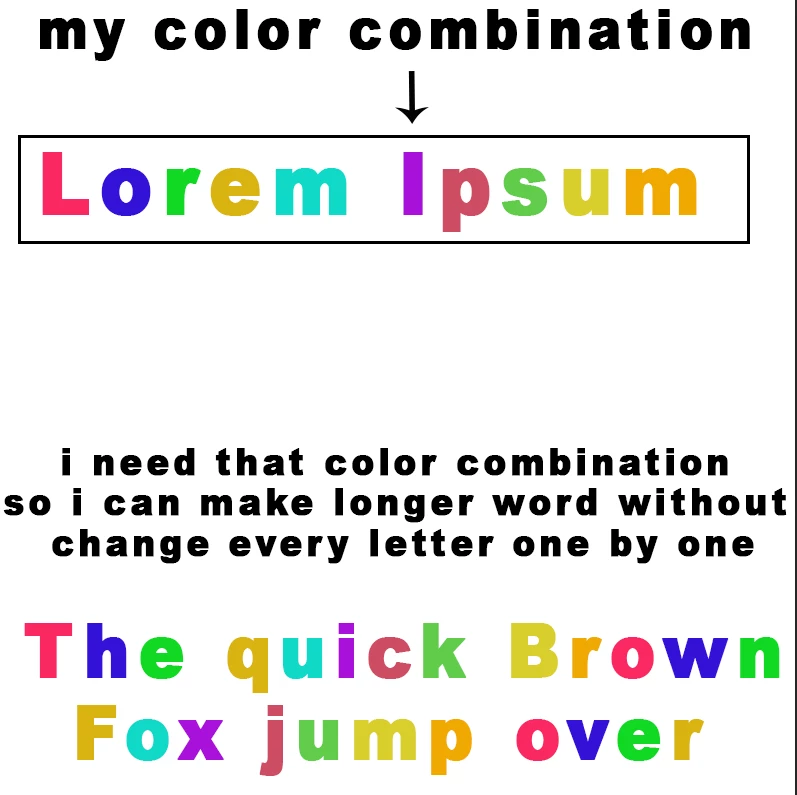
i know how to change color in every letter, but if i want to make  longer words i need to change every letter collor one by one, is there any way to automatically or some way with blending option so i dont need to change every letter color one by one?


nb: sry for my bad english, i attach image below for better explanation 


    This topic has been closed for replies.

    4 replies

    c.pfaffenbichler
    Community Expert
    Community Expert
    October 14, 2019
    The below code might work, naturally you’s habve to amend the Array »theColors«. 

    // apply colors from array to letters of selected type layer;
    // 2019, use it at your own risk;
    #target photoshop-130.064
    if (app.documents.length > 0) {
    //////////////////
    try {
    var theFonts = new Array;
    var theStyleRanges = new Array;
    // get font of active layer;
    var ref = new ActionReference();
    ref.putEnumerated( charIDToTypeID("Lyr "), charIDToTypeID("Ordn"), charIDToTypeID("Trgt") ); 
    var layerDesc = executeActionGet(ref);
    var layerSet = typeIDToStringID(layerDesc.getEnumerationValue(stringIDToTypeID("layerSection")));
    var isBackground = layerDesc.getBoolean(stringIDToTypeID("background"));
    var theName = layerDesc.getString(stringIDToTypeID('name'));
    // if not layer group collect values;
    if (layerSet != "layerSectionEnd" && layerSet != "layerSectionStart" && isBackground != true) {
    var hasText = layerDesc.hasKey(stringIDToTypeID("textKey"));
    if (hasText == true) {
    var textDesc = layerDesc.getObjectValue(stringIDToTypeID('textKey'));
    var theText = textDesc.getString(stringIDToTypeID('textKey'));
    var paragraphRangeList = textDesc.getList(stringIDToTypeID('paragraphStyleRange'));
    var kernRange = textDesc.getList(stringIDToTypeID('kerningRange'));
    var rangeList = textDesc.getList(stringIDToTypeID('textStyleRange'));
    // process the list;
    for (var o = 0; o < rangeList.count; o++) {
    var thisList = rangeList.getObjectValue(o);
    var theFrom = thisList.getInteger(stringIDToTypeID('from'));
    var theTo = thisList.getInteger(stringIDToTypeID('to'));
    var styleDesc = thisList.getObjectValue(stringIDToTypeID('textStyle'));
    var aSize = styleDesc.getUnitDoubleValue(charIDToTypeID( "Sz  " ));
    // check for default font;
    if (styleDesc.hasKey(stringIDToTypeID('fontPostScriptName')) == true) {var aFont = styleDesc.getString(stringIDToTypeID('fontPostScriptName'))}
    else {
    var theDefault = styleDesc.getObjectValue(stringIDToTypeID('baseParentStyle'));
    var aFont = theDefault.getString(stringIDToTypeID('fontPostScriptName'));
    };
    if (styleDesc.hasKey(stringIDToTypeID('impliedFontSize')) == true) {var aFont = styleDesc.getString(stringIDToTypeID('fontPostScriptName'))}
    // add to array;
    theFonts.push([aFont, aSize, theFrom, theTo]);
    theStyleRanges.push(thisList.getObjectValue(stringIDToTypeID('textStyle')));
    }
    }
    };
    // the color array;
    var theColors = [[255,0,0], [255,255,0], [0,255,0],[0,255,255], [0,0,255], [255,0,255]];
    var anIndex = 0;
    var theColorNumber = theColors.length;
    // change text;
    // =======================================================
    var idPxl = charIDToTypeID( "#Pxl" );
    var idTxtt = charIDToTypeID( "Txtt" );
    var idFrom = charIDToTypeID( "From" );
    var idT = charIDToTypeID( "T   " );
    var idTxtS = charIDToTypeID( "TxtS" );
    var idTxLr = charIDToTypeID( "TxLr" );
    var idTxt = charIDToTypeID( "Txt " );
    var idsetd = charIDToTypeID( "setd" );
        var desc6 = new ActionDescriptor();
        var idnull = charIDToTypeID( "null" );
            var ref1 = new ActionReference();
            ref1.putEnumerated( idTxLr, charIDToTypeID( "Ordn" ), charIDToTypeID( "Trgt"  ));
        desc6.putReference( idnull, ref1 );
            var desc7 = new ActionDescriptor();
            desc7.putString( idTxt, theText );
                var list2 = new ActionList();
    //////////////////
    // define each letter individually;
    var theIndex = 0;
    var theRef = theStyleRanges[theIndex];
    var theRef2 = theFonts[theIndex];
    for (var m = 0; m < theText.length; m++) {
    // check for relevant style range;
    if (m == theRef2[3]) {
    theIndex++;
    var theRef = theStyleRanges[theIndex];
    var theRef2 = theFonts[theIndex];
    };
    var desc14 = new ActionDescriptor();
    desc14.putInteger( idFrom, m );
    desc14.putInteger( idT, m+1 );
    var theStyle = theRef;
    var desc21 = new ActionDescriptor();
    desc21.putDouble( charIDToTypeID( "Rd  " ), theColors[anIndex][0] );
    desc21.putDouble( charIDToTypeID( "Grn " ), theColors[anIndex][1]  );
    desc21.putDouble( charIDToTypeID( "Bl  " ), theColors[anIndex][2]  );
    theStyle.putObject( charIDToTypeID( "Clr " ), charIDToTypeID( "RGBC" ), desc21 );
    desc14.putObject( stringIDToTypeID('textStyle'), stringIDToTypeID('textStyle'), theStyle);
    list2.putObject( charIDToTypeID( "Txtt" ),  desc14);
    anIndex++;
    if (theText[m].match(/\s/)!=null) {anIndex--};
    if (anIndex == theColorNumber) {anIndex = 0};
    };
    //////////////////
    //        desc7.putList( stringIDToTypeID('paragraphStyleRange'), paragraphRangeList );
    //        desc7.putList( stringIDToTypeID('kerningRange'), kernRange);
            desc7.putList( idTxtt, list2 );
        desc6.putObject( idT, idTxLr, desc7 );
    executeAction( idsetd, desc6, DialogModes.NO );
    }
    catch (e) {};
    };
    //////////////////
    Chuck Uebele
    Community Expert
    Community Expert
    October 9, 2019

    Doing this with scripting would be a solution, but very involved. See this link for an example along the same lines: https://community.adobe.com/t5/Photoshop/Changing-color-of-text-found-with-regex/td-p/9320147

    davescm
    Community Expert
    Community Expert
    October 9, 2019

    Hi
    Pattern overlay works here. You may need to click snap to origin, or scale and drag it on the canvas, to position it.

    Dave

    jane-e
    Community Expert
    Community Expert
    October 9, 2019

    Dave, can you try that when the text is on multiple lines and when it changes type size to see if it still works? The OP’s pattern is 10 colors that repeat, skipping spaces.


    ~Jane

    davescm
    Community Expert
    Community Expert
    October 9, 2019

    How successful depends on the type Jane. All it really does is add an overlay to the layer. So if the letter width is even and each line is on a separate layer it can adjusted quickly. If the layer width is uneven it would be quicker to paint on a clipped layer.


    Bojan Živković11378569
    Community Expert
    Community Expert
    October 9, 2019

    One way I can think of is to create stripped colored image on separate layer then to clip it to text below. This is much easier to do on line by line basis, so it is recommended to use point instead of paragraph text. Another way is to create pattern, save it then apply as Pattern Overlay layer effect.

    dionvkAuthor
    Participant
    October 9, 2019

    thank you!! using clip mask is great way to make colorful text with less effort, but i dont get it with pattern overlay effect, i manage to create a pattern with stripped colored image, then apply using fill pattern overlay, but it show nothing?