Participant
August 22, 2015
Answered

How to make a script to resize image to fit exact frame?

  • August 22, 2015
  • 4 replies
  • 2402 views

Good afternoon,

My friend is working on a task to make multiple images fit the frame size 500x700 px.

We work out this script, though it sometimes makes Height above 700 px.

Can anyone help to edit it?

___

doc = app.activeDocument; 

doc.changeMode(ChangeMode.RGB); 

var fWidth = 500;

var fHeight = 700;

if (doc.width > fWidth,"px") {

    doc.resizeImage(UnitValue(fWidth,"px"),null,null,null,ResampleMethod.BICUBIC);

}

else {

    doc.resizeImage(null,UnitValue(fHeight,"px"),null,null,ResampleMethod.BICUBIC);

}

___

This topic has been closed for replies.
Correct answer JJMack

The thing is the image need to have a 5:7 aspect ratio to fit an area 500px by 700px.  An image can have a width  and  height any number of pixel. All from a camera will have  a width and height greater the 700px. So your above script would create a bunch very distorted narrow portraits

Download my crafting action package it has some script I wrote to be used within actions that make it very easy to do what you want.

Scripts can be used in actions and actions can be used in scripts.  Photoshop scripts can also be programmed as a Photoshop Plug-in.  When a plug-in is recorded into an action the plug-in records the setting you used in its dialog into the action step. When the Action is played.  The plug-in does not display its dialog instead it will use the recorded setting in the action step.  No user interaction is required the action can be batched.

Most Photoshop users can not write scripts but the have no problem using scripts that other write.  Like Adobe Photomerge, Image Processor, Fit image etc...

I wrote a Plug-in script using Adobe's Fit Image design that will make aspect ratio selection while preserving the document orientation.  So if you have a 4:3 camera and a collection of images  from it  you will  have 4:3 Landscape and 3:4 Portraits.  If you use my aspectratioselection plug-in script in a action and set a 3:2 aspect ration centered followed by a image crop and batched that action on your images you would wind up with 3:2 landscapes and 2:3 Portraits.  A three step action is all you need record.

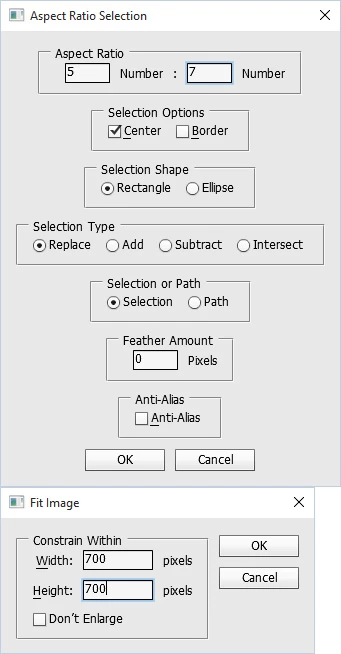
step 1 menu File>Automate>AspectRatioSelection...  In its dialog set 5 7 center rectangle replace selection 0 feather

step 2 menu Image>Crop

step 3 menu File>Automate>Fit Image...  in its dialog set width and height to 700 px

You will wind up with 700x500px Landscapes and 500x700px portraits.

I have created at least six of the lately. I use for making slide shows for my various devices.   I put the images I want to use in a source image folder on my desktop and play an action the creates the six slide shows is a slide in a slideshows folder on my desktop. In six sub folders. The Action is all of two steps. The first step runs a script that clears out the Slideshows folder.  The second step is an Image Processor Pro Plug-in step.  That process the source image folder into the Slideshows folder saving six sets of jpeg images is six sub folders. Galaxy tab display 16:10 sideshow 2560x1600 and also as a 3:2 slide show 2400x1600.  Surface Pro 3   sideshow 3:2   2160x1440, iPo4 4 Slide show 3:2  960x640, HDTV 1920x1080 and 4kTV 3840x2160. I take a coffee break... while the action runs.
Crafting Actions Package UPDATED Aug 10, 2014 Added Conditional Action steps to Action Palette Tips.
Contains

Example
Download

4 replies

Participant
August 23, 2015

And thank you for the additional information!

Participant
August 23, 2015

Hi!

Although, I have made an action workaraound with Fit Image, but your solution is an efficient way to get the result. Thank you

Chuck Uebele
Community Expert
Community Expert
August 22, 2015

Moving to Photoshop Scripting forum.

JJMack
Community Expert
JJMackCommunity ExpertCorrect answer
Community Expert
August 22, 2015

The thing is the image need to have a 5:7 aspect ratio to fit an area 500px by 700px.  An image can have a width  and  height any number of pixel. All from a camera will have  a width and height greater the 700px. So your above script would create a bunch very distorted narrow portraits

Download my crafting action package it has some script I wrote to be used within actions that make it very easy to do what you want.

Scripts can be used in actions and actions can be used in scripts.  Photoshop scripts can also be programmed as a Photoshop Plug-in.  When a plug-in is recorded into an action the plug-in records the setting you used in its dialog into the action step. When the Action is played.  The plug-in does not display its dialog instead it will use the recorded setting in the action step.  No user interaction is required the action can be batched.

Most Photoshop users can not write scripts but the have no problem using scripts that other write.  Like Adobe Photomerge, Image Processor, Fit image etc...

I wrote a Plug-in script using Adobe's Fit Image design that will make aspect ratio selection while preserving the document orientation.  So if you have a 4:3 camera and a collection of images  from it  you will  have 4:3 Landscape and 3:4 Portraits.  If you use my aspectratioselection plug-in script in a action and set a 3:2 aspect ration centered followed by a image crop and batched that action on your images you would wind up with 3:2 landscapes and 2:3 Portraits.  A three step action is all you need record.

step 1 menu File>Automate>AspectRatioSelection...  In its dialog set 5 7 center rectangle replace selection 0 feather

step 2 menu Image>Crop

step 3 menu File>Automate>Fit Image...  in its dialog set width and height to 700 px

You will wind up with 700x500px Landscapes and 500x700px portraits.

I have created at least six of the lately. I use for making slide shows for my various devices.   I put the images I want to use in a source image folder on my desktop and play an action the creates the six slide shows is a slide in a slideshows folder on my desktop. In six sub folders. The Action is all of two steps. The first step runs a script that clears out the Slideshows folder.  The second step is an Image Processor Pro Plug-in step.  That process the source image folder into the Slideshows folder saving six sets of jpeg images is six sub folders. Galaxy tab display 16:10 sideshow 2560x1600 and also as a 3:2 slide show 2400x1600.  Surface Pro 3   sideshow 3:2   2160x1440, iPo4 4 Slide show 3:2  960x640, HDTV 1920x1080 and 4kTV 3840x2160. I take a coffee break... while the action runs.

Crafting Actions Package UPDATED Aug 10, 2014 Added Conditional Action steps to Action Palette Tips.
Contains

Example
Download

JJMack