
Participant
April 4, 2021
Answered

How to make background of an object transparent.

  • April 4, 2021
  • 2 replies
  • 639 views

I selected my main element (a mammoth) with the selection tool.  I would like to make the background transparent (or disappear, so that I am left with only the mammoth to use in a publication.

This topic has been closed for replies.
Correct answer Michael Bullo

If you have a multi-layered file, start by selecting that layer from within the Layers panel. If not, don't worry. Then, with your selection already created, simply press the "Add layer mask" button at the bottom of the Layers panel. The checkerboard pattern shows areas that are now transparent.
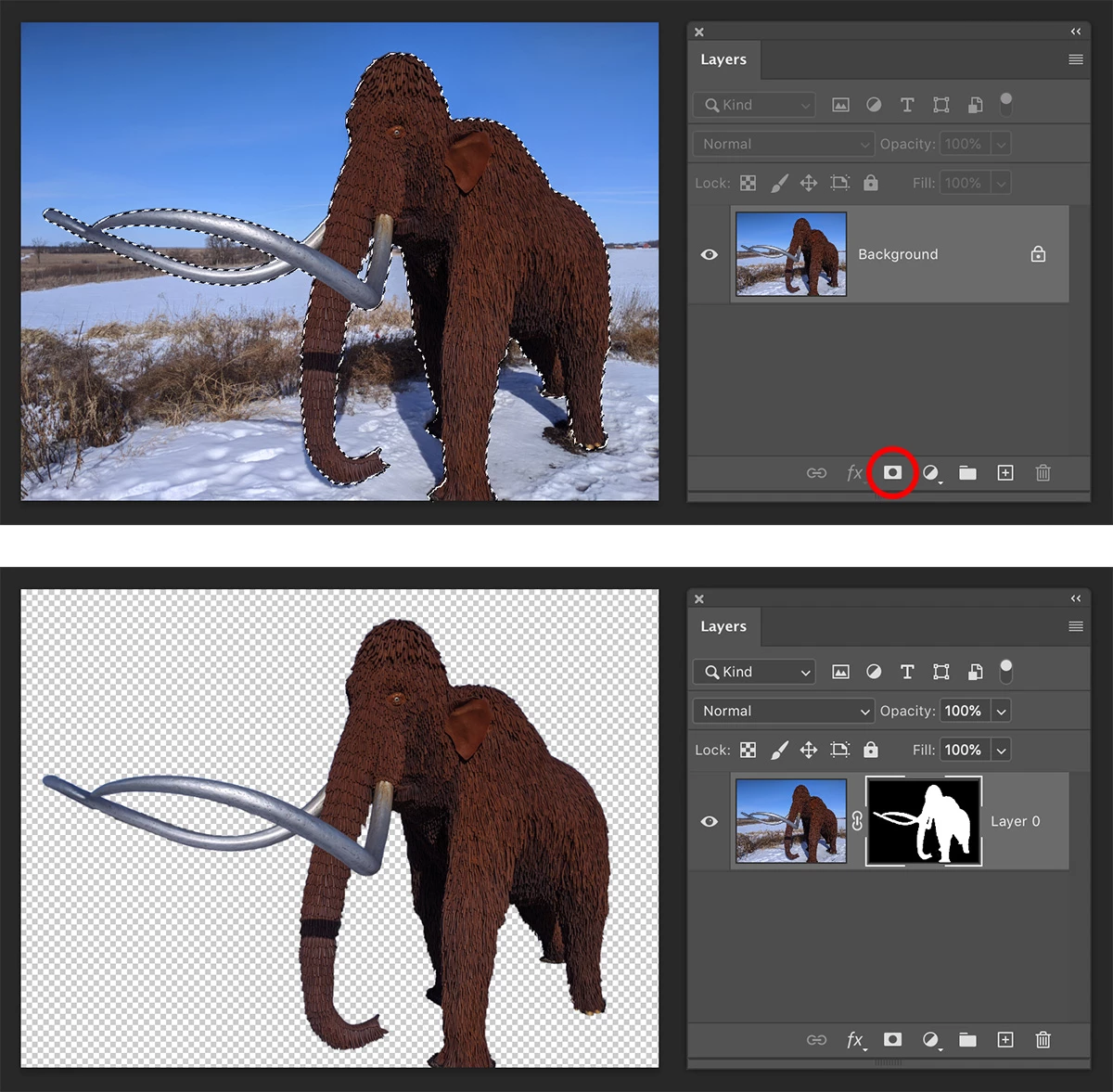


If you are working on a file like a JPEG, your Background layer will be converted into a regular layer that can support transparency. If you want to preserve this new mask, be sure to save your file as a Photoshop file.

2 replies

Michael Bullo
Community Expert
Michael BulloCommunity ExpertCorrect answer
Community Expert
April 5, 2021

If you have a multi-layered file, start by selecting that layer from within the Layers panel. If not, don't worry. Then, with your selection already created, simply press the "Add layer mask" button at the bottom of the Layers panel. The checkerboard pattern shows areas that are now transparent.


If you are working on a file like a JPEG, your Background layer will be converted into a regular layer that can support transparency. If you want to preserve this new mask, be sure to save your file as a Photoshop file.

Participant
April 5, 2021

Many Thanks.  That did it.

Michael Bullo
Community Expert
Community Expert
April 5, 2021

Excellent. Thank you.

lambiloon
Community Expert
Community Expert
April 5, 2021

Hi, check the following video hope it helps you...regards


https://youtu.be/aQw5ho6zPTU

Ali Sajjad / Graphic Design Trainer / Freelancer / Adobe Certified Professional
Participant
April 5, 2021

I did not see anything in this video about making part of the image transparent.