
Participant
August 30, 2022
Answered

How to make LGBT Rainbow Effect for a Black & White Image

  • August 30, 2022
  • 5 replies
  • 3534 views

I have several images that are all black and white; I'm wanting to turn the entire white portion of each of the images to have rainbow colors stack on top of each other like th LGBT rainbow flag and get rid of the white entirely (while keeping the black potions of the images). Any help would be tremendously appreciated!
This topic has been closed for replies.
Correct answer Trevor.Dennis

 @Clay25991967es2o


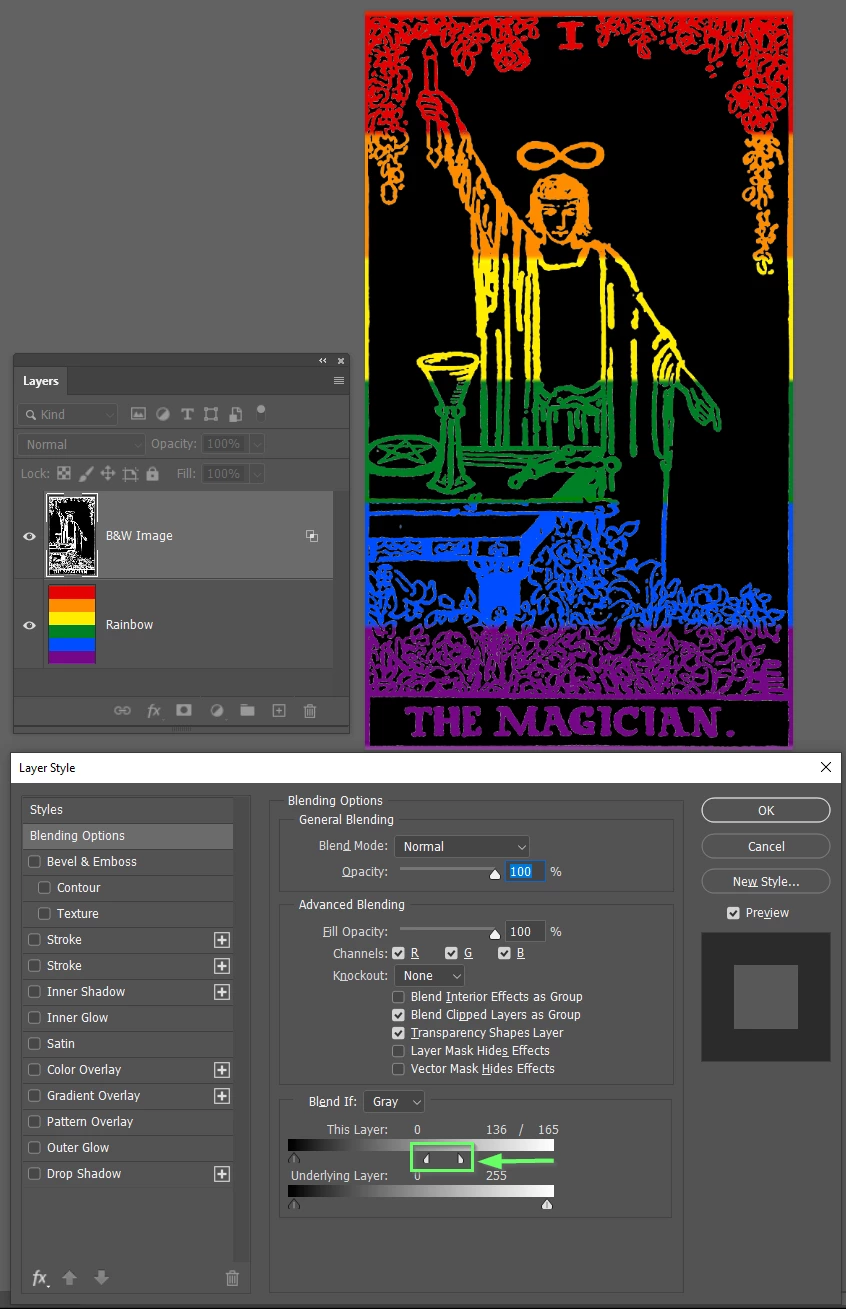
With a black and white image like that, Blend If is the way to go.


Arrange the layers as below.

You'll need to enlarge the rainbow graphic which you can do with Free Transform (Ctrl T)

Double click the B&W image to open the Layer Styles panel, and use the Blend If sliders moving them to the left.

Note you can get more control by holding down the Alt(Opt) key and seperating the slider.


5 replies

Chris 486
Community Expert
Community Expert
August 31, 2022

Trevor provides some great options for replacing the white portion of an image. I would also like to add an option of using the Select Color Range tool. 

It can be found by going to Select>Color Range


Here is adobe's section on it:

Select color ranges in Photoshop (adobe.com)


And a great video of it in action to get a very precise cutout/mask:

Precisely Cut Out Hair Using Color Range in Photoshop! - YouTube


Bojan Živković11378569
Community Expert
Community Expert
August 31, 2022

Beware that some color modes including Grayscale mode won't allow you to have color gradient. Safe option is to check that Image > Mode is set to RGB before adding gradient.

Trevor.Dennis
Community Expert
Community Expert
August 31, 2022

Another option, and perhaps a better one, is to place the rainbow layer above the B&W image and use Blend If

Double click the B&W layer to open the Layer Styles panel, and use the This Layer slider moving the right slider to the left.  If you hold down the Alt (Opt) key you can separate the right slider, as shown in my cyan highlight, to get more control over what tonal values will become transparent to reveal the rainbow in the layer beneath it.  You can see that this method has eliminated the slight fringe that shows in the layer mask version.

Trevor.Dennis
Community Expert
Community Expert
August 31, 2022

You can't use colorize, or the color blend mode over white.  It just won't show.  So you'll need to select the wite area and use a mask. 

Place the rainbow in a new layer above the B&W image.

Turn the rainbow layer off and Select the white area with the magic wand tool.

Turn the raibow layer back, and give it a layer mask.


I am sure you'll know that there is already a rainbow gradient available.  If you open the gradients panel you can use the search bar to find it as gradients are kind of hidden away nowadays.  My green highlight is the add layer mask icon.

Note I have used the radial gradient (my red highlight


Chris 486
Community Expert
Community Expert
August 31, 2022

Hi Clay!


If you could share a visual example with us, we could give you some great tips on how to approach you request. 


Trevor.Dennis
Community Expert
Community Expert
August 31, 2022

One more option then I am done.  Unless I think of something else 😉


The Sky Replacement tool in the Edit menu does an amazing job of selecting the sky, so I sometimes use it purely for the layer mask it produces.  Turn the Sky Replacement group off, and Alt (Opt) drag either of the layer masks to the rainbow layer above. 


You can Free Transform > Warp the rainbow as below

I suspect you will use the rainbow colours in a lot of your projects, so you might like to save various rainbow options to the Sky Replacement tool.  You can see that I have done that with some local NZ skies that took my fancy.


You could create new Layer Styles and gradients based on the rainbow, or make them into Smart Objects and save them to a Create Cloud Library.  I particularly like the CC Libraries as it means those assets are available anywhere in the world where you have an internet connection.  


OK I am going to do some work before I am in trouble with the missus. 😞