Participant
August 30, 2017
Answered

How to make photo take on gradient colors? [Edited for brevity]

  • August 30, 2017
  • 2 replies
  • 379 views

I am trying to get a gradient to merge with my image, but i do not want it to be transparent, if I pick a  solid gradient it just covers my image. Is there anyway to merge this solid gradient with my photo, so the photo takes on the colors of the gradient?

@

Okay so I am trying to give one of my photos this effect, but when I use a solid gradient it just shows the gradient and not the photo. Is there anyway I can merge the two so i can get this color scheme. Or can I get a step by step way to turn my photo like this with the color gradient and how to get this white highlight in the picture as well. Thank you

This topic has been closed for replies.
Correct answer c.pfaffenbichler

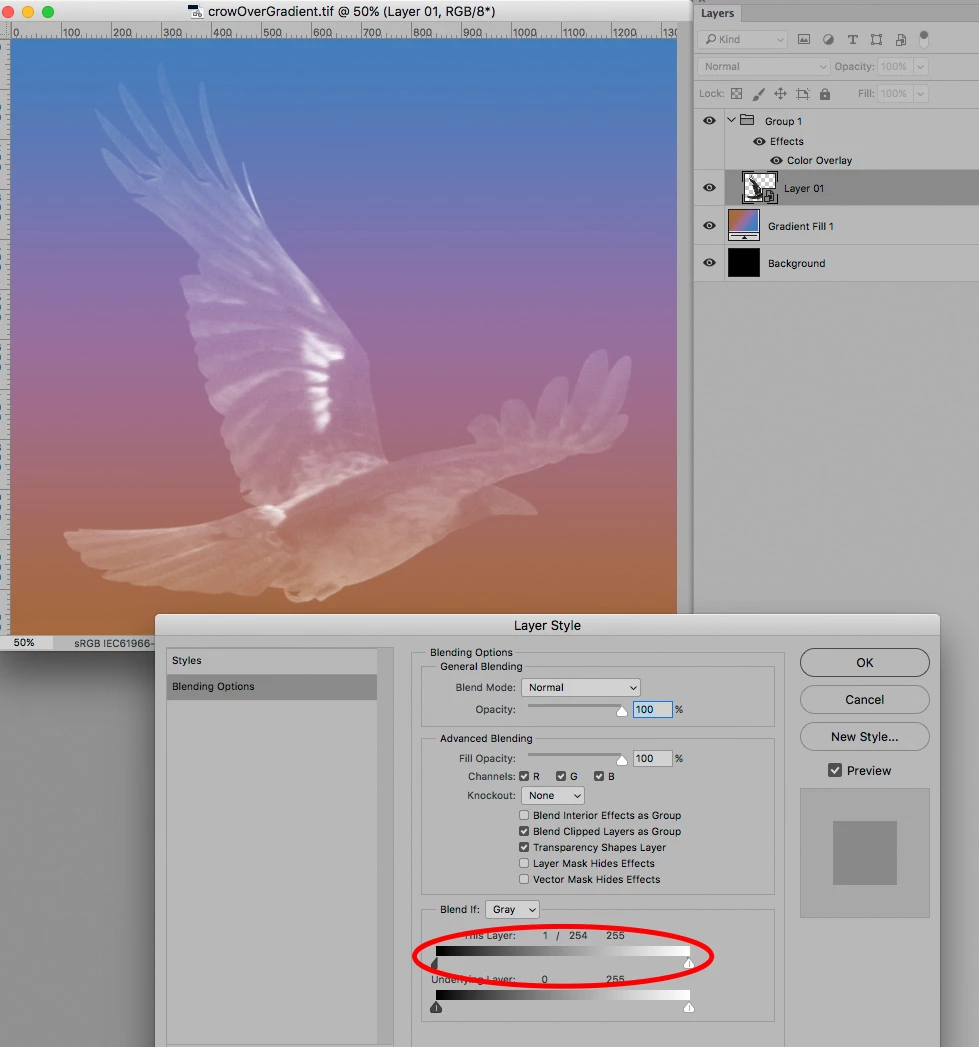
I recommend restructuring the Layers:

• The Gradient at the bottom

• the image with an appropriate  Blend If setting in

• a Group with Layer Style Color Overlay

2 replies

Norman Sanders
Legend
August 30, 2017

An alternate: It looks as though the hand is a flat tone on a transparent background over the gradient.

c.pfaffenbichler
Community Expert
c.pfaffenbichlerCommunity ExpertCorrect answer
Community Expert
August 30, 2017

I recommend restructuring the Layers:

• The Gradient at the bottom

• the image with an appropriate  Blend If setting in

• a Group with Layer Style Color Overlay