Participant
February 11, 2022
Question

How to make squared zig zag (?) line?

  • February 11, 2022
  • 1 reply
  • 168 views

I don't really know what to call this type of line, but it's usually used to denote fortress walls in maps and I'm trying to create a consistently spaced distort, I suppose, on the line but I simply don't know how to achieve it. I feel like there has to be some way. For reference, this is what I'm trying to create:
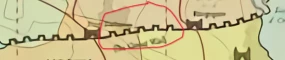
Any ideas would be helpful! I am also not opposed to creating something in Illustrator and pulling it into Photoshop.

This topic has been closed for replies.

1 reply

Semaphoric
Community Expert
Community Expert
February 12, 2022

In Photoshop, you could make a Brush of a single crennelation (if that's the term), and stroke a path with it. I just did a quick try, and it looked pretty bad. The ends often wouldn't meet. Maybe something good could be built diving deep into the brush settings. People like Kyle Webster do things I can barely understand 🙂


Illustrator would be the tool to us for this. Open your image in Illustrator, and add a Path at the desired location. Stroke with an Art Brush, and then Paste in place into Photoshop. Pasting as a Smart Object allows you to update the path in Illustrator, but pasting as a Shape Layer or Pixels are nice and direct.


Or, yo could just do the whole thing in Illustrator, as it's much better for maps than Photoshop.