Inspiring
July 22, 2023
Question

How to make this type of shape

  • July 22, 2023
  • 3 replies
  • 393 views

Hey,


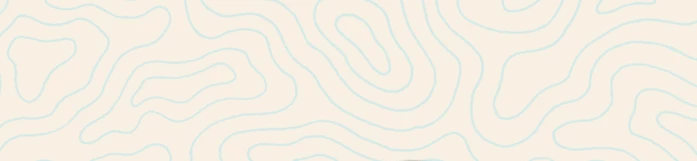
How looking for replicating this circle / lines shapes. 


What tool to use ? any tips !


Thanks in advance,


This topic has been closed for replies.

3 replies

c.pfaffenbichler
Community Expert
Community Expert
July 23, 2023

Another variation (using Gradient Map, Blend if, Layer Style Stroke, …). 

One benefit might be the immediate editability with Solid Color Layers with Layer Masks with a sufficient Feather (see screenshot 2 and 3 ). 

Myra Ferguson
Community Expert
Community Expert
July 22, 2023

Depending on how much control you want over the lines, you might want to use Illustrator instead where you can create shapes and use Offset Path.


In Photoshop, one way that you could create what looks a bit like a topographical map would be to do the following:

  1. Use Filter > Render > Clouds with foreground set to black and background set to white to have Photoshop create shapes for you or draw your own black shapes on a white background
  2. Apply Gaussian Blur (Filter > Blur > Gaussian Blur) - apply enough blur to spread the edges of the shapes over the canvas.
  3. Add the Posterize adjustmenter layer (either from the middle icon a the bottom of the Layers panel select Posterize... or go to Layer > New Adjustment Layer > Posterize...)
  4. In the Properties panel with the Posterize layer selected, increase the number of levels until you get the delineation that you want
  5. Select both the Posterize adjustment layer and the layer with the blurred shapes or clouds and convert them to a Smart Object (either right-click in the Layers panel and select Convert to Smart Object or go to Layers > Smart Objects > Convert to Smart Object)
  6. Go to Filter > Stylize > Find Edges


Jeff Arola
Community Expert
Community Expert
July 22, 2023

Search for Topographic or Contour Map Effect like in this tutorial:

https://www.youtube.com/watch?v=qU_u_7CPA40
