AG_Ps_100
Inspiring
September 3, 2018
Answered

How to match free transform to another layer

  • September 3, 2018
  • 1 reply
  • 7378 views

Hello everyone,

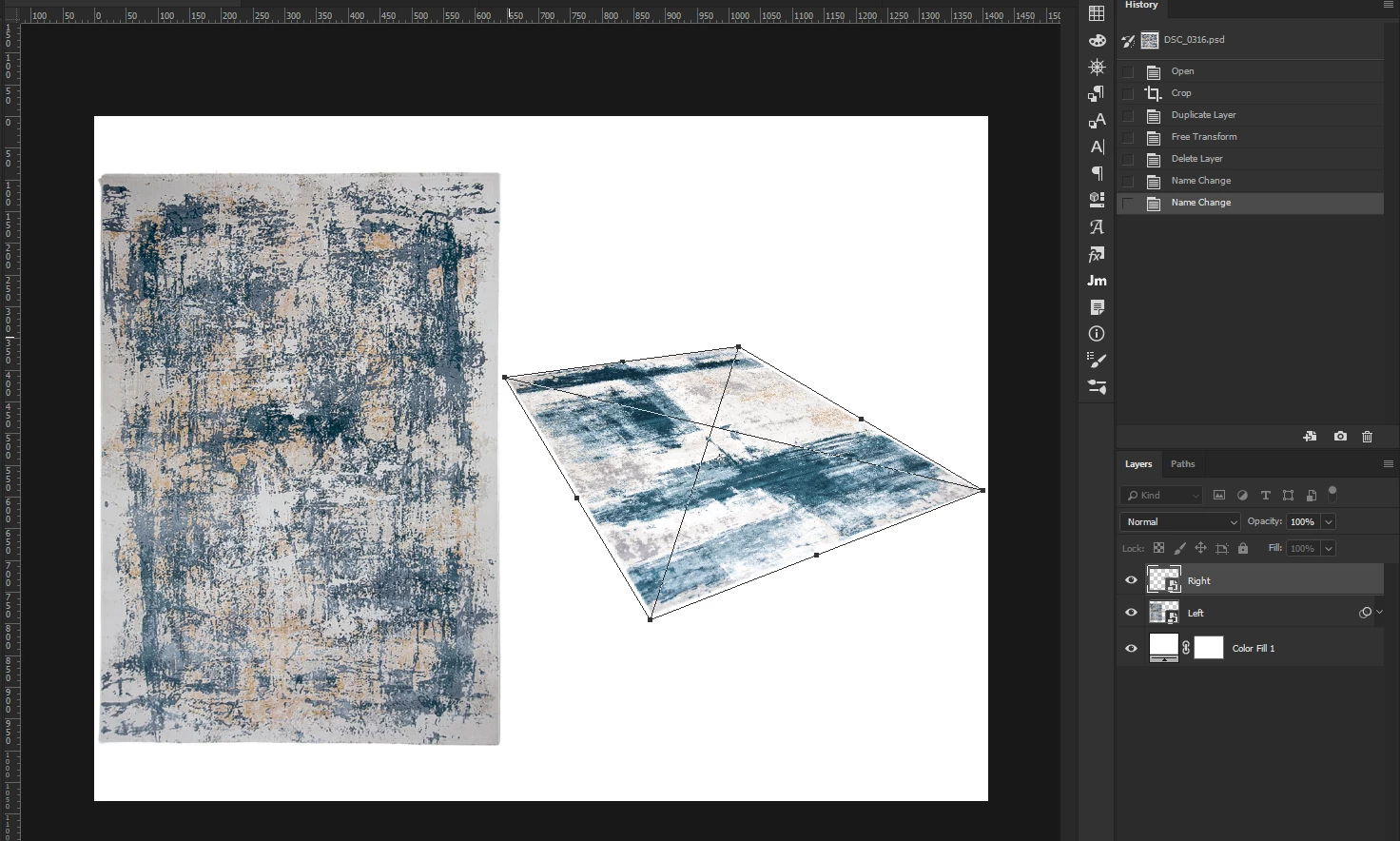
I have 2 layers. They are both rectangles. I changed the angle of the right layer using free transform and i want to match it for the left one.

If I recorded an action in the first place it would probably work and I would have used it.

But since I didn't recorded a macro, I want to know if i can do it now using a script.

Note: Edit > Transform > Again doesn't work.

Thanks.

This topic has been closed for replies.
Correct answer r-bin

any ideas?


It is assumed that the smartobject "Layer 2" has a straight-angle border shape and has no rotations or distortions.

After you transform the "Layer 1" smartobject, run the script.
The layer "Layer 2" will take the form of a layer "Layer 1".

var r = new ActionReference();

r.putProperty(stringIDToTypeID("property"), stringIDToTypeID("smartObjectMore"));

r.putName(stringIDToTypeID("layer"), "Layer 1");

var list1 = executeActionGet(r).getObjectValue(stringIDToTypeID("smartObjectMore")).getList(stringIDToTypeID("nonAffineTransform"));

var p1 = new Array();

for (var i = 0; i < list1.count; i+=2) p1.push([list1.getDouble(i), list1.getDouble(i+1)]);

var r = new ActionReference();

r.putProperty(stringIDToTypeID("property"), stringIDToTypeID("smartObjectMore"));

r.putName(stringIDToTypeID("layer"), "Layer 2");

var list2 = executeActionGet(r).getObjectValue(stringIDToTypeID("smartObjectMore")).getList(stringIDToTypeID("nonAffineTransform"));

var p2 = new Array();

for (var i = 0; i < list2.count; i+=2) p2.push([list2.getDouble(i), list2.getDouble(i+1)]);

activeDocument.activeLayer = activeDocument.layers.getByName("Layer 2");

/// WITHOUT THIS, IT CAN BE BUGGY WTF??? ///////

var doc = activeDocument;

executeAction(stringIDToTypeID("placedLayerEditContents"), undefined, DialogModes.NO);

activeDocument.suspendHistory("", "");

activeDocument.close(SaveOptions.SAVECHANGES);

activeDocument = doc;

///////////////////////////////////////////////

var d = new ActionDescriptor();

var l = new ActionList();

l.putUnitDouble(charIDToTypeID("#Pxl"), p2[0][0]);

l.putUnitDouble(charIDToTypeID("#Pxl"), p2[1][1]);

l.putUnitDouble(charIDToTypeID("#Pxl"), p2[2][0]);

l.putUnitDouble(charIDToTypeID("#Pxl"), p2[3][1]);

d.putList(stringIDToTypeID("rectangle"), l );

var l = new ActionList();

l.putUnitDouble(charIDToTypeID("#Pxl"), p1[0][0]);

l.putUnitDouble(charIDToTypeID("#Pxl"), p1[0][1]);

l.putUnitDouble(charIDToTypeID("#Pxl"), p1[1][0]);

l.putUnitDouble(charIDToTypeID("#Pxl"), p1[1][1]);

l.putUnitDouble(charIDToTypeID("#Pxl"), p1[2][0]);

l.putUnitDouble(charIDToTypeID("#Pxl"), p1[2][1]);

l.putUnitDouble(charIDToTypeID("#Pxl"), p1[3][0]);

l.putUnitDouble(charIDToTypeID("#Pxl"), p1[3][1]);

d.putList(stringIDToTypeID("quadrilateral"), l);

var b0 = activeDocument.activeLayer.bounds;

executeAction(stringIDToTypeID("transform"), d, DialogModes.NO);

var b1 = activeDocument.activeLayer.bounds;

activeDocument.activeLayer.translate(b0[0] - b1[0], b0[1] - b1[1]);

1 reply

Legend
September 3, 2018

It is assumed that there are two similar layers.
During the script, you transform the first layer, after which the transformation is applied to the second layer.

Try

var layer0 = activeDocument.layers[0];

var layer1 = activeDocument.layers[1];

app.activeDocument.suspendHistory("Transform two layers", "transform_two()");

///////////////////////////////////////////////////////////////////////////////////////////

function transform_two()

    {

    try {

        app.preferences.rulerUnits = Units.CM;

        app.activeDocument.activeLayer = layer0;

        var x0 = layer0.bounds[0].value;

        var y0 = layer0.bounds[1].value;

        runMenuItem(stringIDToTypeID("freeTransform"));


        app.activeDocument.activeLayer = layer1;

        transform_again(x0, y0);

        }

    catch (e) { alert(e); }

    }

///////////////////////////////////////////////////////////////////////////////////////////

function transform_again(x0, y0)

    {

    try {

        var layer = app.activeDocument.activeLayer;

        var x1 = layer.bounds[0].value;

        var y1 = layer.bounds[1].value;

        move(layer, x0-x1, y0-y1)

        var r = new ActionReference();

        var d  = new ActionDescriptor();

        r.putEnumerated( charIDToTypeID( "Lyr " ), charIDToTypeID( "Ordn" ), charIDToTypeID( "Trgt" ) );

        d.putReference( charIDToTypeID( "null" ), r );

        d.putBoolean( charIDToTypeID( "LstT" ), true );

        executeAction( charIDToTypeID( "Trnf" ), d, DialogModes.NO );

        move(layer, x1-x0, y1-y0);

        return true;

        }

    catch (e) { alert(e); return false; }

    }

///////////////////////////////////////////////////////////////////////////////////////////

function move(layer, x, y)

    {

    try {

        if (layer != undefined) app.activeDocument.activeLayer = layer;

        var d1 = new ActionDescriptor();

        var ref = new ActionReference();

        ref.putEnumerated( charIDToTypeID( "Lyr " ), charIDToTypeID( "Ordn" ), charIDToTypeID( "Trgt" ) );

        d1.putReference( charIDToTypeID( "null" ), ref );

        var d2 = new ActionDescriptor();

        d2.putUnitDouble( charIDToTypeID( "Hrzn" ), charIDToTypeID( "#Rlt" ), x*72/2.54 );

        d2.putUnitDouble( charIDToTypeID( "Vrtc" ), charIDToTypeID( "#Rlt" ), y*72/2.54 );

        d1.putObject( charIDToTypeID( "T   " ), charIDToTypeID( "Ofst" ), d2);

        executeAction( charIDToTypeID( "move" ), d1, DialogModes.NO );

        }

    catch (e) { alert(e); throw(e); }

    }

AG_Ps_100
AG_Ps_100Author
Inspiring
September 4, 2018

sorry for the delay, this is the message i keep getting:

Kukurykus
Legend
September 4, 2018

For me script worked. I created document, unlocked background, duplicated new layer and ran script.