
Participant
February 4, 2024
Question

How to modify, remove, or replace part of an image?

  • February 4, 2024
  • 1 reply
  • 408 views

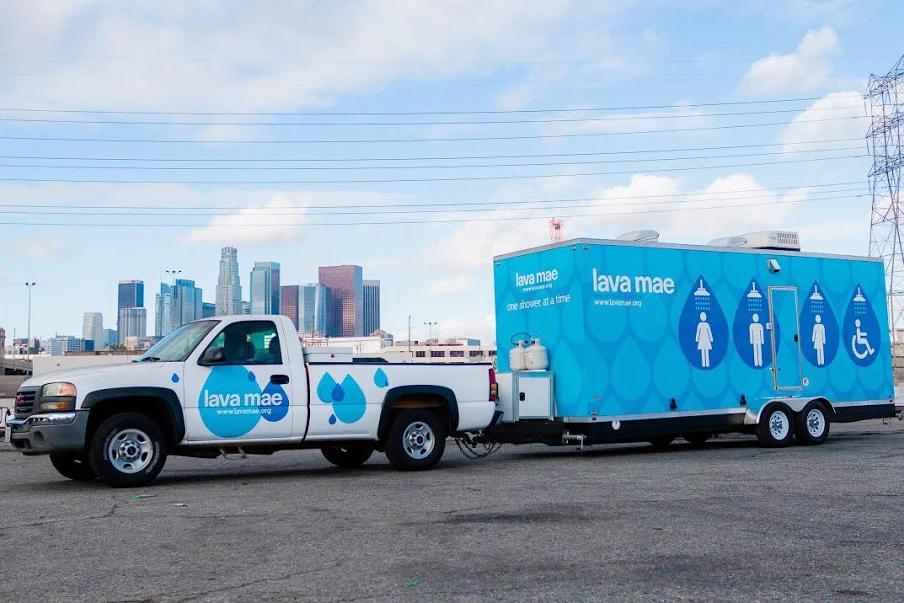
I have an image of a truck pulling a utility trailer with wording and graphics on it. I want to add my own wording and graphic and graphic on the trailer. How do I select the trailer, delete the graphic content, and add my own and do the same for the text. I want to start with a blank canvas basically.
This topic has been closed for replies.

1 reply

Community Expert
February 4, 2024

I would draw vector paths on the pickup truck and trailer shapes using the Pen Tool. This would be easier to do on a high resolution image. The paths can be drawn and edited to cover the truck and trailer shapes precisely and then turned into selections. The existing "lava mae" graphics can be covered up with new fills. Additional paths would need to be created to re-build shadows and seams that run through the existing graphics in the image. It sounds complicated, but it's not all that difficult to do. I use an approach somewhat similar to this when designing vehicle wraps over photos of a client's vehicle.

c.pfaffenbichler
Community Expert
Community Expert
February 7, 2024

I want to add one point:

The Paths do not necessarily need to be turned into Selections/Layer Masks; Vector Masks can work fine if their Feather can be set globally. That is if they do not need to have different feathering/blurring at different locations.