
November 21, 2019
Answered

How to paint in a shape

  • November 21, 2019
  • 1 reply
  • 3368 views

Hi, 


I would like to paint in a shape but I cannot. In fact I would like to do like Hank Whashington : https://www.behance.net/live/videos/3195/An-Illustration-a-Day-with-Hank-Washington-1-of-3?tracking_source=to_replay (see around 1:25:00) but I am not able to do it.


I think he ask for a new layer but that layer let him to brush without going outside a shape  drew in another layer. How does he do that? 


Warm regards,

Mika
This topic has been closed for replies.
Correct answer Chuck Uebele

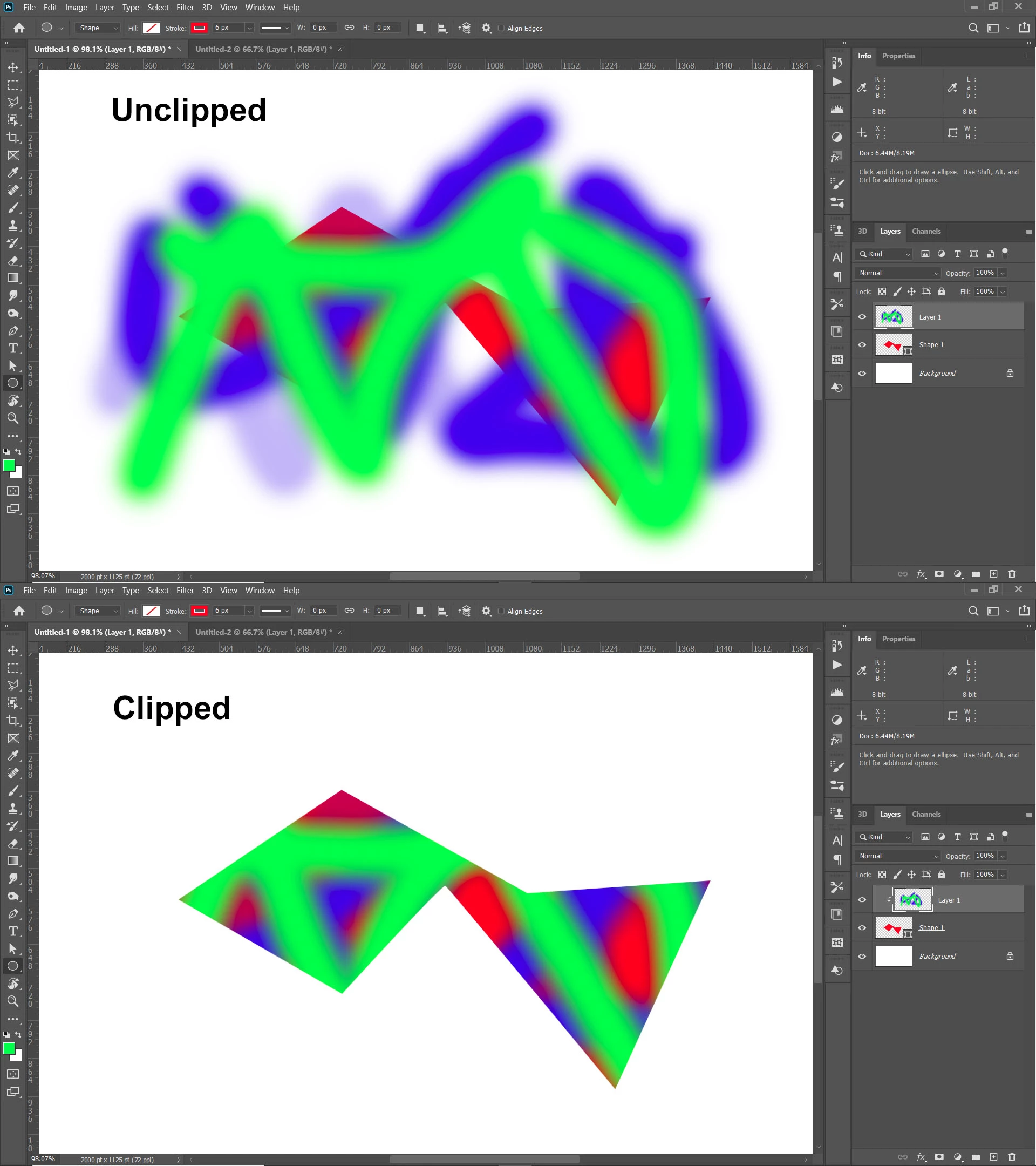
You can't paint on a shape layer. What you can do is add a pixel layer above the shape layer and clip it to the shape layer by holding the alt/opt key and clicking between the two layers in the layer panel. Then you can paint on the pixel layer and not go outside of the shape layer.

1 reply

Chuck Uebele
Community Expert
Chuck UebeleCommunity ExpertCorrect answer
Community Expert
November 21, 2019

You can't paint on a shape layer. What you can do is add a pixel layer above the shape layer and clip it to the shape layer by holding the alt/opt key and clicking between the two layers in the layer panel. Then you can paint on the pixel layer and not go outside of the shape layer.

KShinabery212
Community Expert
Community Expert
November 22, 2019

Theoretically, if you make a shape any method.  

Use the Magic Want to select the background.... then select inverse...

create a new layer...

then you can paint with in a given area.


Chuck's answer is also great if you understand masking.  Which if you do not then there are seveal videos on how to mask on YouTube.

Let's connect on LinkedIn. https://www.linkedin.com/in/kshinabery/
November 22, 2019

Many thanks for your answers, I will try Chuck advice.