Participant
July 29, 2024
Question

How to remove top bar and display the tool bar?

  • July 29, 2024
  • 1 reply
  • 651 views

Dear Photoshop Experts,


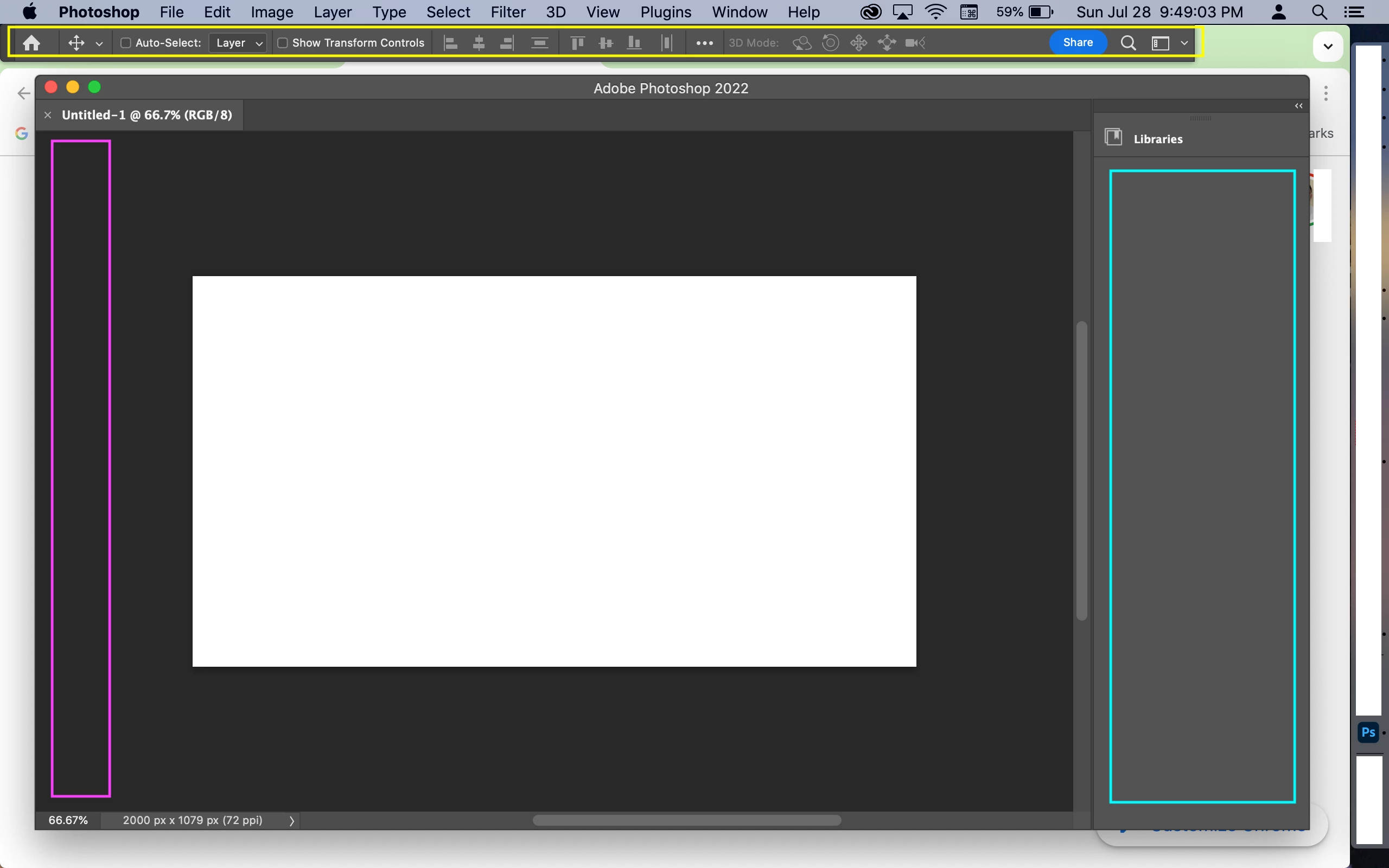
I am using an old version of Photoshop, version 23.5.5, the below screenshot is this version. I have 3 questions.

1. How do I remove the top bar in the yellow box?

2. How do I display the toolbox in the pink box?

3. I remember there are editing tools in the teal box. How do I display them?


Thanks!
 

This topic has been closed for replies.

1 reply

Conrad_C
Community Expert
Community Expert
July 29, 2024

The answer to all three questions is in the Window menu. You’re asking questions about how to hide and show different panels, and all panel visibility commands are in the Window menu.


Answers to your numbered questions:

1. Choose Window > Options so that it is deselected.

2. Choose Window > Tools so that it is selected.

3. Choose Window > Properties so that it is selected.


Optional: If you want to reset all of the panels to the way they are when the software is freshly installed, you could choose Window > Workspace > Essentials (Default).


Also optional: If you want to restore the single window view that’s more similar to other Mac applications, choose Window > Application Frame so that it is selected.