Inspiring
August 19, 2022
Answered

How to remove word "copy" from duplicated layers in layerSets

  • August 19, 2022
  • 3 replies
  • 928 views

How to remove word copy from layers, when i duplicate group with script? After using this script all layers in duplicated group got sufix copy, when i duplicate group manualy layers doesnt have this sufix. Thanks in advance

var theDoc = app.activeDocument;
var theLayer = theDoc.activeLayer.duplicate(theDoc.activeLayer, ElementPlacement.PLACEBEFORE);
theLayer.name = "Duplicate";


Correct answer Stephen Marsh

@milevic wrote:

Thanks guys, it works perfect, second one is interesting for me because it changes name of group also


Thanks, that is a natural feature of the command... however, you know how to change the parent group name if you use the code from jazz-y. Same with the code from r-bin.


As an example, extending the code from jazz-y into a function with a variable and a parameter to rename:


dupeWithoutCopy("Duplicate");

function dupeWithoutCopy(theName) {
    var s2t = stringIDToTypeID;
    (r = new ActionReference()).putProperty(s2t("property"), p = s2t("addCopyToLayerNames"));
    r.putClass(s2t("application"));
    (d = new ActionDescriptor()).putReference(s2t("target"), r);
    var addCopy = executeActionGet(r).getBoolean(p);
    d.putBoolean(s2t("addCopyToLayerNames"), false)
    executeAction(s2t("set"), d, DialogModes.NO);
    executeAction(s2t("copyToLayer"), undefined, DialogModes.NO);
    d.putBoolean(s2t("addCopyToLayerNames"), addCopy)
    executeAction(s2t("set"), d, DialogModes.NO);
    // Rename the active layer
    activeDocument.activeLayer.name = theName;
}


Or, extending the code from r-bin:


dupeWithoutCopy("Duplicate");

function dupeWithoutCopy(theName) {
    executeAction(stringIDToTypeID("copyToLayer"), undefined, DialogModes.NO);
    activeDocument.activeLayer.name = theName;
}

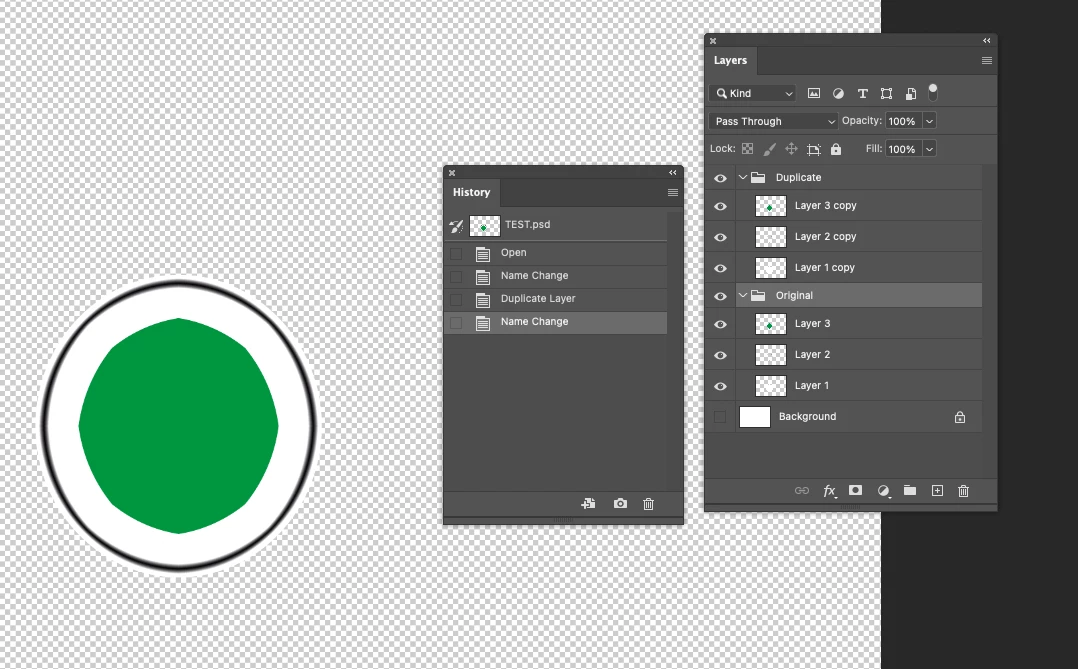
 

3 replies

Stephen Marsh
Community Expert
Community Expert
August 20, 2022

@milevic – Here is another take, it uses a modified function created from the Layer > Duplicate Layer/Group command which includes the layer rename as a parameter in the function call:


dupeWithoutCopy("Duplicate");

function dupeWithoutCopy(layerName) {
	var s2t = function (s) {
		return app.stringIDToTypeID(s);
	};
	var descriptor = new ActionDescriptor();
	var list = new ActionList();
	var reference = new ActionReference();
	reference.putEnumerated( s2t( "layer" ), s2t( "ordinal" ), s2t( "targetEnum" ));
    descriptor.putReference(s2t("null"), reference);
    // Layer/Group name
	descriptor.putString( s2t( "name" ), layerName );
	descriptor.putInteger( s2t( "version" ), 5 );
	descriptor.putList( s2t( "ID" ), list );
	executeAction( s2t( "duplicate" ), descriptor, DialogModes.NO );
}


That being said, I do prefer the script from @jazz-y

milevicAuthor
Inspiring
August 20, 2022

Thanks guys, it works perfect, second one is interesting for me because it changes name of group also

Stephen Marsh
Community Expert
Stephen MarshCommunity ExpertCorrect answer
Community Expert
August 21, 2022

@milevic wrote:

Thanks guys, it works perfect, second one is interesting for me because it changes name of group also


Thanks, that is a natural feature of the command... however, you know how to change the parent group name if you use the code from jazz-y. Same with the code from r-bin.


As an example, extending the code from jazz-y into a function with a variable and a parameter to rename:


dupeWithoutCopy("Duplicate");

function dupeWithoutCopy(theName) {
    var s2t = stringIDToTypeID;
    (r = new ActionReference()).putProperty(s2t("property"), p = s2t("addCopyToLayerNames"));
    r.putClass(s2t("application"));
    (d = new ActionDescriptor()).putReference(s2t("target"), r);
    var addCopy = executeActionGet(r).getBoolean(p);
    d.putBoolean(s2t("addCopyToLayerNames"), false)
    executeAction(s2t("set"), d, DialogModes.NO);
    executeAction(s2t("copyToLayer"), undefined, DialogModes.NO);
    d.putBoolean(s2t("addCopyToLayerNames"), addCopy)
    executeAction(s2t("set"), d, DialogModes.NO);
    // Rename the active layer
    activeDocument.activeLayer.name = theName;
}


Or, extending the code from r-bin:


dupeWithoutCopy("Duplicate");

function dupeWithoutCopy(theName) {
    executeAction(stringIDToTypeID("copyToLayer"), undefined, DialogModes.NO);
    activeDocument.activeLayer.name = theName;
}


Legend
August 19, 2022


var s2t = stringIDToTypeID;
(r = new ActionReference()).putProperty(s2t("property"), p = s2t("addCopyToLayerNames"));
r.putClass(s2t("application"));
(d = new ActionDescriptor()).putReference(s2t("target"), r);
var addCopy = executeActionGet(r).getBoolean(p);
d.putBoolean(s2t("addCopyToLayerNames"), false)
executeAction(s2t("set"), d, DialogModes.NO);
executeAction(s2t("copyToLayer"), undefined, DialogModes.NO);
d.putBoolean(s2t("addCopyToLayerNames"), addCopy)
executeAction(s2t("set"), d, DialogModes.NO);


c.pfaffenbichler
Community Expert
Community Expert
August 19, 2022

Did you turn off »Add "copy" …« in the Layers Panel Options? 

Stephen Marsh
Community Expert
Community Expert
August 20, 2022

@c.pfaffenbichler – This too was my first thought when this came up a week or two ago in another topic. It appears that the DOM code ignores this setting, which of course means that AM code is required.


Edit: Looking at that other topic, I came up with the following, however, I can't recall how I extracted that bit of code from SL:


// SL code
var idcopyToLayer = stringIDToTypeID( "copyToLayer" );
executeAction(idcopyToLayer, undefined, DialogModes.NO);
// DOM code
activeDocument.activeLayer.name = "Duplicate";


Another one here from @r-bin –


executeAction( stringIDToTypeID("copyToLayer"), undefined, DialogModes.NO );


https://community.adobe.com/t5/photoshop-ecosystem-discussions/script-to-copy-group-of-layers-without-adding-word-quot-copy-quot/m-p/9549351


Both of these require the layer panel options to be set to not add the word copy for the parent set, however the child layers don't have the word copy, even if the layer panel is set otherwise.