Jim_Palik
Inspiring
May 31, 2018
Answered

How to replicate actions among layers

  • May 31, 2018
  • 1 reply
  • 571 views

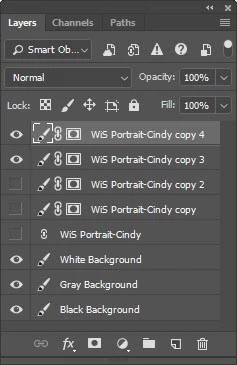
I am learning how to use Smart Objects. I do green background still photography. I delete my green background using select and mask. when do this I usually create three different base backgrounds (White, Gray, and Black) under my image to see if any cleanup is needed. There is almost always some cleanup needed depending on the subject that I was photographing and areas of the picture that do not have sharp (out of focus) edges. Smart objects is perfect because it allows me to return to the select and mask layer to modify the green background deletion. However, some cleanup is faster simply using the eraser too. The problem is that this only works on the layer selected.

Is there a way to make my erasures replicate down through each of the layers?

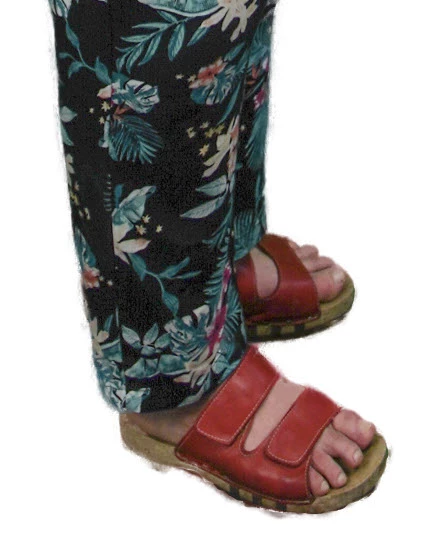
I have attached two screen shots illustrating a typical green screen background deletion.

Thank you in advance for your help

Jim
This topic has been closed for replies.
Correct answer JJMack

I would use White or a shade of Gray.  Your subject needs to have good contrast with it.  I would not photograph a person with stark white hair one a white background for example.  The reason to use a neutral color is a neutral color spill is easy blend into the replacement background and the masking requires may not need to be perfect to get good acceptable results. Image captures on a neutral backgrounds do not exhibit effects like green and blue color cast so the image color is easier to process.

About: "Is it possible to replicate and eraser function across multiple layers?"  I'm mot sure what you actually mean by that.  You can only target a single layer. If you could target multiple layer different pixels will be being changed on each layer you would not be seeing what changing on each layer you would only the opposite change. If` you record the use of the eraser on one layer.  Then playback the use on an other layer the has different content and may nave a different size. How likely is the result  going to be the result you want particularly if you use a pressure sensitive pen erasing.   If you do not install the scriptlistener plugin.  You can record an action enable tool recording and record your erasure use.  when done stop recording the action. target an other layer and play the action.   I install the scriptlistener which disable tool recording.  I have never found tool recording useful and IMO Adobe implantation fails to record all it should. Playback is not always what you think it should be like.

1 reply

JJMack
Community Expert
Community Expert
May 31, 2018

For still image I would suggest that you would be better off using a neutral chroma color key.  Green and blue keys are use mostly for video because skin tones do not have blues and green shades.  Video Background removal does not need to be perfect because the human eye is not going to be able to see most of the chroma key spill at 30 images per second.  High resolution still image is a diffent story the image is still and high resilution and color spill is a big issue. There are always soft areas and sharp small area like fly away hair that will be contaminated with the background color even with  a perfect mask the color contamination will be seen. Your mask are far from perfect.

You a dealing with a single image not 30 different image per second your problem is different then video your masking needs to be much better then video masking and you need to deals with color spill  your image is not changing 30 time per second. Its a still.

JJMack
Jim_Palik
Jim_PalikAuthor
Inspiring
May 31, 2018

Hi JJ,

Thank you for the reply. I really understand the problem with color spill. Please tell me what you mean by neutral chroma color key. I assume that you are referring to the background color. What color would you use?

I have had fairly good luck with the green background but as you said, color spill is always a problem.

Do you know the answer to my question. Is it possible to replicate and eraser function across multiple layers?

Where are you located. I am an American from California living now in Germany.

Thank you again, I look forward to you answer.

Jim

[please refrain from PII and 3rd party URLs in this area - Moderator]
JJMack
Community Expert
JJMackCommunity ExpertCorrect answer
Community Expert
May 31, 2018

I would use White or a shade of Gray.  Your subject needs to have good contrast with it.  I would not photograph a person with stark white hair one a white background for example.  The reason to use a neutral color is a neutral color spill is easy blend into the replacement background and the masking requires may not need to be perfect to get good acceptable results. Image captures on a neutral backgrounds do not exhibit effects like green and blue color cast so the image color is easier to process.

About: "Is it possible to replicate and eraser function across multiple layers?"  I'm mot sure what you actually mean by that.  You can only target a single layer. If you could target multiple layer different pixels will be being changed on each layer you would not be seeing what changing on each layer you would only the opposite change. If` you record the use of the eraser on one layer.  Then playback the use on an other layer the has different content and may nave a different size. How likely is the result  going to be the result you want particularly if you use a pressure sensitive pen erasing.   If you do not install the scriptlistener plugin.  You can record an action enable tool recording and record your erasure use.  when done stop recording the action. target an other layer and play the action.   I install the scriptlistener which disable tool recording.  I have never found tool recording useful and IMO Adobe implantation fails to record all it should. Playback is not always what you think it should be like.

JJMack