
Niksha
Participating Frequently
November 22, 2023
Answered

How to save multiple layers at once?

  • November 22, 2023
  • 2 replies
  • 1464 views

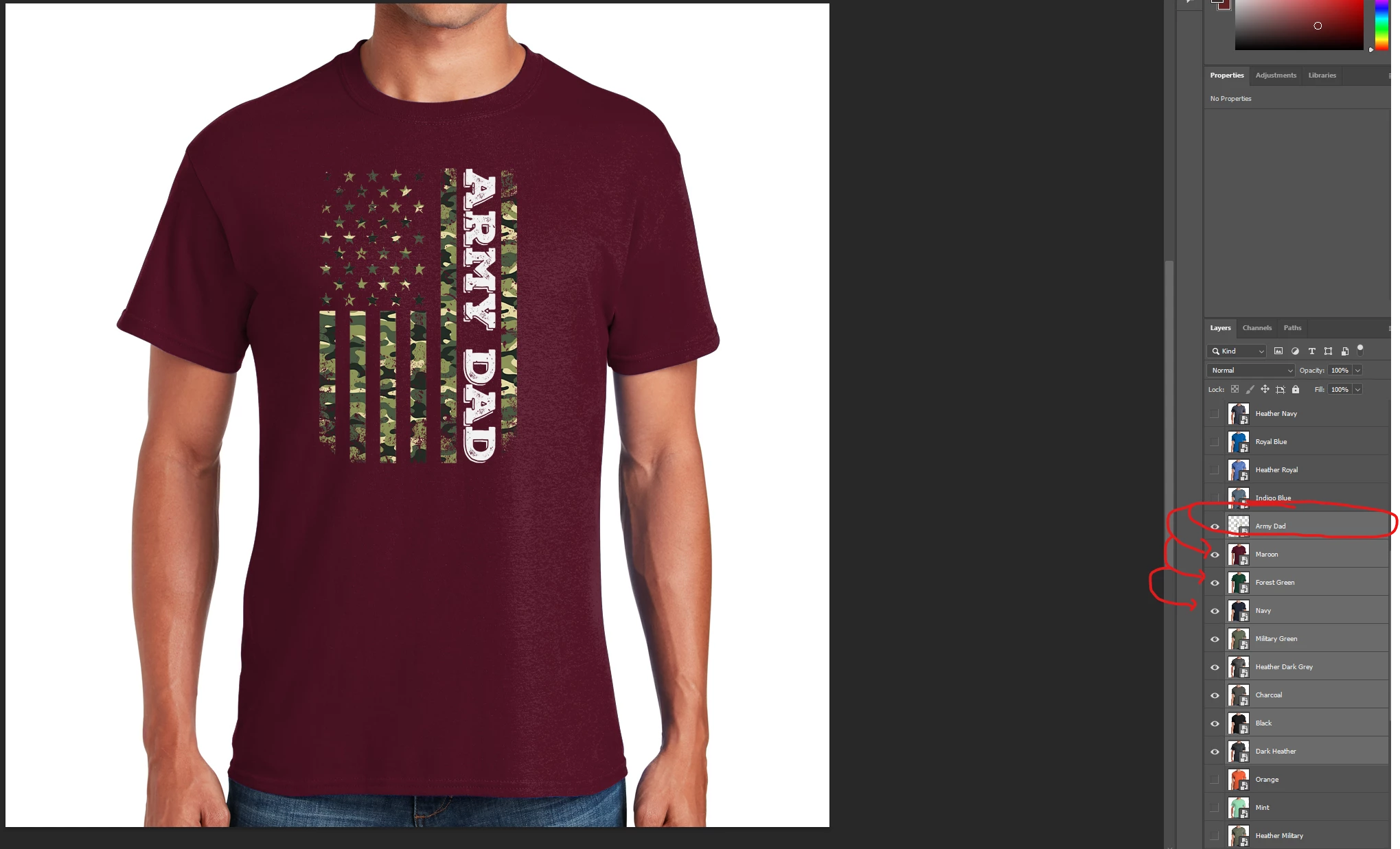
Hi, i have a question. Is there an option to save multiple layers but first image need to apply do all layers below. I know there is option for that in photoshop but it's not working for me. Im creating t-shirt mockups and i will leave screenshot so you can better understand what i need if possible. So as you can see on image the frist layer called army dad need to be visible on all t-shirts below, i can turn off/on layers and save them but it will take me some time to do it because i have over 1000 images... So is there an option to somehow save them all at once but design need to be visible on all t-shirts? Thanks
This topic has been closed for replies.

2 replies

Niksha
NikshaAuthor
Participating Frequently
November 22, 2023

Last one is working like a charm bro, thank you soooo much for this!!! 🙂

Stephen Marsh
Community Expert
Community Expert
November 23, 2023

You're welcome. The following 2 of the 3 scripts offer more options:


Layer Saver Plus script can also use a common layer and create versions with the other layers + common layer:


As can the Layer Saver script:


Kevin Stohlmeyer
Community Expert
Community Expert
November 22, 2023
Niksha
NikshaAuthor
Participating Frequently
November 22, 2023

I just tried that one and it save all images/layers i have in that PSD file. I need the first image to appear on different variation of t-shirt colors as show on the SS so i dont need to go and save one by one. Can you help me with that? Im new here so im not sure where to find such a script for that? 🙂

Kevin Stohlmeyer
Community Expert
Community Expert
November 22, 2023

tagging @c.pfaffenbichler - he's my go to for scripting around here. He may remember/know the specific solution.