
how to select and paint the triangle?
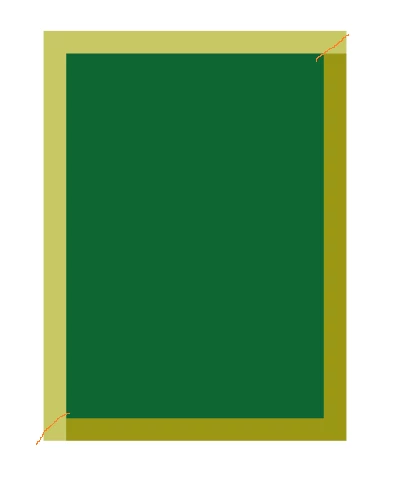
I want to make an imitation cutout mat.
Created and filled two colors 4 rectangular areas - sections mat. Now you need to fill in the corners. I can calculate pixel by pixel rows and fill them, but it seems to me that there must be a simpler solution.In the example script - create a blank document, fill the new layer rectangel area (this will portray the picture) in the Layers palette make this layer active and run the script.
Help me paint 2 color corner number 2 🙂
Thanks !
#target photoshop;
var fillColor1 = new SolidColor()fillColor1.rgb.red = 255;
fillColor1.rgb.green = 10;
fillColor1.rgb.blue = 10;
var fillColor2 = new SolidColor()
fillColor2.rgb.red = 155;
fillColor2.rgb.green = 50;
fillColor2.rgb.blue = 100;
// you can change this parametr
var widthSrez = 20;
main(0)
function main(type){//---------------------------------------------------------
var mySelection =new Array(4);
for(var o=0;o<mySelection.length;o++){
mySelection
= new Array(4) }
var doc = app.activeDocument;
var bounds = doc.activeLayer.bounds;
var newLayer = doc.artLayers.add();
newLayer.name = 'Срез' ;
switch(type){
case 0:
//left
mySelection[0][0] =bounds[0].value;
mySelection[0][1] =bounds[0].value+widthSrez;
mySelection[0][2] =bounds[1].value;
mySelection[0][3] =bounds[3].value;
mySelection[0][4] =1;
//top
mySelection[1][0] =bounds[0].value;
mySelection[1][1] =bounds[2].value;
mySelection[1][2] =bounds[1].value;
mySelection[1][3] =bounds[1].value+widthSrez;;
mySelection[1][4] =1;
//right
mySelection[2][0] =bounds[2].value - widthSrez;
mySelection[2][1] =bounds[2].value;
mySelection[2][2] =bounds[1].value + widthSrez;
mySelection[2][3] =bounds[3].value- widthSrez;
mySelection[2][4] =2;
//bottom
mySelection[3][0] =bounds[0].value+ widthSrez;
mySelection[3][1] =bounds[2].value;
mySelection[3][2] =bounds[3].value-widthSrez;
mySelection[3][3] =bounds[3].value;
mySelection[3][4] =2;
break;
case 1://other type
break;
case 2://other type
break;
case 3://other type
break;
}
for(var p=0;p<mySelection.length;p++){
var newSelect = Array(
Array(mySelection
[0], mySelection
[2]),
Array(mySelection
[1], mySelection
[2]),
Array(mySelection
[1], mySelection
[3]),
Array(mySelection
[0],mySelection
[3]),
Array(mySelection
[0],mySelection
[2])
);
doc.selection.select(newSelect);
if(mySelection
[4]==1)
doc.selection.fill (fillColor1, ColorBlendMode.NORMAL,100,false);
else{
doc.selection.fill (fillColor2, ColorBlendMode.NORMAL,100,false);
//in this place paint the corners !!
}
doc.selection.deselect()
}
}
 AdChoices