
edwardk41415667
Participant
October 23, 2017
Answered

How to set preference to open files in 16 bit mode.

  • October 23, 2017
  • 1 reply
  • 10534 views

I had CC2017 installed and when I opened my images they all opened in 16 bit mode.  After CC2018 installed my images now open in 8 bit mode.  I can switch them to 16 bit mode, but I would like the system to open the file in 16 bit mode, without having to jump thru hoops to get to a starting mode of my liking.  Cannot recall having to go through any setup when cc2017 installed on the system.  Thanks.
    This topic has been closed for replies.
    Correct answer Trevor.Dennis

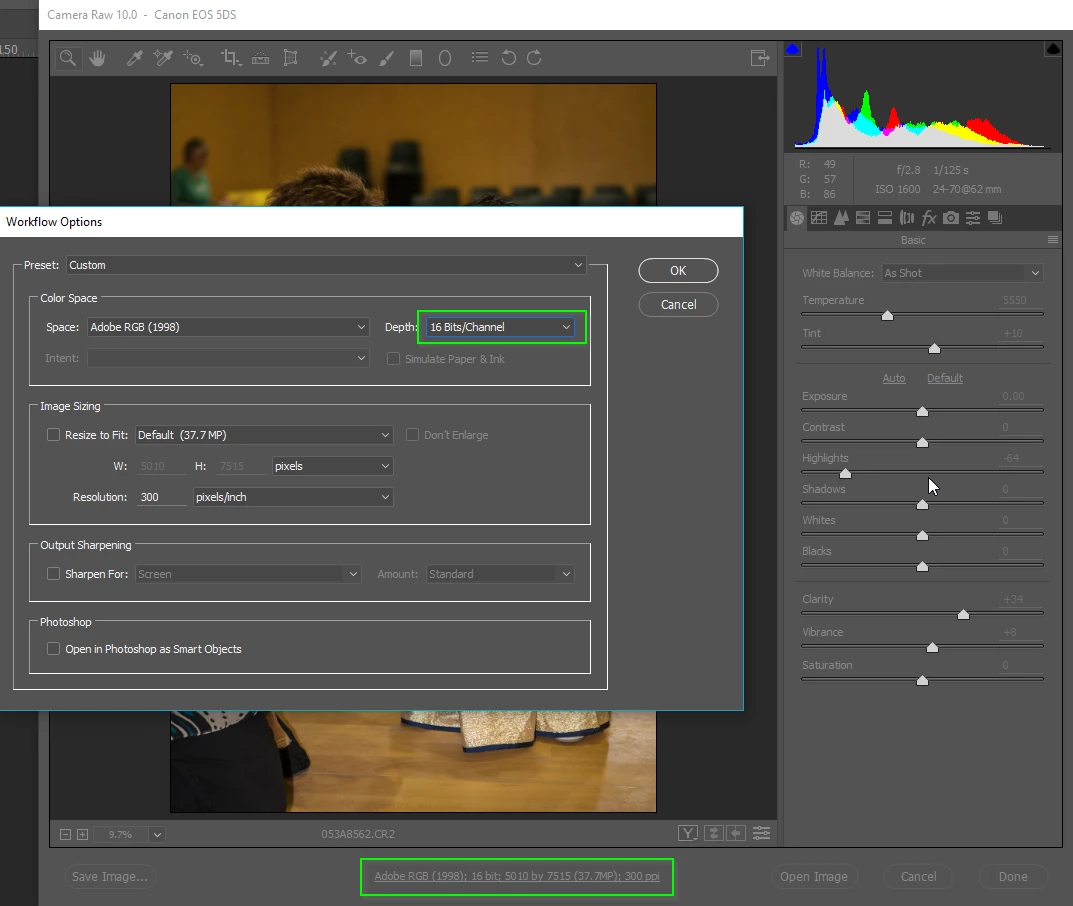
    I'm thinking that you are talking about RAW files?  Open any RAW file into ACR, and click on the link at the bottom of the screen

    1 reply

    Trevor.Dennis
    Community Expert
    Trevor.DennisCommunity ExpertCorrect answer
    Community Expert
    October 23, 2017

    I'm thinking that you are talking about RAW files?  Open any RAW file into ACR, and click on the link at the bottom of the screen

    Participant
    January 30, 2020

    Well, this works for this image, but when I open the next raw image, it defaults to 8 bits.  How does one set it up so that every raw image opened in ACR gets opened in 16 bits as the default?

    D Fosse
    Community Expert
    Community Expert
    January 30, 2020

    That is the way. This is a sticky setting, it doesn't change on its own.


    If it does, you may have a permissions issue somewhere. Do you have other preferences that keep reverting?