
Participant
February 21, 2016
Question

How to show the action's "Record Stop" dialog box using Javascript?

  • February 21, 2016
  • 1 reply
  • 239 views

To show action's "Record Stop" dialog box (I mean this😞
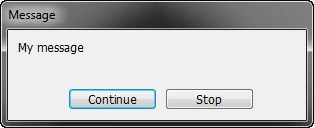
I use this code:

var desc27 = new ActionDescriptor();

desc27.putString( charIDToTypeID("Msge"), "My message");

desc27.putBoolean( charIDToTypeID("Cntn"), true);

executeAction(charIDToTypeID("Stop"), desc27, DialogModes.ALL);//***

app.displayDialogs = DialogModes.NO;

And when user clicks on the "Continue" button - everything works as it should.

BUT. When user clicks on the "Stop" button - I get an exception: "User cancelled the operation" at line marked ***

Mu question is: this is normal behavior, or this needs to be fixed?

This topic has been closed for replies.

1 reply

February 21, 2016

This code snippet shows how I ended up emulating the actions palette's handling of "stop with continue" in my script Convert Actions File | Tonton Pixel:

function stop (message, _continue)

{

    var desc = new ActionDescriptor ();

    desc.putString (app.stringIDToTypeID ("message"), message);

    desc.putBoolean (app.stringIDToTypeID ("continue"), _continue || false);

    app.executeAction (app.stringIDToTypeID ("stop"), desc, DialogModes.ALL);

}

//

try

{

    alert ("Do something...");

    stop ("Stop or Continue?", true);

    alert ("Do something more...");

}

catch (e)

{

    if (e.number !== 8007)  // Not a user cancel error

    {

        try

        {

            stop (e.message.replace (/^.*\n- /, ""));

        }

        catch (e)

        {

        }

    }

}

And so, yes, what you described is normal behaviour! ;-)

HTH,

--Mikaeru