Inspiring
March 17, 2024
Answered

How to turn OFF zoom in Photoshop 24.7.2 on Mac. Want to only magnify area selected.

  • March 17, 2024
  • 3 replies
  • 530 views

How to turn OFF zoom in Photoshop 24.7.2 on Mac (OS 14.3.1). Want to only magnify area selected.

Have overscroll  unchecked.

Do not want the magnifying glass to zoom so it goes up like 3000%.

Want to get back to just magnifying area I am selecting. 

Can't find answer. Found some 1 line talks about it but no answers.

Help would be appreciated!!!
This topic has been closed for replies.
Correct answer Jeff Arola

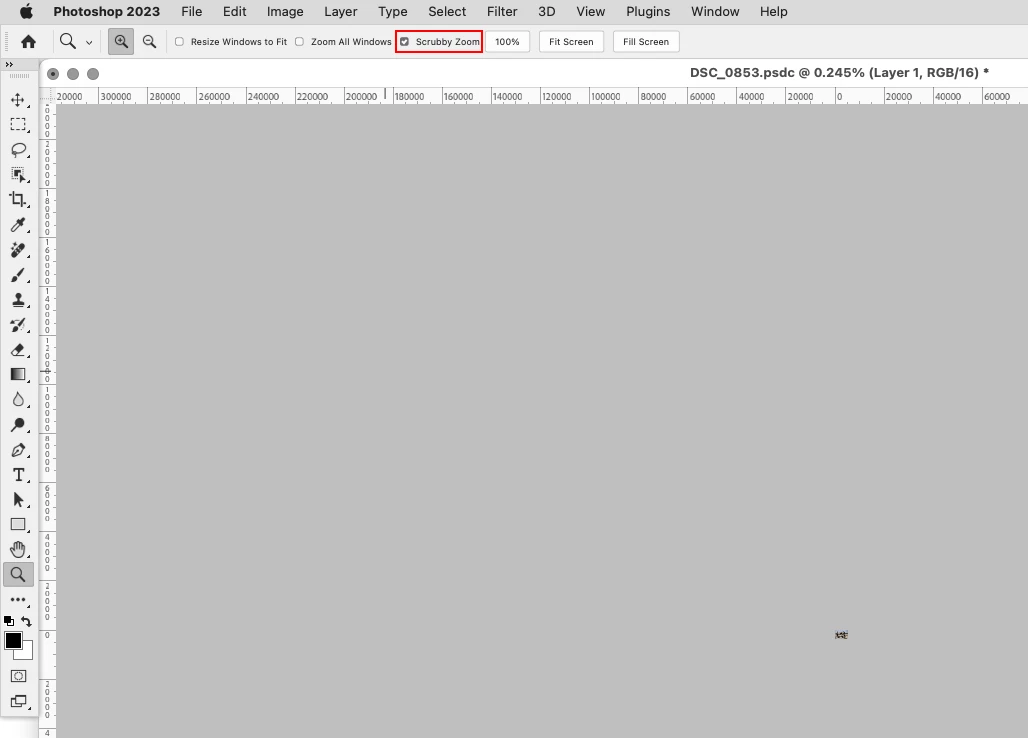
With the Zoom Tool selected uncheck Scrubby Zoom in the tool options bar


3 replies

Jeff Arola
Community Expert
Jeff ArolaCommunity ExpertCorrect answer
Community Expert
March 17, 2024

With the Zoom Tool selected uncheck Scrubby Zoom in the tool options bar


NTC AnnAuthor
Inspiring
March 17, 2024
Thank you!!!!!!!!!!!
NTC AnnAuthor
Inspiring
April 2, 2024
Can't find page to post another question re. Adobe Photoshop in Adobe
Community. Help please.
Accidentally closed the side bar for Adobe Phtooshop 24.7.2 for Mac.
The one that has crop, magic eraser, clone, and all the other tools that
usually are on the L. For some reason, it separated away from the
background.
Can someone please direct this ? to the correct place.
Thank you for help!!!!!
John T Smith
Community Expert
Community Expert
March 17, 2024

You need to ask program questions in the forum for the program you are using
To ask in the forum for your program please start at https://community.adobe.com/
Moving from Using the Community (which is about the forums) to the correct forum

kglad
Community Expert
Community Expert
March 17, 2024

in the future, to find the best place to post your message, use the list here, https://community.adobe.com/

p.s. i don't think the adobe website, and forums in particular, are easy to navigate, so don't spend a lot of time searching that forum list. do your best and we'll move the post (like this one has already been moved) if it helps you get responses.


<"moved from using the community">