
nicolejadeb1
Participant
March 24, 2019
Question

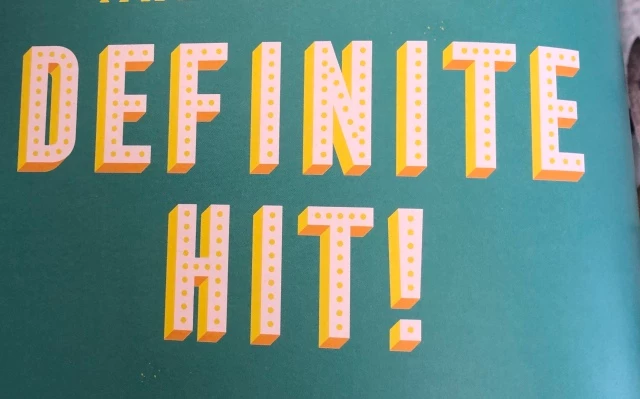
How would I create the 3D shading?

  • March 24, 2019
  • 1 reply
  • 366 views

Hi! I'm aware of how to duplicate text layers to create the 3D effect, but how do I add the dark orange parts? so it adds a bit more depth to the text. I've been looking at a few similar tutorials with the belevel emboss section but it never looks like this? Just want to recreate the darker parts on the 3D bit, if that makes sense!

Thanks so much!
This topic has been closed for replies.

1 reply

davescm
Community Expert
Community Expert
March 24, 2019

Hi

You could do that with a 3D extrusion from the text.

I used an extrusion below and added two infinite lights - yellow from the left and orange from the bottom. I turned the shadows off for both lights and also turned the IBL off. I set the camera to Orthographic rather than the usual Perspective view.

The front material I set to illumination . Finally I rendered using "Lighting only" in scene style (rather than the usual "solid" and added the dots as a separate layer

Dave