
Participant
July 20, 2023
Resuelto

hue/saturation

  • July 20, 2023
  • 3 respuestas
  • 337 visualizaciones

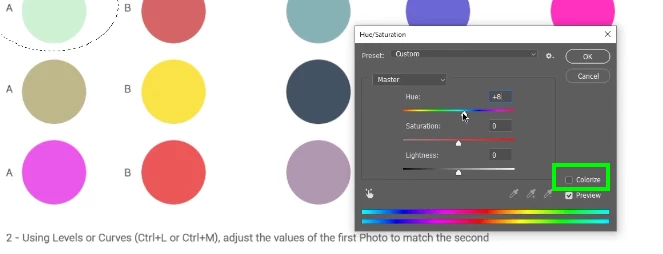
Hello, I've encountered a problem with hue/saturation, the colors don't match and it seems I can't choose some of them at all. The version of my Photoshop is 24.6, I work on Windows 10.
Este tema ha sido cerrado para respuestas.
Mejor respuesta de Kevin Stohlmeyer

Hi @Piotr277485964mk6 everything appears normal - Hue/Saturation adjusts colors it does not apply unless you check the box to colorize.


3 respuestas

Participant
July 21, 2023

I was sure to check if it's the same with checking the boxto colorize but I must have lowered the saturation so I couldn't see the colors properly. Now everything seems to work. Thank you for your time and help.

Chris 486
Community Expert
Community Expert
July 21, 2023

Hello @Piotr277485964mk6 ,


As @Kevin Stohlmeyer mentioned, the tool looks like it is working as intended. Do you feel you are not able to find the color you are looking for to match the example?


Here is a link that may be helpful to explain more of each settings in the hue/saturation panel:

Adjust hue and saturation in Photoshop (adobe.com)


I have found sometime looking at another instruction set speaks more clearly to me.

Let us know if you have a more specific question and we would be happy to guide you through the use of the tool.

Kevin Stohlmeyer
Community Expert
Community Expert
July 20, 2023

Hi @Piotr277485964mk6 everything appears normal - Hue/Saturation adjusts colors it does not apply unless you check the box to colorize.