

Question
Hues and Blending
This is weird. Basically, I was testing to see how far apart hues had to be before I could easily see the difference. I started with a horizontal gradient of hues 20 through 28. I put a vertical white to black gradient on top of it with the luminosity blend mode. Then I added a white layer set to color blend mode. I duplicated that layer, flipped it horizontally, and changed the blend mode to Difference. I expected the result to show black in the middle (black shows there was zero difference), lightening on either side as the difference between the layers increased. I wasn't surprised to see all black because there wasn't going to be a whole lot of difference. I used Blendif to double check that the result showed black in the middle. I moved the slider on the left (dark) to the right (light) and it almost immediately went transparent, so I slowly slid the slider (unintentional alliteration) to the left. From positions 255 through 2, everything was transparent. At position 1, an unfamiliar pattern emerged. At position 0, everything was black again.
Where did all that come from? I attached the file so you can see this in action. Start at the bottom, work your way to the top. Remember to turn off underlying layers at Stamp layers 1, 2, and 3.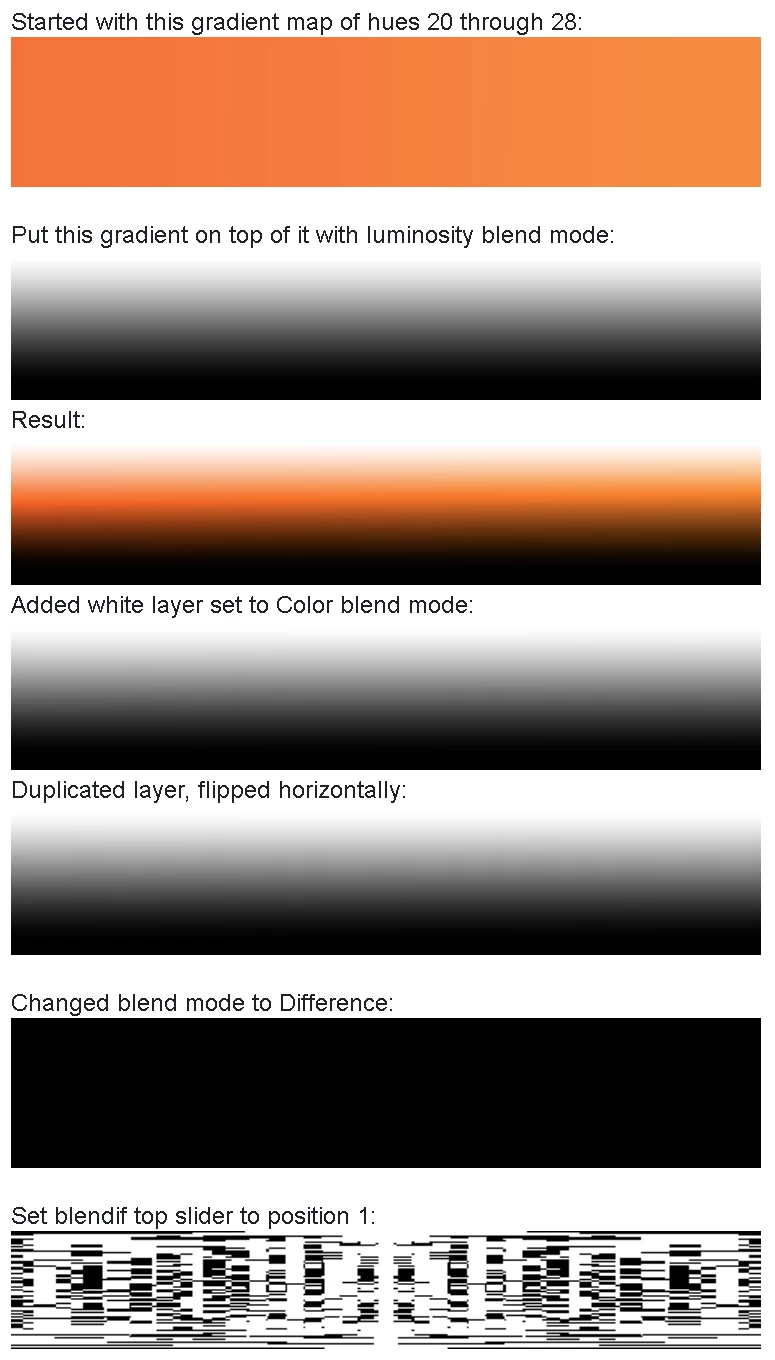
 AdChoices