
leethestrange86
Known Participant
April 3, 2019
Answered

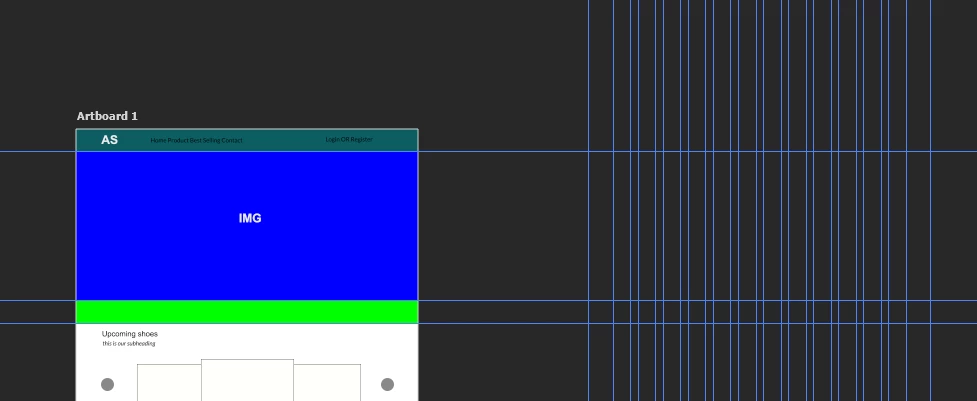
I accidentally moved my artboard out from under my guides

  • April 3, 2019
  • 1 reply
  • 1249 views

Hey guys,

I was working on a project and when I looked at it again the artboard had been moved out from under the guides.  I have no idea how this happened.  When I try to move the artboard back the guides move with the artboards (ie if I move the artboard 10 pixels to the right, the guides also move 10 pixels to the right).  Is there a way to fix this?
    This topic has been closed for replies.
    Correct answer davescm

    Hi

    The only way I can think of is to select the artboard then use the move tool but just drag the right hand edge of the artboard to the right until you get it into the required position. The artboard will be stretched. Then drag the left hand edge to the right and restore the artboard size.

    You can now use the Move tool as normal to drag any content layers back onto the artboard.

    Dave

    1 reply

    davescm
    Community Expert
    davescmCommunity ExpertCorrect answer
    Community Expert
    April 3, 2019

    Hi

    The only way I can think of is to select the artboard then use the move tool but just drag the right hand edge of the artboard to the right until you get it into the required position. The artboard will be stretched. Then drag the left hand edge to the right and restore the artboard size.

    You can now use the Move tool as normal to drag any content layers back onto the artboard.

    Dave

    chanaart
    Community Expert
    Community Expert
    April 3, 2019

    I second that! since I do it a lot by mistake. Try to re alighn it and move the Art board....

    leethestrange86
    Known Participant
    April 4, 2019

    Thank you!