Inspiring
August 29, 2023
Answered

I can not fix a shape in an image

  • August 29, 2023
  • 2 replies
  • 431 views

When I put an arrow or shape in an image and hit return they disappear. How do I apply them.

This topic has been closed for replies.
Correct answer Trevor.Dennis

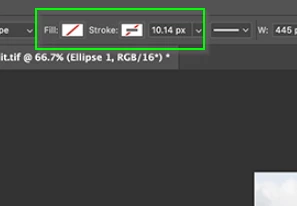
Those diagonal red lines indicate that both fill and stroke are turned off
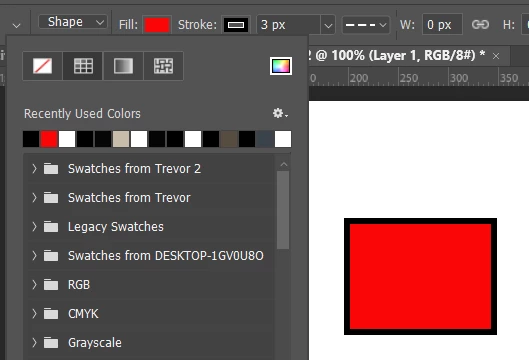
In the example below I have fill set to red and the stroke set to black. One or both of fill and stroke need to be set to a colour, or you'll see nothing.
2 replies

c.pfaffenbichler
Community Expert
Community Expert
August 31, 2023

Please include all pertinent Panels (Toolbar, Layers, Options Bar, Paths, …) in the screenshots @jane-e already requested. 

tonyhuntAuthor
Inspiring
September 12, 2023

Trevor.Dennis
Community Expert
Trevor.DennisCommunity ExpertCorrect answer
Community Expert
September 12, 2023

Those diagonal red lines indicate that both fill and stroke are turned off

In the example below I have fill set to red and the stroke set to black. One or both of fill and stroke need to be set to a colour, or you'll see nothing.

jane-e
Community Expert
Community Expert
August 29, 2023

@tonyhunt 


  • Do the arrows have a fill/stroke?
  • Is the layer they are on hidden by another layer?


Please post screenshots so we can see what you are seeing. There are several possible reasons for this. Use the Insert Image button in a reply window.


Jane

tonyhuntAuthor
Inspiring
September 12, 2023