zuzanakucharcik
Participant
October 29, 2017
Question

I can't enable pen pressure in Photoshop (I've read FAQs)

  • October 29, 2017
  • 2 replies
  • 443 views

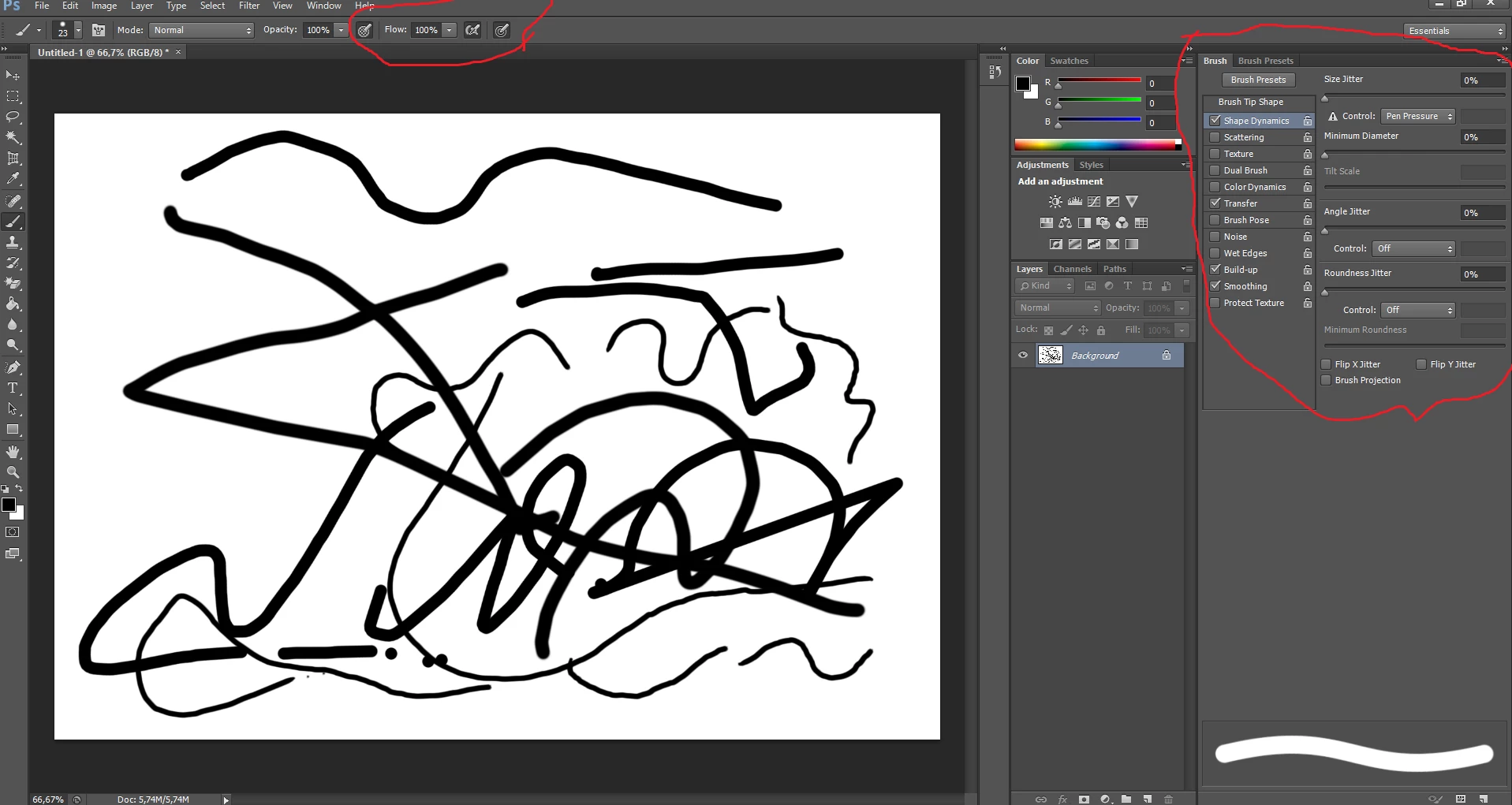
Hello, I have a problem with my pen settings in Photoshop, the pen pressure doesn't work and I really don't think that it is caused by tablet or tablet settings because the pen pressure does work in other programs.

I tried to solve it through the buttons and settings I circled in the picture and nothing worked.

I've seen lot of tutorials about this issue, I've read a few forums about it and I still couldn't solve my problem, please, help me.
This topic has been closed for replies.

2 replies

radwayg26589863
Participant
May 5, 2018

Hi,

I might have a solution to your problem.

Go to brush settings:

Click on shape dynamics, then on "Control," click pen pressure.

Hope it helps,

-Rad

Mohit Goyal
Community Manager
Community Manager
December 5, 2017

Hi zuzanakucharcik,

Please refer the related forum thread and please try the offered suggestions.

Photoshop won't recognize tablet pen pressure. Have tried everything. Help?

Regards,

Mohit