
Participant
February 27, 2018
Answered

I can't remove the "scaling" when resizing a picture

  • February 27, 2018
  • 2 replies
  • 331 views

I am used to CS4 but now have the latest version of Photoshop (via Creative Cloud)

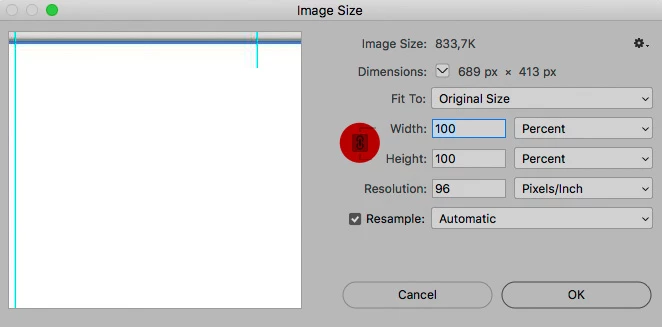
When resizing an image, it used to be possible to uncheck a box to keep the scale of the image.  It seems not to be possible any more.  How can I do this?

I have a second question.  When cropping the image it gives the dimensions in inches.  I am working with centimeters or pixels.  How can I change the default measurement?
This topic has been closed for replies.
Correct answer c.pfaffenbichler
When resizing an image, it used to be possible to uncheck a box to keep the scale of the image.  It seems not to be possible any more.

2 replies

c.pfaffenbichler
Community Expert
Community Expert
February 27, 2018
I have a second question.  When cropping the image it gives the dimensions in inches.  I am working with centimeters or pixels.  How can I change the default measurement?

You can enter »XXcm« or »XXpx« for example.

To which units are your rulers set?

Participant
February 27, 2018

They were set in inches.  I've put them in centimeters and all is now well!

c.pfaffenbichler
Community Expert
c.pfaffenbichlerCommunity ExpertCorrect answer
Community Expert
February 27, 2018
When resizing an image, it used to be possible to uncheck a box to keep the scale of the image.  It seems not to be possible any more.