
carolinebtnr
Participant
March 16, 2017
Answered

I didn't find my ICC profile in Photoshop / Je ne trouve pas mon profil ICC sur Photoshop

  • March 16, 2017
  • 2 replies
  • 754 views

Hi everyone,

I just installed an ICC profile on ColorSync on my Mac, but I couldn't find it on Photoshop. I don't want to put the profile on my picture but I want to put it in my photoshop.

Thank you,

--

Bonjour tout le monde,

Je viens juste d'installer un profil ICC sur ColorSync dans mon Mac, mais je ne le retrouve pas sur Photoshop. Je veux l'attribuer à Photoshop mais non à l'image. Comment dois-je faire ?

Merci,
This topic has been closed for replies.
Correct answer Terri Stevens

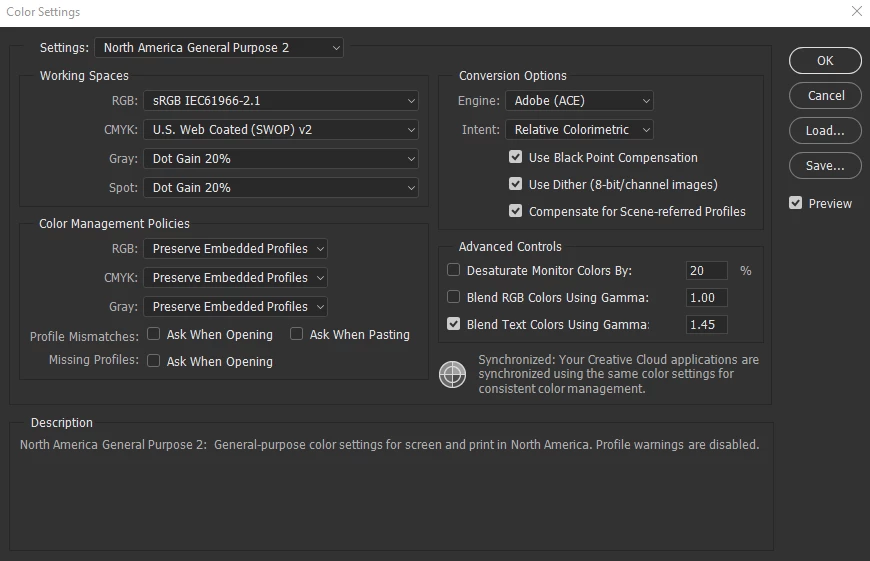
If I understand you correctly, you want to use your display profile in Photoshop. This is not how Photoshop works and you will not get good results that way. This is because Photoshop color manages your images using standard profiles like sRGB, ProPhoto RGB , Adobe RGB etc The program then interacts with the monitor display profile to produce the final color managed image. If you have a standard monitor not a wide gamut one, then just select sRGB  as your working space under Color Settings like below. Make sure your display profile is installed in it's operating system folder.

2 replies

Terri Stevens
Terri StevensCorrect answer
Legend
March 16, 2017

If I understand you correctly, you want to use your display profile in Photoshop. This is not how Photoshop works and you will not get good results that way. This is because Photoshop color manages your images using standard profiles like sRGB, ProPhoto RGB , Adobe RGB etc The program then interacts with the monitor display profile to produce the final color managed image. If you have a standard monitor not a wide gamut one, then just select sRGB  as your working space under Color Settings like below. Make sure your display profile is installed in it's operating system folder.

kglad
Community Expert
Community Expert
March 16, 2017