Participant
June 21, 2018
Answered

I get Error 8800 whenever I try to use the move tool.

  • June 21, 2018
  • 4 replies
  • 3353 views

I've been getting this error since I last updated photoshop a few days ago and It's really impacting my work.

Is there any solution to fix this? I tried all methods that I found on the help forum as well as google.
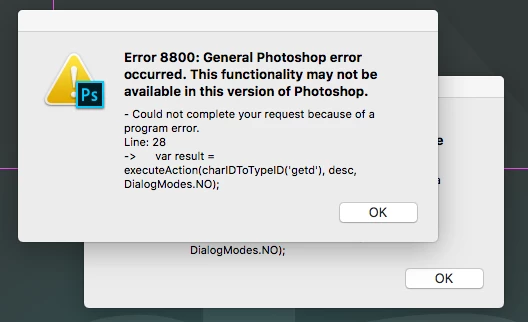
Cheers, L.

This topic has been closed for replies.
Correct answer lucianr44118348

I tried all those, I tried renaming the file and I even uninstalled / reinstalled the whole adobe cloud and reseted everything on my laptop.

The only moment it worked was when I logged in in Safe mode. It might be something wrong with my laptop.

Thank you for your help until now.

4 replies

c.pfaffenbichler
Community Expert
Community Expert
June 21, 2018

Is File > Generate > Image Assets checked?

If so try unchecking it.

JJMack
Community Expert
Community Expert
June 21, 2018

On my windows system checking or unchecking that.  The move tool does not fails if I remove that script file.  The Script does not seem to be used on a Windows system when you use Photoshop's move tool.

JJMack
lucianr44118348AuthorCorrect answer
Participant
June 21, 2018

I tried all those, I tried renaming the file and I even uninstalled / reinstalled the whole adobe cloud and reseted everything on my laptop.

The only moment it worked was when I logged in in Safe mode. It might be something wrong with my laptop.

Thank you for your help until now.

JJMack
Community Expert
Community Expert
June 21, 2018

That script line 28 seems to be from getLeyersSVG.jsx in Generator-builtin\lib\jsx? What are you trying to move? Do you use a MAC?

JJMack
Participant
June 21, 2018

I am using a MAC.

It triggers this error when I want to use the move tool regardless of what I try to move.

JJMack
Community Expert
Community Expert
June 21, 2018

I'm a Windows user I do not know why using Photoshop move tool on a Mac would  use that script.  Verify the it is that script.  Rename that script file then try using the move tool.  See if you get a different error then. On Windows that script is not used by the move tool.  I do not get an error if I remove that script on windows and use the move tool. The move tool works as expected.

JJMack
c.pfaffenbichler
Community Expert
Community Expert
June 21, 2018

Is anything set under

File > Scripts > Script Events Manager

?

c.pfaffenbichler
Community Expert
Community Expert
June 21, 2018

Please read this (in particular the section titled "Supply pertinent information for quicker answers"):

https://forums.adobe.com/docs/DOC-7044

What have you done for trouble-shooting so far?

Restoring Preferences after making sure all customized presets like Actions, Patterns, Brushes etc. have been saved might be a good starting point:

https://helpx.adobe.com/photoshop/kb/basic-trouble-shooting-steps.html